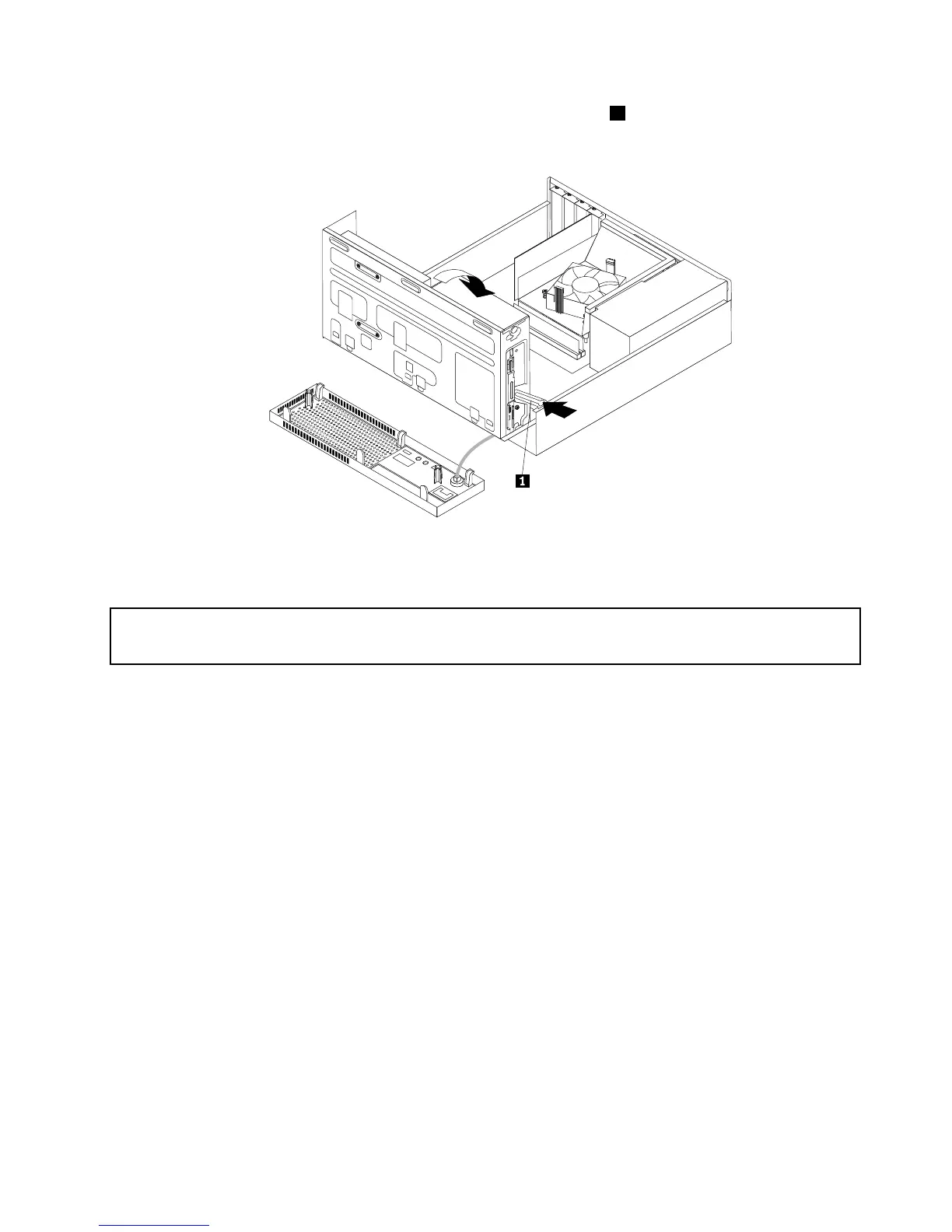
5.Tolowerthedrivebayassembly,pressthedrivebayassemblyclip1inwardandpivotthedrivebay
assemblydownwardasshown.
Figure13.Loweringthedrivebayassembly
InstallingorreplacingaPCIExpresscard
Attention:
Donotopenyourcomputerorattemptanyrepairbeforereadingandunderstandingthe“Importantsafetyinformation”
onpagev.
ThissectionprovidesinstructionsonhowtoinstallorreplaceaPCIExpresscard.Yourcomputerhastwo
PCIExpressx1cardslotsandonePCIExpressx16graphicscardslot.
ToinstallorreplaceaPCIExpresscard,dothefollowing:
1.Turnoffthecomputeranddisconnectallpowercordsfromelectricaloutlets.
2.Removethecomputercover.See“Removingthecomputercover”onpage38.
3.DependingonwhetheryouareinstallingorreplacingaPCIExpresscard,dooneofthefollowing:
•IfyouareinstallingaPCIExpresscard,removethescrewthatsecurestheappropriatemetalslot
cover.Then,removethemetalslotcover.
Chapter5.Installingorreplacinghardware41













 To Next Page