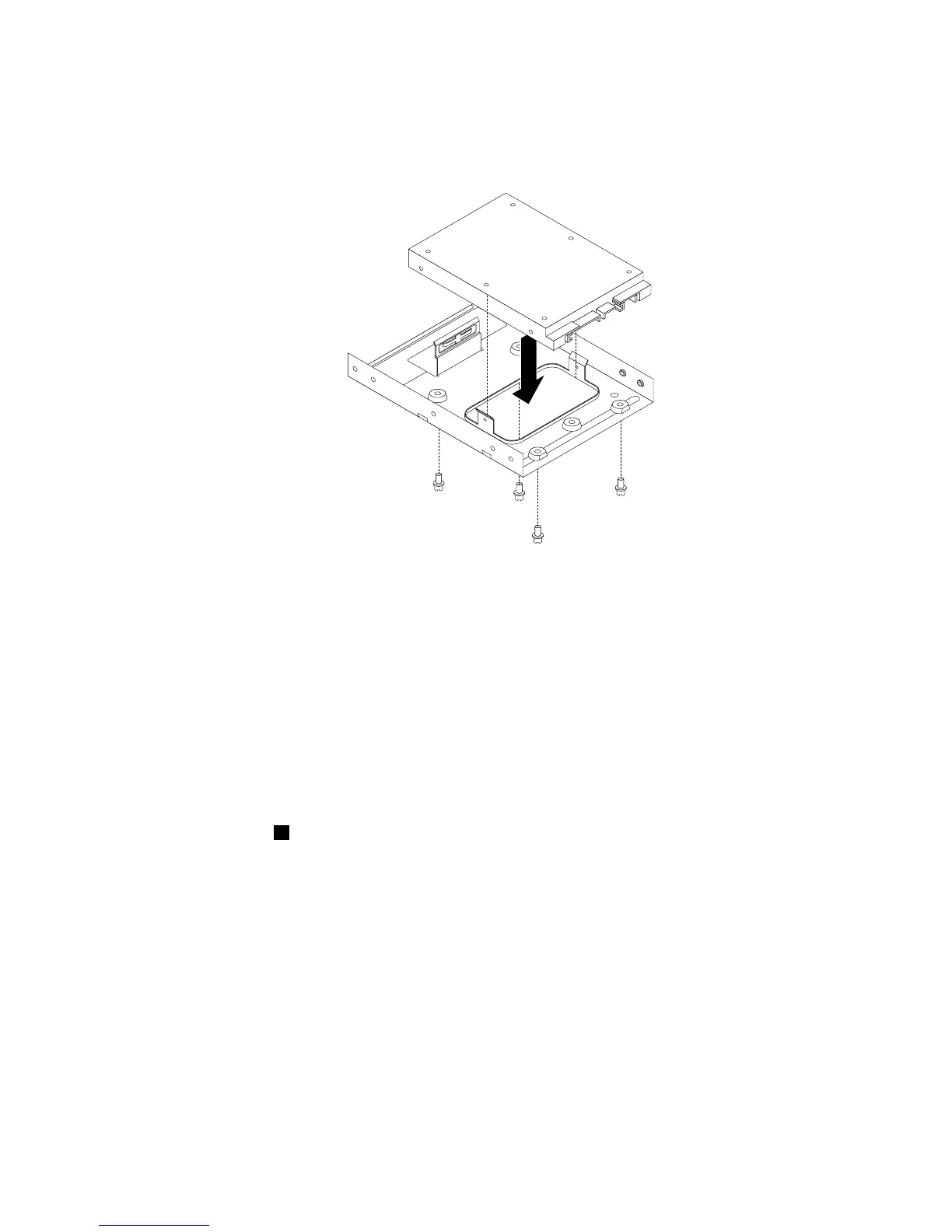
3.Positionthesolid-statedriveintothestorageconvertersothattheholesinthedrivearealignedwith
thecorrespondingholesintheconverter.Then,installthefourscrewstosecurethesolid-statedrive
totheconverter.
Figure31.Installingthesolid-statedriveintothestorageconverter
Replacingthesolid-statedriveonthebottomoftheopticaldrivebay
Toreplacethesolid-statedriveonthebottomoftheopticaldrivebay,dothefollowing:
1.Removeallmediafromthedrivesandturnoffallattacheddevicesandthecomputer.Then,disconnect
allpowercordsfromelectricaloutletsanddisconnectallcablesthatareconnectedtothecomputer.
2.Removethecomputercover.See“Removingthecomputercover”onpage38.
3.Removethefrontbezel.See“Removingandreinstallingthefrontbezel”onpage38.
4.Pivotthedrivebayassemblyupward.See“Accessingthesystemboardcomponentsanddrives”
onpage40.
5.Notethecableroutinganddisconnectthesignalcableandthepowercablefromthesolid-statedrive.
See“Locatingpartsonthesystemboard”onpage13.
6.Removethescrew1andthencarefullyslidethesolid-statedrivebracketupwardtoremovethebracket
fromthebottomoftheopticaldrivebay.
Chapter5.Installingorreplacinghardware53













 To Next Page