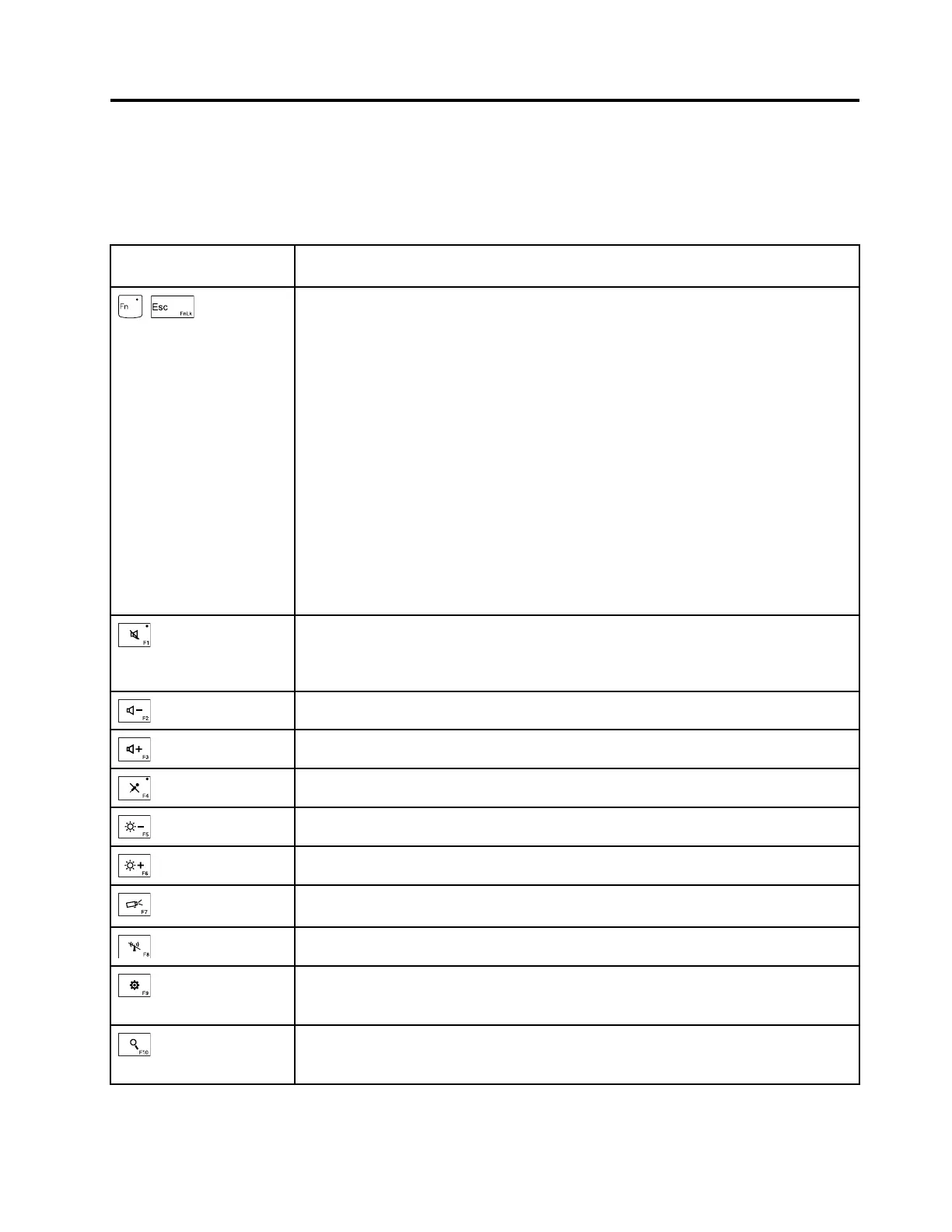
Chapter6.Functionkeys
Thefollowingtabledescribesthefunctionsoffunctionkeysandkeycombinations.
Table8.Functionkeys
Functionkeyandkey
combination
Description
+
YoucanconfiguretheFnkeyandfunctionkeysintheKeyboardPropertieswindow
bydoingthefollowing:
1.GotoControlPanel.ChangetheviewofControlPanelfromCategorytoLarge
iconsorSmallicons.
2.ClickKeyboard.IntheKeyboardPropertieswindow,clicktheFnandfunction
keysorThinkPadF1–F12keystab.
3.Selecttheoptionsofyourpreference.
PressFn+EsctoenableordisabletheFnLockfunction.
•WhentheFnLockfunctionisdisabled:TheFnLockindicatorisoff.Toinitiatethe
specialfunctionprintedasanicononeachfunctionkey,pressthecorresponding
functionkeydirectly.ToinputF1-F12,presstheFnkeyandthecorresponding
functionkey.
•WhentheFnLockfunctionisenabled:TheFnLockindicatorturnson.ToinputF1-
F12,pressthecorrespondingfunctionkeydirectly.Toinitiatethespecialfunction
printedasanicononeachfunctionkey,presstheFnkeyandthecorresponding
functionkey.
Mutesorunmutesthespeakers.
Ifyoumutethesoundandturnoffyourcomputer,thesoundwillremainmutedwhen
youturnonyourcomputeragain.T oturnonthesound,pressF2orF3.
Decreasesthespeakervolume.
Increasesthespeakervolume.
Mutesorunmutesthemicrophones.
Darkensthedisplay.
Brightensthedisplay.
Switchesthedisplayoutputlocationbetweenthecomputerdisplayandanexternal
monitor.
Enablesordisablesthewirelessfeatures.
ForWindows10:OpenstheSettingswindow.
ForWindows7:OpensControlPanel.
ForWindows10:OpenstheCortana
®
searchbox.
ForWindows7:OpensWindowsSearch.
©CopyrightLenovo2015
47












 To Next Page