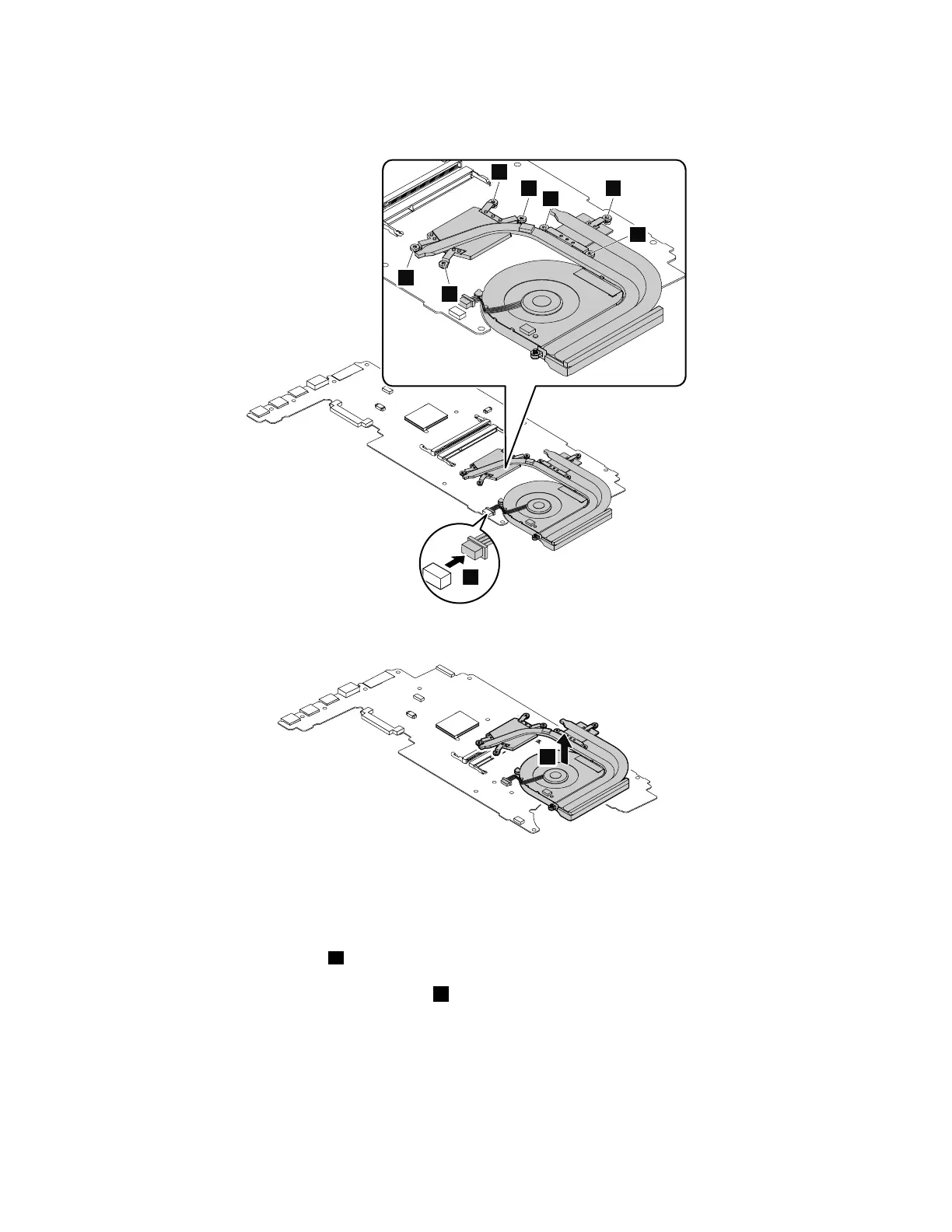
Turnoverthesystemboard.Thethermalfanassemblyisontheothersideofthesystemboard.Then
loosenthescrewsinthealphabeticalorderasshown.
Removethethermalfanassembly.
Whenyouinstallthethermalfanassembly:
•Alwayswearfingerstallswhenhandlingthethermalfanassembly.Donottouchorholdanypartofthe
thermalfanassemblywithbarefingers.
•Beforeyouattachthethermalfanassemblytothecomputer,applythermalgrease,atanamountof
0.2grams,onthepartmarked
a asshowninthefollowingillustrations.Eithertoomuchortooless
applicationofgreasecancauseathermalproblemduetoimperfectcontactwithacomponent.Y oumust
peelthethinfilmofffromtherubbersmarked
b .
76ThinkPadE460andE465HardwareMaintenanceManual












 To Next Page