•ForWindows8:PresstheWindowskeytogototheStartscreen.ClickLenovoSettings➙Power.Then
selecttheEnableUSBchargefromthecomputerbatteryevenwhenthecomputerisoffcheckbox.
Attention:WhenyouattachaUSBcabletotheconnector,ensurethattheUSBmarkisfacingupward.
Otherwisetheconnectormightbedamaged.
4acpowerconnector
Connecttheacpoweradaptertotheacpowerconnectortoprovideacpowertothecomputerandcharge
thebattery.
Anindicatortotheleftoftheconnectorshowsthestatusofacpower.Whentheacpoweradapteris
connected,theindicatorislit.Ifabatteryisinstalledinthecomputer,theindicatorisgreenwhenthe
batterycharges.
5Security-lockslot
Purchaseasecuritycablelockthattsthisslottolockyourcomputertoastationaryobjecttoprotect
yourcomputerfromtheft.
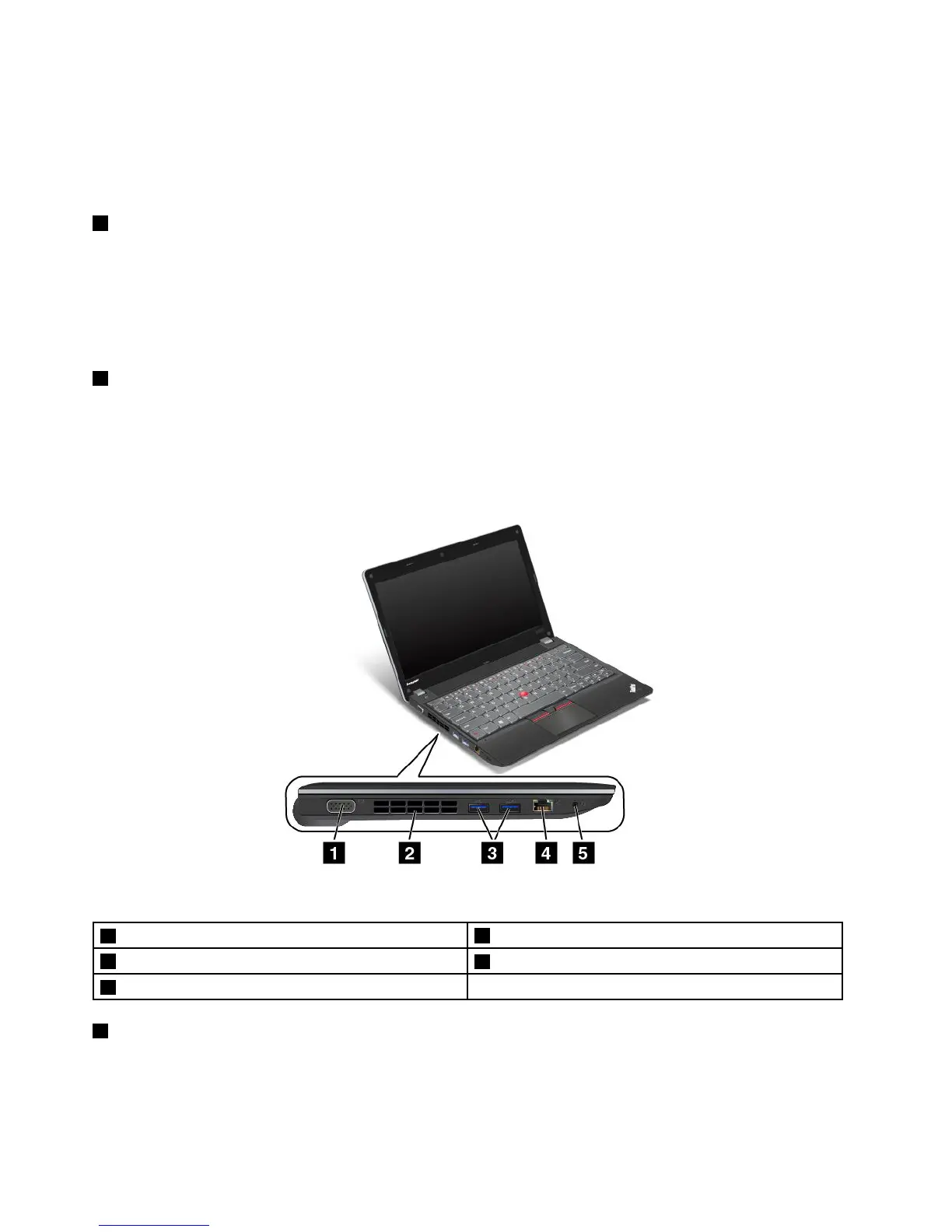
Left-sideview
Figure3.Left-sideview
1VGAconnector
4Ethernetconnector
2Fanlouvers
5Comboaudioconnector
3USB3.0connectors
1VGAconnector
AttachaVideographicsarray(VGA)compatiblemonitororprojectortoyourcomputertodisplaythe
computeroutput.
4UserGuide










 To Next Page