Attention:
•Donottouchthecontactedgeofthememorymodule.Otherwisethememorymodulemightbe
damaged.
•Ifonlyonememorymoduleisinstalledintoyourcomputer,ensurethatyouinstallthememorymodule
intotheslotusedinthefollowingillustration.Otherwiseyourcomputercannotworknormally.
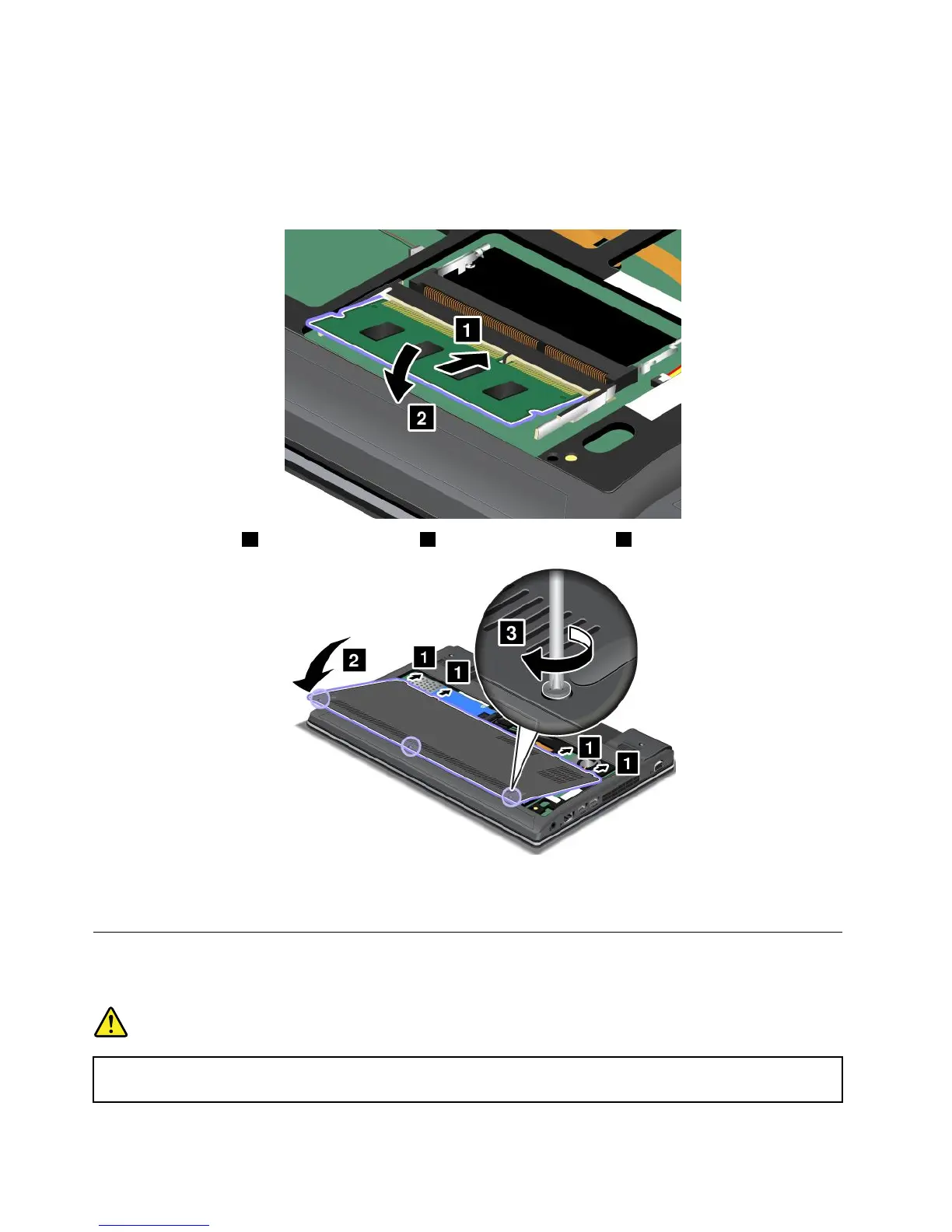
7.Attachthecover1andpivotitdownward2.Thentightenthescrews3.
8.Reinstallthebattery.See“Replacingthebattery”onpage59.
9.Turnthecomputeroveragain.Connecttheacpoweradapterandallcables.
Replacingthekeyboard
Beforeyoustart,printtheseinstructions.
DANGER
Duringelectricalstorms,donotconnectthecabletoordisconnectitfromthetelephoneoutlet
onthewall.
68UserGuide










 To Next Page