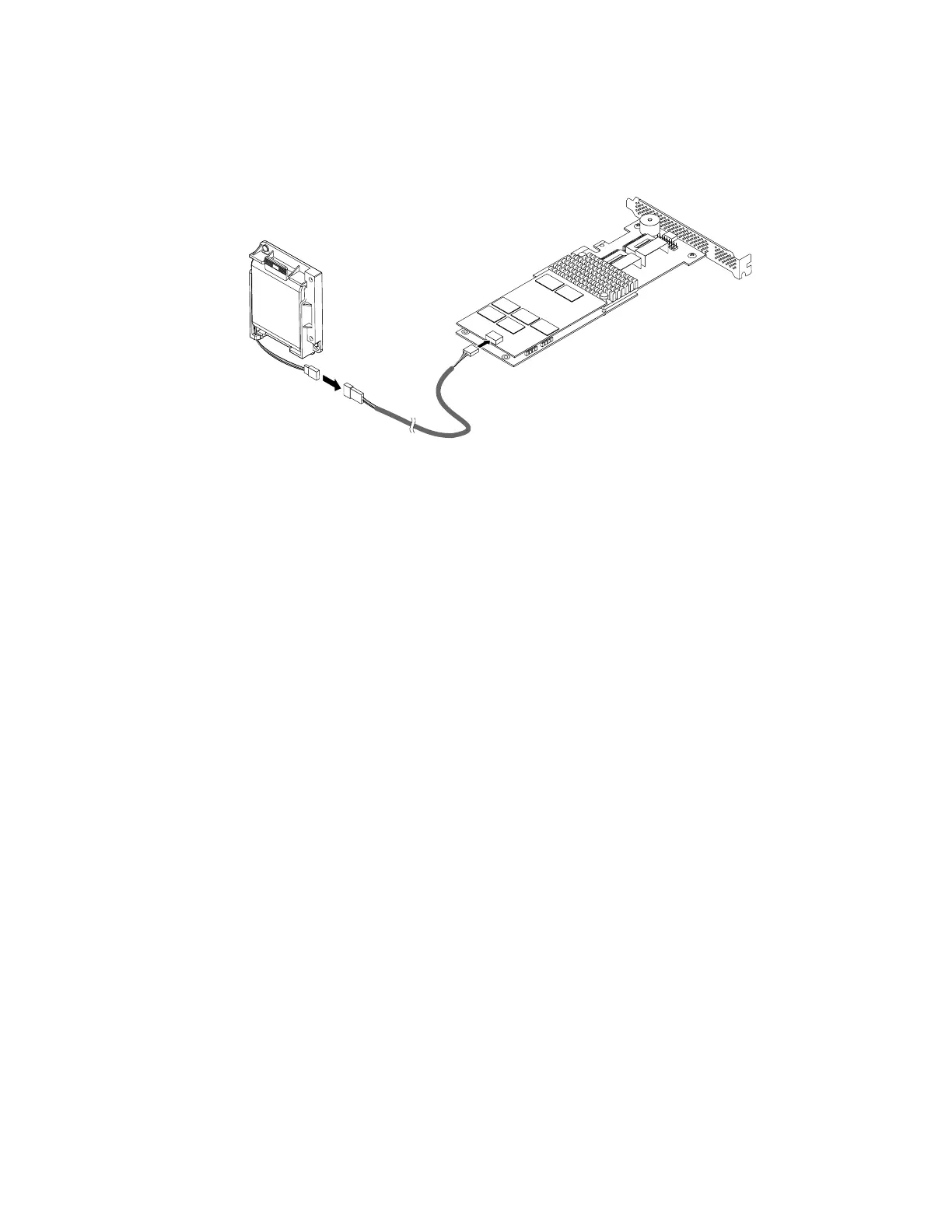
8.ConnectthecableofthenewThinkServerRAIDSuperCapacitorModuletotheThinkServerRAID
SuperCapacitorModuleconnectoronthePCIExpresscardusingtheextendedcableshippedwith
theThinkServerRAIDSuperCapacitorModule.
Figure108.ConnectingthecableoftheThinkServerRAIDSuperCapacitorModuletothePCIExpresscard
9.IfyouareinstructedtoreturnthefailingThinkServerRAIDSuperCapacitorModule,followallpackaging
instructionsanduseanypackagingmaterialsthataresuppliedtoyouforshipping.
Whattodonext:
•Toworkwithanotherpieceofhardware,gototheappropriatesection.
•Tocompletethereplacementprocedure,goto“Completingthepartsreplacement”onpage184.
InstallingorreplacingtheThinkServerRAIDSuperCapacitorModuleontheriser
cardassembly2
Beforeyoubegin,printalltherelatedinstructionsorensurethatyoucanviewthePDFversiononanother
computerforreference.
Note:UseanydocumentationthatcomeswiththeThinkServerRAIDSuperCapacitorModuleandfollow
thoseinstructionsinadditiontotheinstructionsinthistopic.
ToinstallorreplacetheThinkServerRAIDSuperCapacitorModuleontherisercardassembly2,dothe
following:
1.Removeallmediafromthedrivesandturnoffallattacheddevicesandtheserver.Then,disconnectall
powercordsfromelectricaloutletsanddisconnectallcablesthatareconnectedtotheserver.
2.Iftheserverisinstalledinarackcabinet,removetheserverfromtherackcabinetandplaceitonaflat,
clean,andstatic-protectivesurface.SeetheRackInstallationInstructionsthatcomeswiththeserver.
3.Removetheservercover.See“Removingtheservercover”onpage77.
4.Removethecoolingshroud.See“Removingandreinstallingthecoolingshroud”onpage82.
5.Removetherisercardassembly2.See“Replacingtherisercardassembly2”onpage157.Thenlay
therisercardassembly2upsidedownonaflat,clean,andstatic-protectivesurface.
6.IfyouareinstallingtheThinkServerRAIDSuperCapacitorModule,gotostep77onpage144.
IfyouarereplacingtheThinkServerRAIDSuperCapacitorModule,dothefollowing:
a.DisconnectthecableoftheThinkServerRAIDSuperCapacitorModulefromthePCIExpresscard.
Chapter6.Installing,removing,orreplacinghardware143








 To Next Page