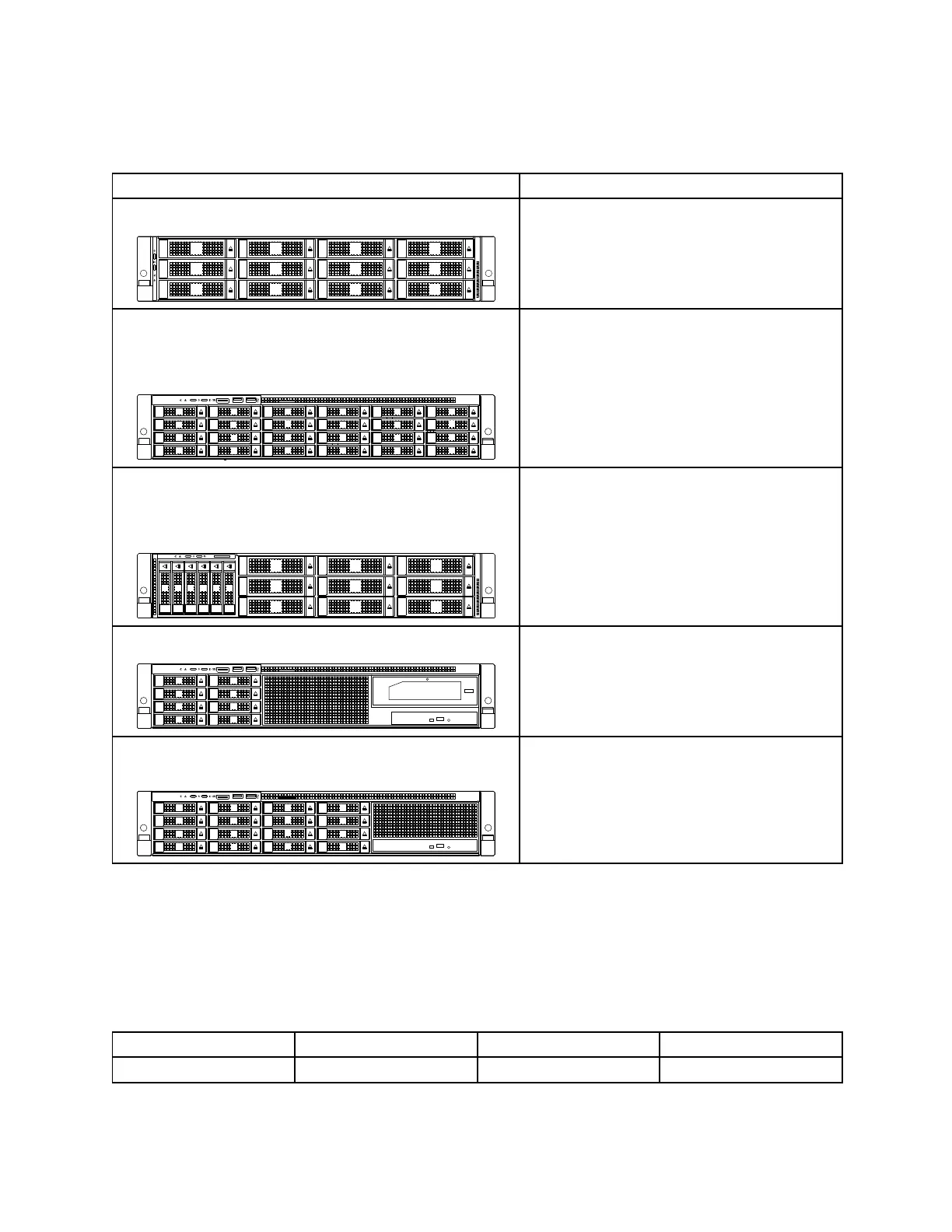
•Inthefront:
Yourservercomeswithoneofthefollowingbackplaneanddriveconfigurations:
BackplaneanddriveconfigurationDrivetype
Onebackplaneforuptotwelve3.5-inchdrives
–Hot-swapSATA/SASHDD
–Hot-swapSATA/SASSSD
Twobackplanesforuptotwenty-four2.5-inchdrives:
–Backplaneforupto8drives
–Backplaneforupto16drives
0
1
2
3
4
5
6
7
8
9
10
11
12
13
14
15
16
17
18
19
20
21
22
23
–Hot-swapSATA/SASHDD
–Hot-swapSATA/SASSSD
–Easy-swapPCIeSSD(supportedonlyby
AnyBay*drivebays20–23)
Twobackplanesforuptofifteendrives:
–Backplaneforuptosix2.5-inchdrives
–Backplaneforuptonine3.5-inchdrives
0 1 2 3 4 5
6
7
8
9
10
11
12
13
14
–Hot-swapSATA/SASHDD
–Hot-swapSATA/SASSSD
–Easy-swapPCIeSSD(supportedonlyby
AnyBay*drivebays2–5)
Onebackplaneforuptoeight2.5-inchstoragedrives
–Hot-swapSATA/SASHDD
–Hot-swapSATA/SASSSD
Twobackplanesforuptosixteen2.5-inchstoragedrives(each
supportseightdrives)
–Hot-swapSATA/SASHDD
–Hot-swapSATA/SASSSD
Notes:
–*:APCIeinterposercardandapass-throughboardmustbeinstalledtosupportAnyBay.Formore
information,see“PCIeinterposercardandPCIepass-throughboard”onpage38
–Youcaninstalla2.5-inchdriveintoa3.5-inch-drivebay.Formoreinformation,see“Installinga2.5-inch
driveintoa3.5-inch-drivebay”onpage158
.
•Intherear:
BackplanequantityDrivebaysizeDrivebayquantityDrivetype
12.5-inch2
Hot-swapSATAHDD/SSD
40ThinkServerRD650UserGuideandHardwareMaintenanceManual




 To Next Page