Thistopicprovidesinstructionsonhowtoinstallthetertiaryharddiskdrive.
Toinstallthetertiaryharddiskdrive,dothefollowing:
1.Removeallmediafromthedrivesandturnoffallattacheddevicesandtheserver.Then,disconnectall
powercordsfromelectricaloutletsanddisconnectallcablesthatareconnectedtotheserver.
2.Removetheservercover.See“Removingtheservercover”onpage37.
3.Removethefrontbezel.See“Removingandreinstallingthefrontbezel”onpage38.
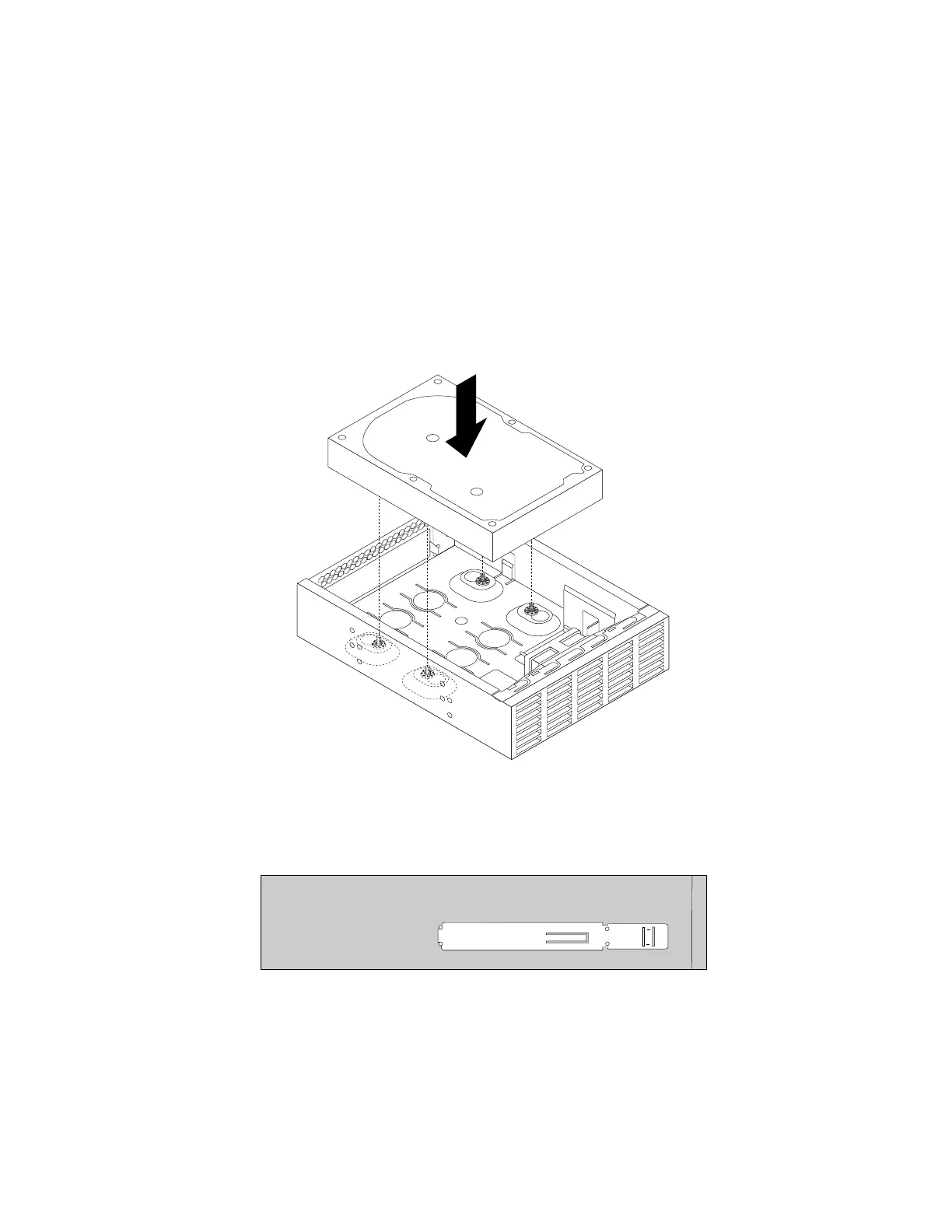
4.Installtheharddiskdriveintothe5.25-inchto3.5-inchdriveconversionbracket.Then,installthefour
screwstosecuretheharddiskdriveinthebracket.
Note:Youcanobtaina5.25-inchto3.5-inchdriveconversionbracketfromalocalcomputerretailer
orbycontactingtheCustomerSupportCenter.
Figure24.Installingtheharddiskdriveintothedriveconversionbracket
5.Installtheretaineronthesideofthebracket.
Figure25.Installingtheretaineronthesideofthebracket
6.Ifthereisametalstaticshieldinstalledinthesecondaryopticaldrivebay,removethemetalstaticshield.
52ThinkServerTS140UserGuide











 To Next Page