4.3 Record Config
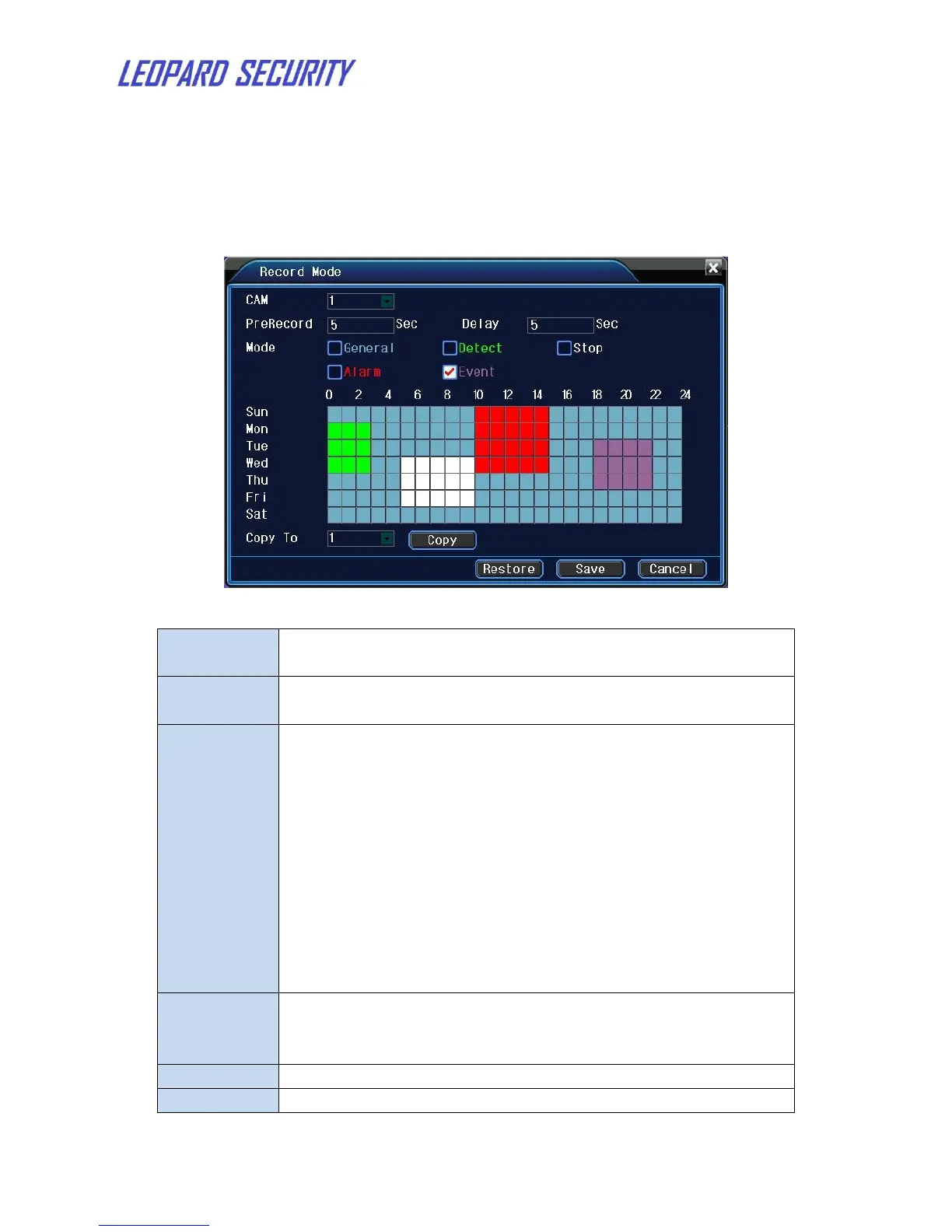
Set the recording parameters in the surveillance channel. The system is set 24
hours consecutive recording in the first startup. You can enter Main Menu
Record Record Mode to set.
Figure 5: Record Config
Choose the corresponding channel number to set the
channel. Choose the all option to set the entire channels.
Record 1-30 seconds before the action. (time length is
decided by the code stream)
Set video state: general,detect,alarm,event,stop.
General: Perform the regular recording in the set time
section.
Detect: Trigger the “motion detect”, “camera mask”
or “video loss” signal. When above alarm is set as
opening recording, the “detection recording” state is
on.
Alarm: Trigger the external alarm signal in the set
time section. When above alarm is set as opening
recording, the “detection recording” state is on.
Event: All record except general record
Set the time section of common recording, The recording
will start only in the set range. First select one of the record
mode, then click the left key or drag to select the period.
Copy the current channel settings to other channels.
restore the record configuration to default.


 To Next Page