EasyManua.ls Logo

Leopard Security LI-NVR-6209 - Rear Panel

Leopard Security LI-NVR-6209
30 pages
Print Icon
To Next Page IconTo Next Page
To Previous Page IconTo Previous Page
Loading...
H264 NVR Users Guide
9
MENU: Press to open the main menu or confirm
LEFT: Press to move cursor left; in PTZ mode, press to pan
camera left
RIGHT: Press to move cursor right; in PTZ mode, press to
pan camera right
UP: Press to move cursor up; in PTZ mode, press to pan
camera up
DOWN: Press to move cursor down; in PTZ mode, press to
pan camera down

Description
Power Status
LED will turn on if the NVR includes hard drive
LED will turn on if there is alarm
LED will turn on if view the video over Network
LED will turn on when recording
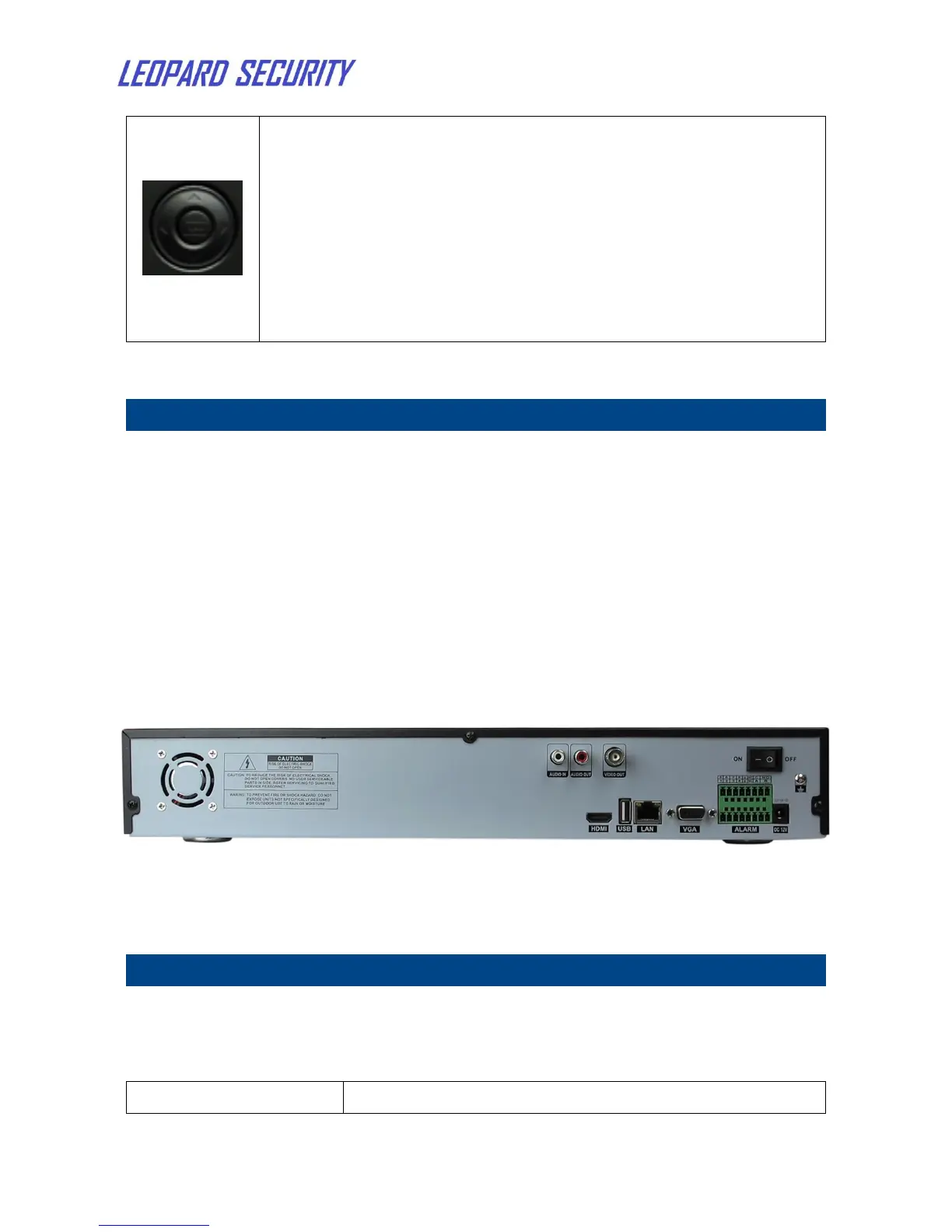
2.2 Rear panel
Figure 2: NVR Rear panel
Description
On-off Switch
Power input , DC 12V
RS485 control interface
LAN
To connect Ethernet