4.9 PTZ control
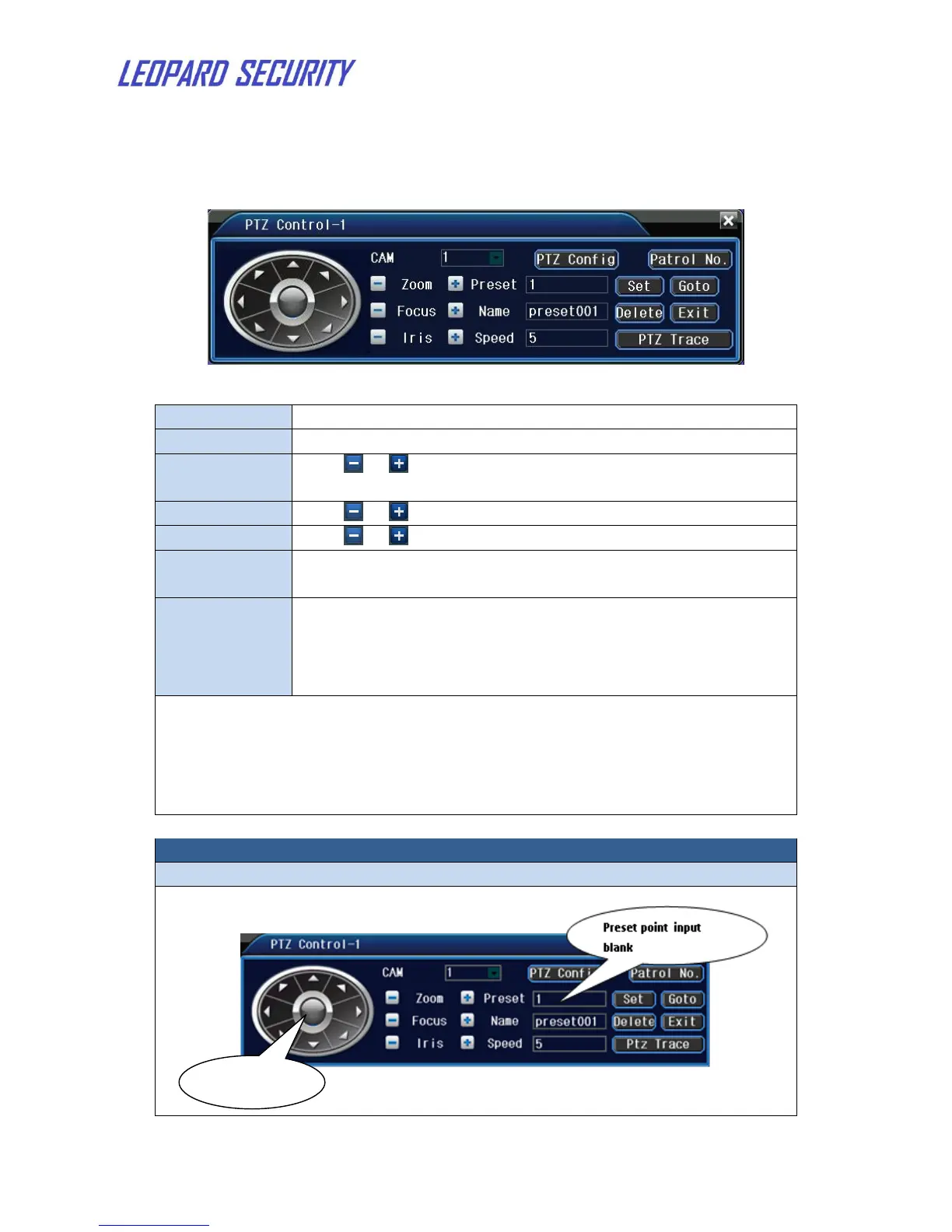
PTZ Operation interface is as followed.
Figure 11: PTZ control Interface
Choose the dome camera input channel.
Set the PTZ rotation range. Default range: 1 ~ 8.
Click / button to adjust the zoom multiple of the
camera.
Click / button to adjust the focus of the camera.
Click / button to adjust the iris of the camera.
Control the PTZ rotation. 8 directions control is supportive.
(4 directions in Front panel is supportive )
Full-screen show channel image. Left press mouse and
control PTZ to rotate orientation. Left press mouse and
then rotate the mouse to adjust the zoom multiple of the
camera. Click “PTZ Trace” to begin.
Note: 1. Decoder A (B) line connects with NVR A (B) line. Make sure the
connection is right before use.
2. Click Main menuSystem PTZ config to set the PTZ
parameters.
3. The PTZ functions are decided by the PTZ protocols.
Set a location for the preset, calls the preset points, PTZ automatically turns
to the setting position.


 To Next Page