EasyManua.ls Logo

level 1 System 1000 - Display Panel

level 1 System 1000
44 pages
Print Icon
To Next Page IconTo Next Page
To Previous Page IconTo Previous Page
Loading...
TEMPERATURE
circuitry.
Press
and
hold
this
button
to
test
this
alarm
circuitry.
When
the
switch
is
released
the
WATER
OVER
TEMPERATURE
alarm
will
continue
to
sound.
This
is
normal
operation.
To
clear
the
alarm
condition,
turn
the
unit
OFF
and
then
back
ON
again.
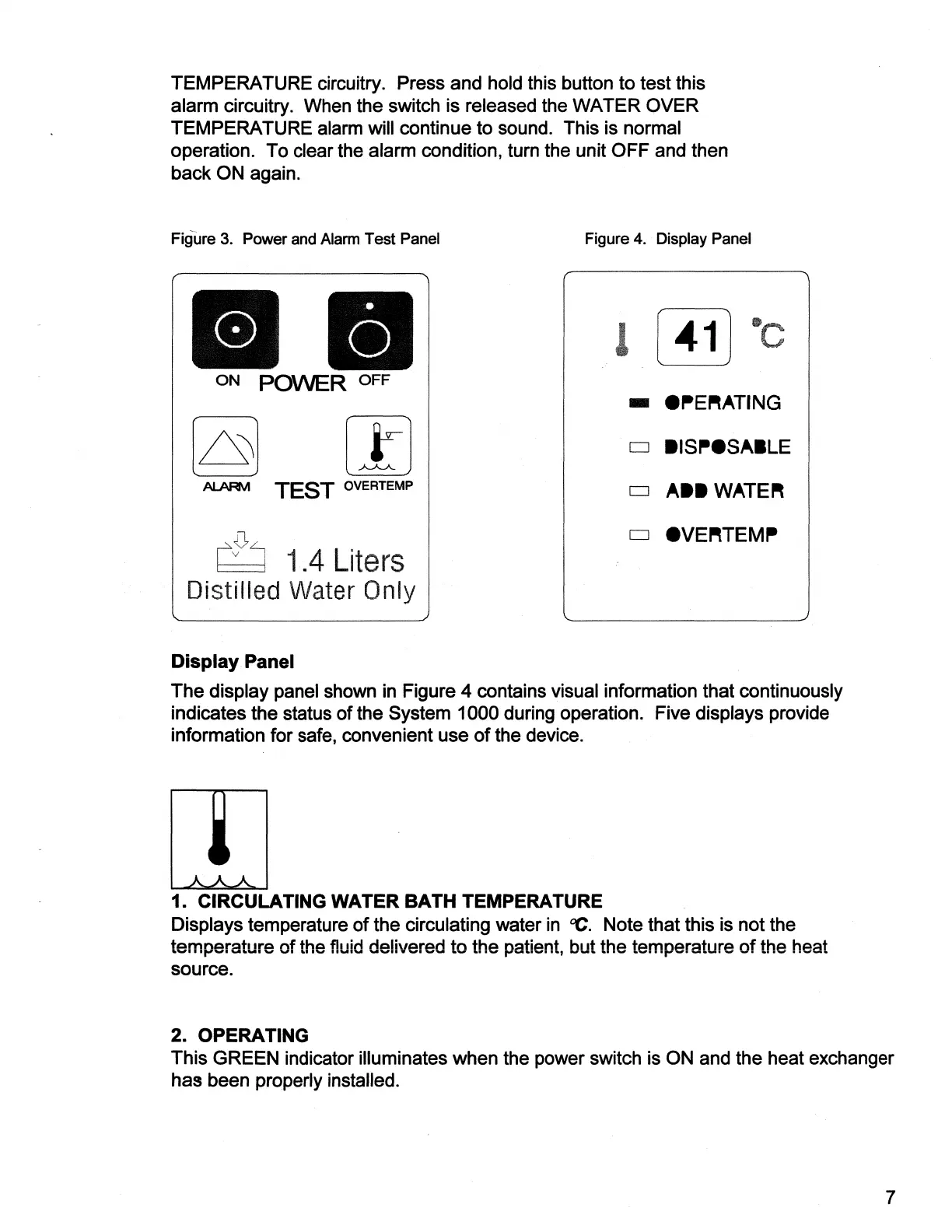
Figure
3.
Power
and
Alarm
Test
Panel
Figure
4.
Display
Panel
C
x
|
C
y
|
(une
=
А
o
ON
POWER
OFF
@PERATING
|
O
BISPOSABLE
ALARM
TEST
OVERTEMP
ABB
WATER
DI
@VERTEMP
1.4
Liters
Distilled
Water
Only
q
|
q
|
y
Display
Panel
The
display
panel
shown
in
Figure
4
contains
visual
information
that
continuously
indicates
the
status
of
the
System
1000
during
operation.
Five
displays
provide
information
for
safe,
convenient
use
of
the
device.
AAA
1.
CIRCULATING
WATER
BATH
TEMPERATURE
Displays
temperature
of
the
circulating
water
in
°C.
Note
that
this
is
not
the
temperatu!
ire
of
the
fluid
delivered
to
the
natient,
but
the
temperature
of
the
heat
SOUTCE.
2.
OPERATING
This
GREEN
indicator
illuminates
when
the
power
switch
is
ON
and
the
heat
exchanger
has
been
properly
installed.

Related product manuals