EasyManua.ls Logo

level 1 System 1000 - Symbol Glossary for Hardware and Disposables

level 1 System 1000
44 pages
Print Icon
To Next Page IconTo Next Page
To Previous Page IconTo Previous Page
Loading...
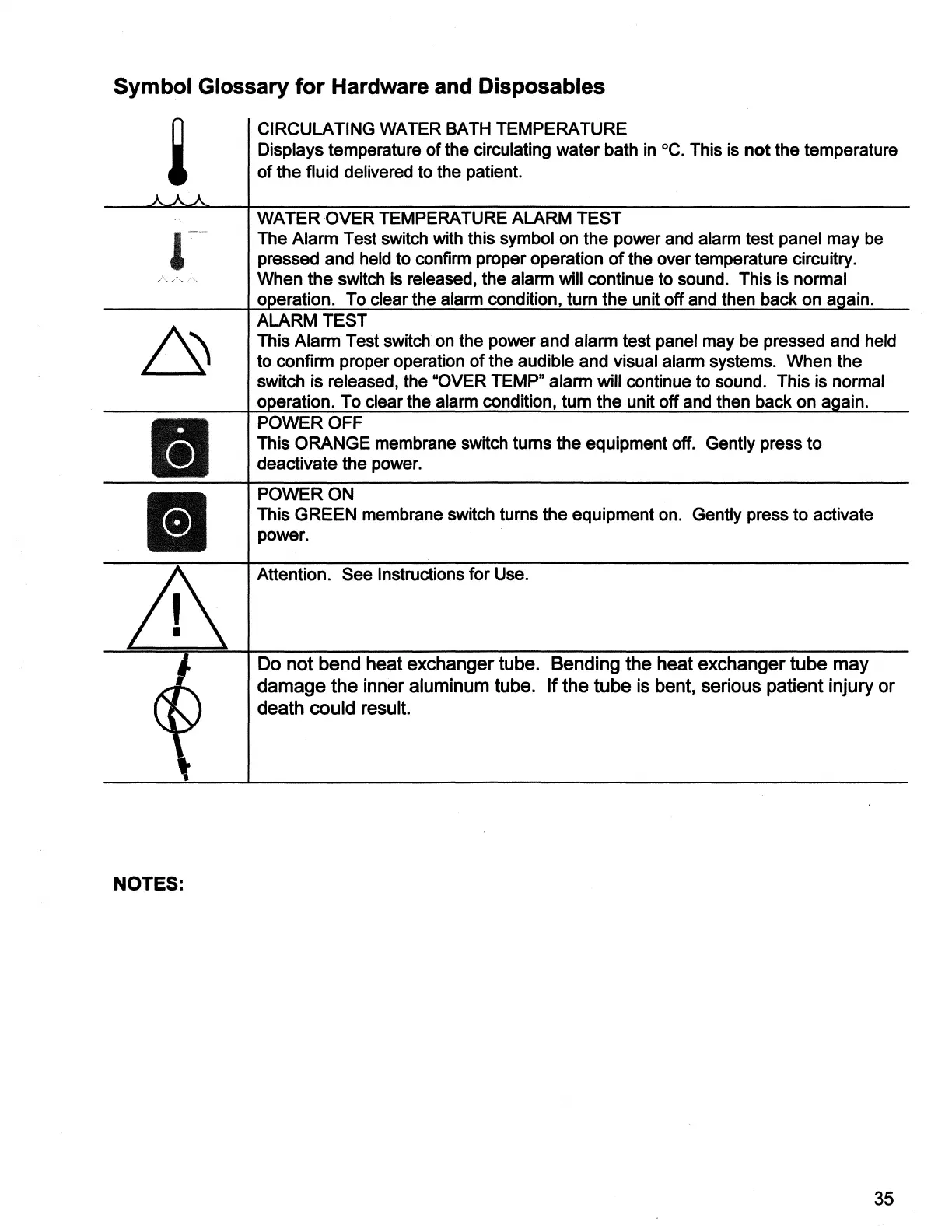
Symbol
Glossary
for
Hardware
and
Disposables
CIRCULATING
WATER
BATH
TEMPERATURE
Displays
temperature
of
the
circulating
water
bath
in
°C.
This
is
not
the
temperature
of
the
fluid
delivered
to
the
patient.
WATER
OVER
TEMPERATURE
ALARM
TEST
The
Alarm
Test
switch
with
this
symbol
on
the
power
and
alarm
test
panel
may
be
pressed
and
held
to
confirm
proper
operation
of
the
over
temperature
circuitry.
When
the
switch
is
released,
the
alarm
will
continue
to
sound.
This
is
normal
operation.
To
clear
the
alarm
condition,
turn
the
unit
off
and
then
back
on
again.
ALARM
TEST
|
This
Alarm
Test
switch
on
the
power
and
alarm
test
panel
may
be
pressed
and
held
to
confirm
proper
operation
of
the
audible
and
visual
alarm
systems.
When
the
switch
is
released,
the
“OVER
TEMP”
alarm
will
continue
to
sound.
This
is
normal
operation.
To
clear
the
alarm
condition,
turn
the
unit
off
and
then
back
on
again.
POWER
OFF
This
ORANGE
membrane
switch
turns
the
equipment
off.
Gently
press
to
deactivate
the
power.
POWER
ON
This
GREEN
membrane
switch
turns
the
equipment
on.
Gently
press
to
activate
power.
|
Attention.
See
Instructions
for
Use.
Do
not
bend
heat
exchanger
tube.
Bending
the
heat
exchanger
tube
may
damage
the
inner
aluminum
tube.
If
the
tube
is
bent,
serious
patient
injury
or
death
could
result.
NOTES:
35

Related product manuals