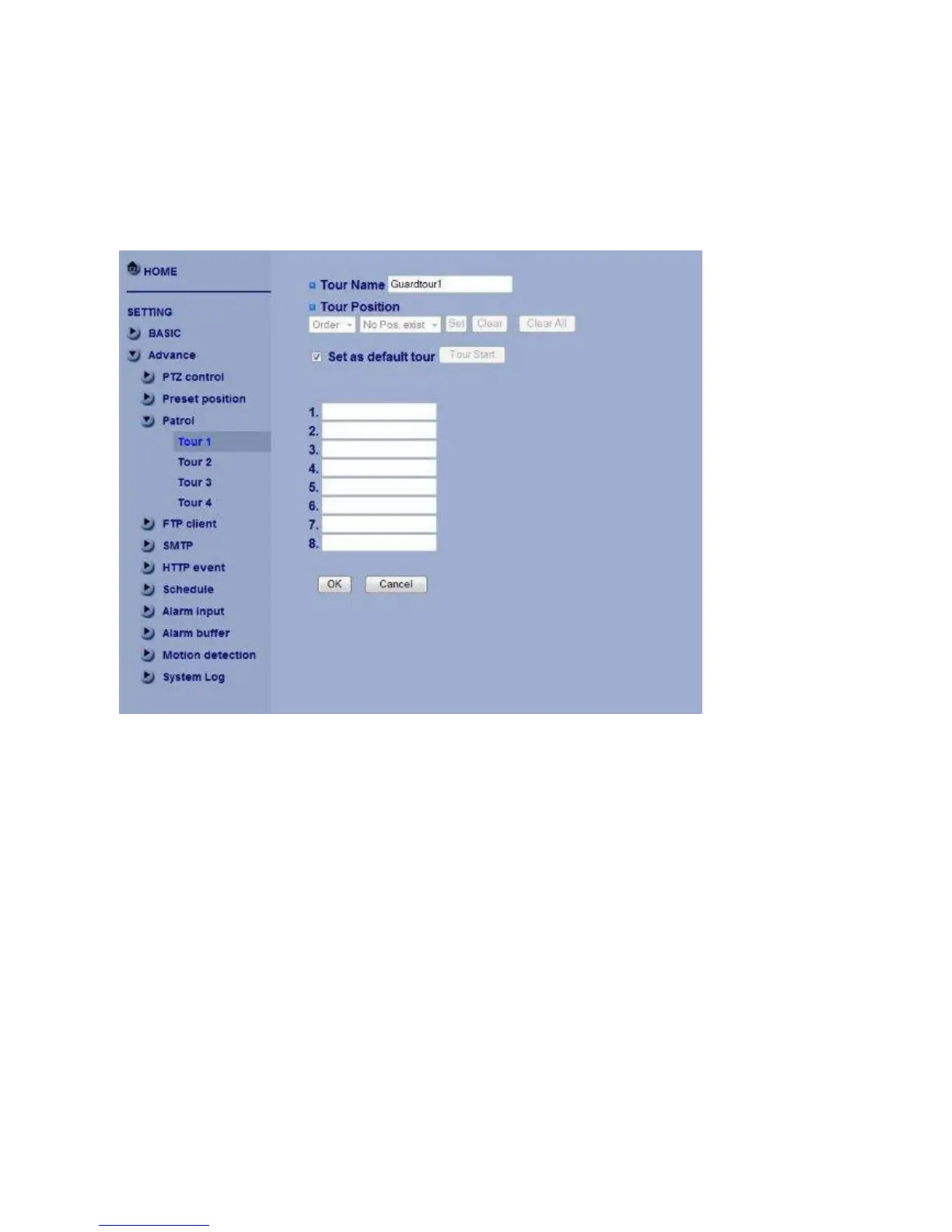
Patrol
There are four patrol tours to set for composing different preset positions. Each one lists up
to 8 positions which can be programmed, and the camera moves to the programmed
positions sequentially. The camera stops when it moves to the last preset position.
General
Tour name:Rename the tour name.
Tour position
Order:There are 8 orders to select for camera directions.
Select Pos.:There are up to 32 preset positions to choose for each order.
Recall:When you click Recall, the camera moves to position of the selected preset number.
Clear:When setting specific preset number position to tour, click Clear to clear this direction
information.
Clear All:Be careful! When you click Clear All, it will clear this tour all information out.
Set:Use it to save the camera position to a preset number.
Set as default tour:Click it on to set this tour as default.
Tour Start:To click Tour Start, and the camera moves on patrol tour.
Tour Stop:While the camera moves on patrol tour, click Tour Stop to stop the patrol tour.
Carry out the following steps:
1. Click “Order” to choose one of eight orders.
2. Click Select Pos. to set the preset position.



 To Next Page