24Fast /2 Gigabit Ethernet combo Web Smart Switch
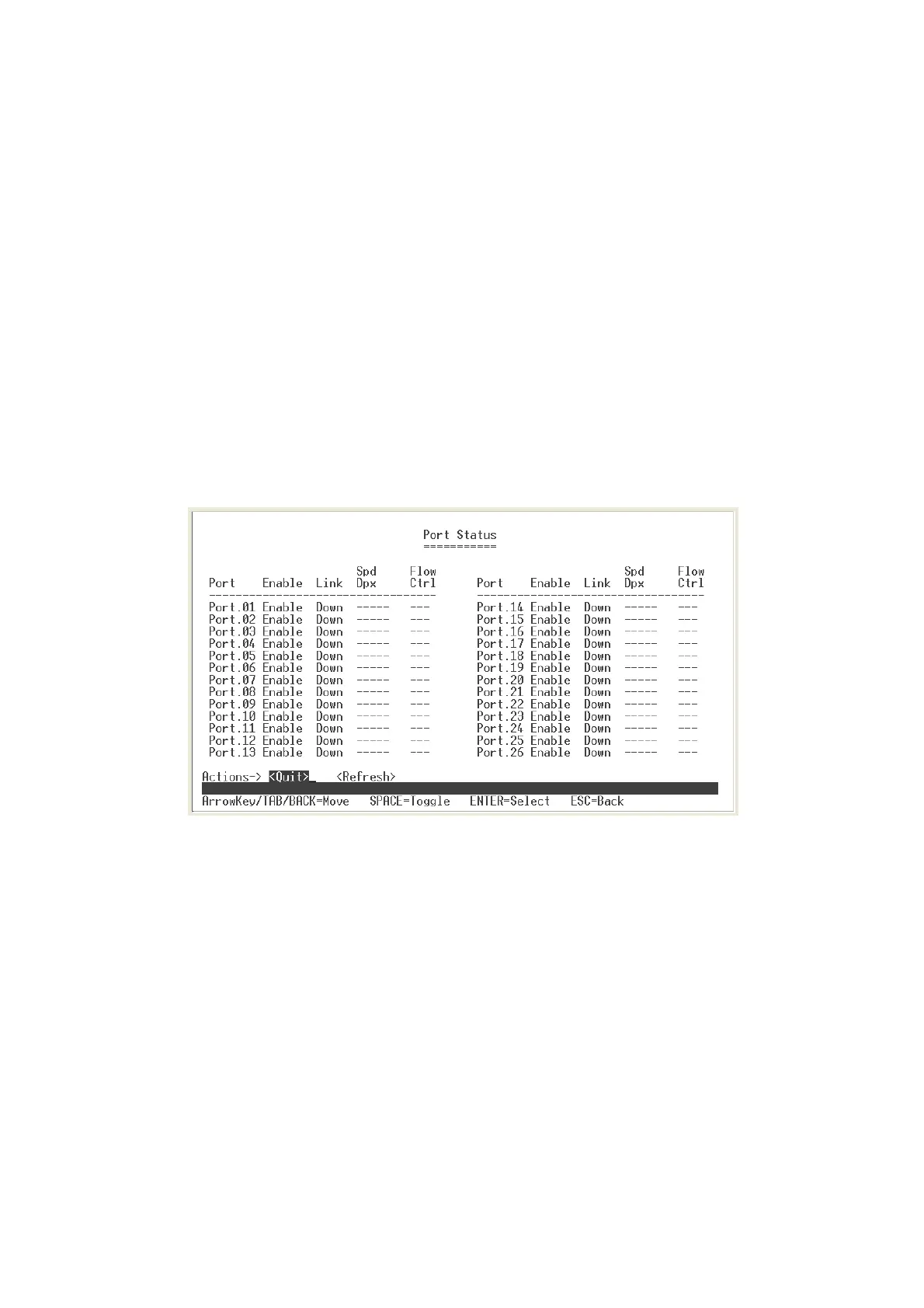
Port Status
User can view each port status. Select
<Refresh>
action to get current port status
information. The port 25 and 26 represent the auto detect gigabit port status. The port
25 and 26 port status display will depend on the connection detect to be different.
1.
Enable:
display port current availability – Enable or Disable.
2.
Link:
display port statuses link status. When the port is connecting with the device
and work normally, the link status is “
UP
”. Opposite is “
Down
”.
3.
Spd/Dpx:
display port connection speed.
4.
Flow Ctrl:
display the flow control status is “on” or “off” mode.
Status and Counters main configuration interface
Port Configuration
User can set up each port status.
1. Select
<Edit>
2. Use
Arrow/Tab/Backspace
key to move between items.
3.
Enable:
The port can be set to disable or enable mode. If the port setting is
disable then will not receive or transmit any packet.
4.
Nway:
set port Nway negotiation “on” or “off”.
13











 To Next Page