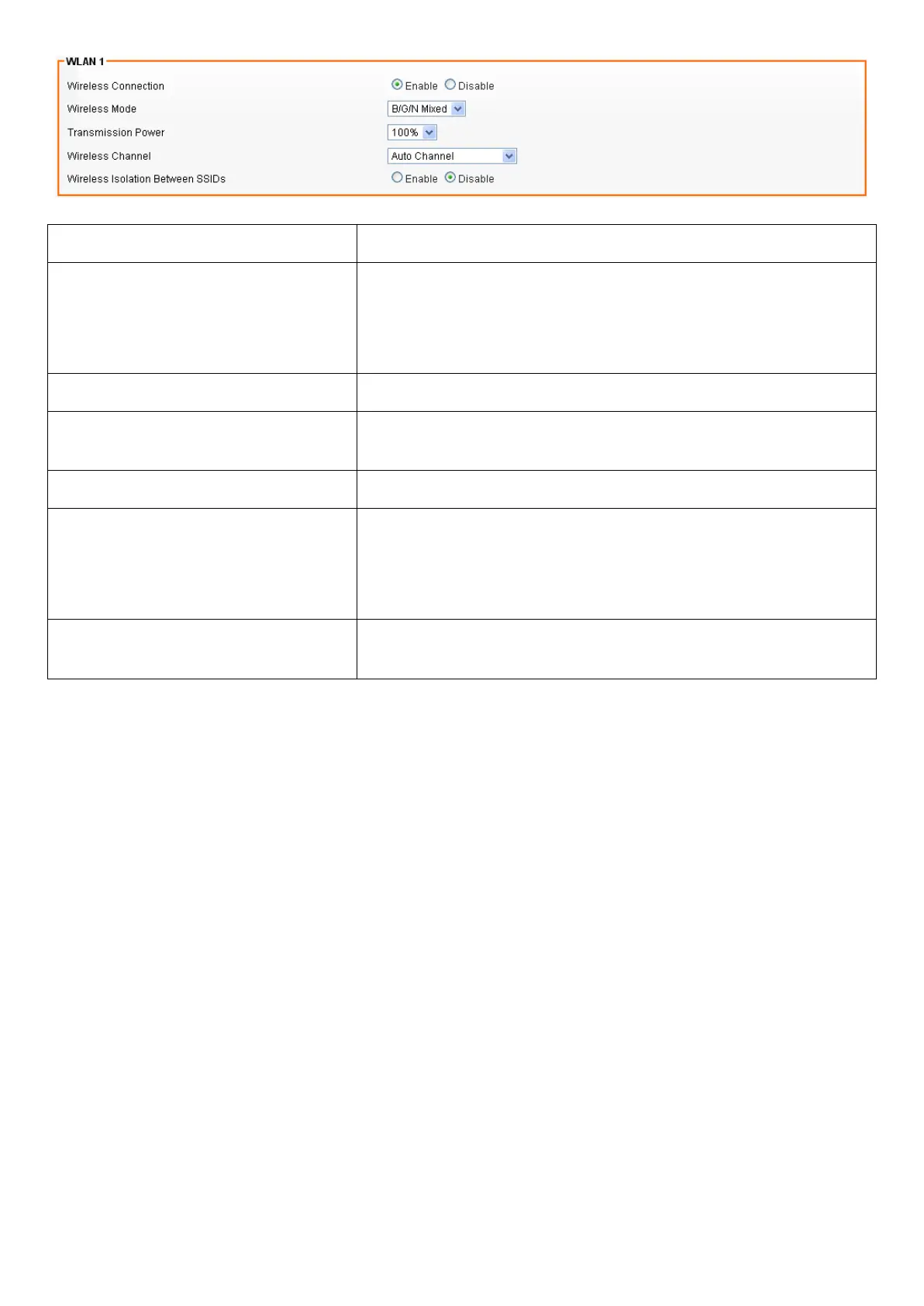
Field Description
Wireless Connection Select Enable if you would like to turn on the wireless
signal.
Select Disable if you would like to turn off the wireless
signal.
Wireless Mode Select the wireless mode for 802.11b/g/n or mixed use.
Transmission Power Select the transmission power class from 10%, 25%, 50%,
75%, and 100%.
Wireless Channel Select which channel to be located to.
Wireless Isolation Between SSIDs Select Enable if you would like to omit the access from
one SSID to another.
Select Disable if you would like to allow the access from
one SSID to another.
Max Station Connection(Number
1~255, 0:unlimited)
Max Station Connection Number of client
SSID Wireless Settings
Users are able to configure each SSID with its own attributes. Further, various security modes are
available based on the user’s needs and preference: Disable, WEP, WPA Pre-Shared Key, WPA,
WPA2 Pre-Shared Key, and WPA2. However, it is important to note that all devices under the wireless
network must use the same security mode.
You can configure the security settings of your wireless network to suit your desired preference.
Different methods will grant different levels of security. Using encryption - data packet is encrypted
before transmission - can prevent data packets from being intruded on by un-trusted parties. However,
please note that the higher the security level is, the lower the data throughput becomes.














 To Next Page