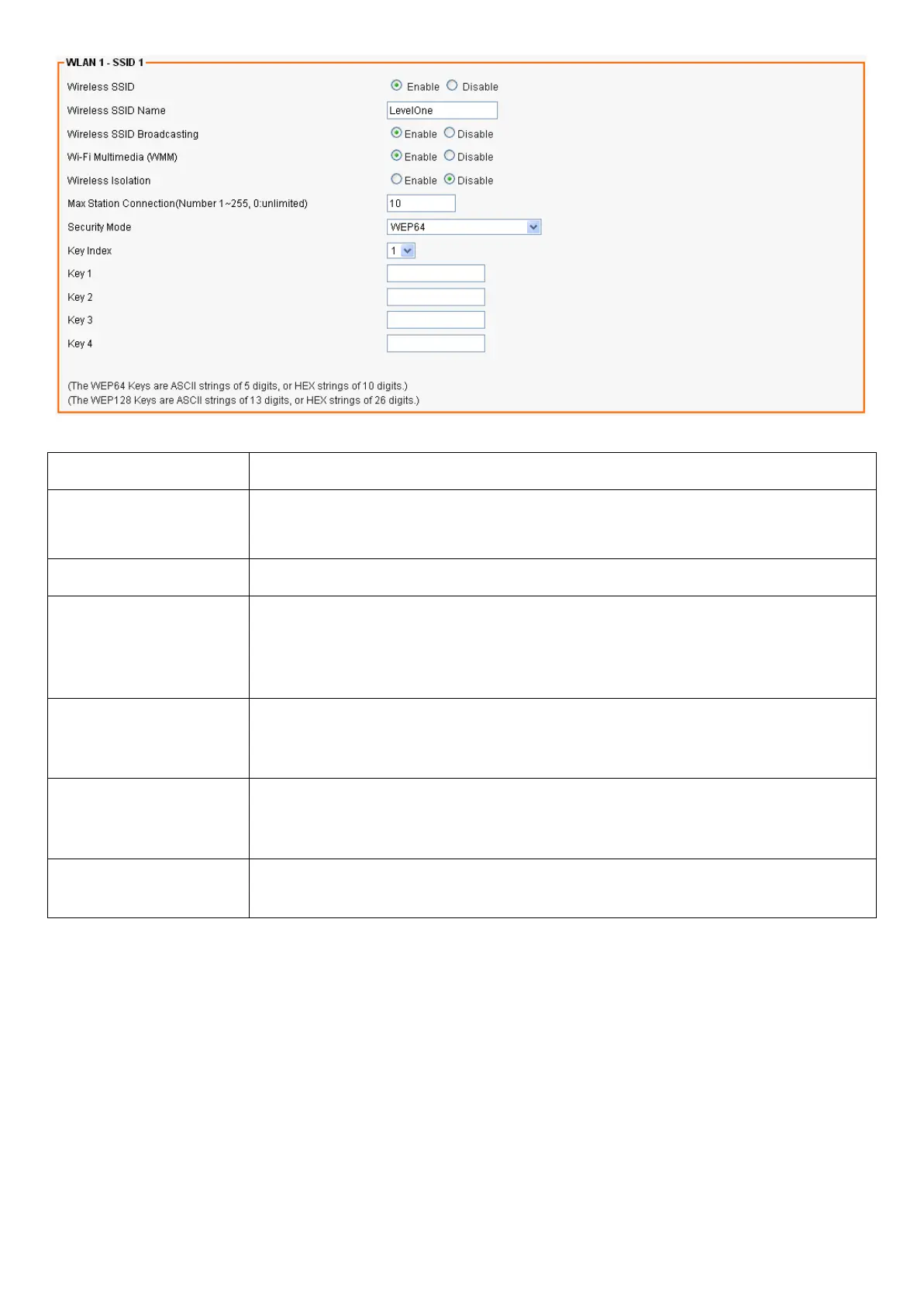
Field Description
Wireless SSID Select Enable if you would like to turn on this SSID.
Select Disable if you would like to turn off this SSID.
Wireless SSID Name Enter the wireless station name you would like to have.
Wireless SSID
Broadcasting
The device broadcasts SSID periodically. Select Enable to turn it on or
Disable to turn it off. Enabling SSID Broadcasting brings convenience
for users to find and connect the device. Disabling SSID broadcasting
enhances the security by hiding SSID information.
Wi-Fi Multimedia
(WMM)
Select Enable to prioritize different traffic types based on their
characteristics. For example, VoIP or video traffic will have higher
priorities over ordinary traffic.
Wireless Isolation Select Enable if you would like to omit the access to other network
devices connecting to this SSID. Select Disable if you would like to
allow the access to other network devices connecting to this SSID.
Security Mode Configure the security to Disable, WEP, WPA Pre-Shared Key, WPA,
WPA2 Pre-Shared Key, and WPA2














 To Next Page