14
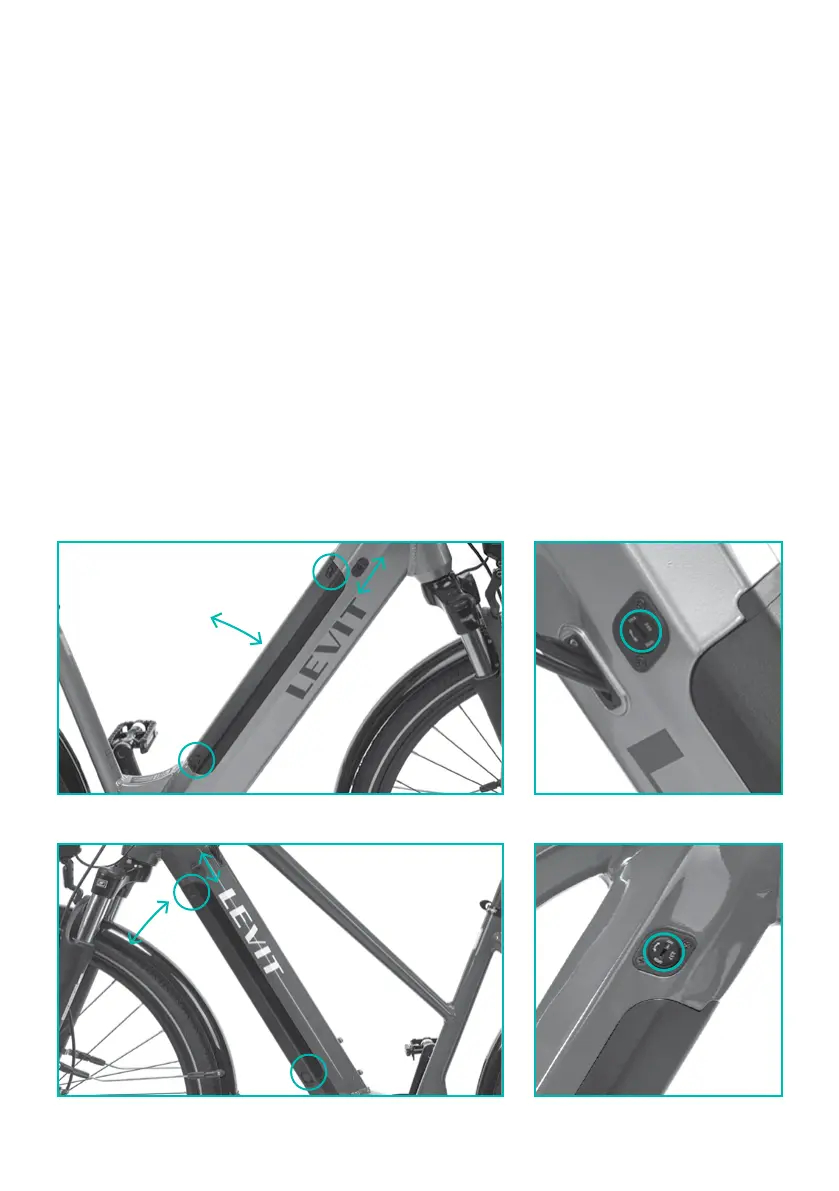
Integrated baery
Muan, Musca, Nefel, Svarog, Sokor, Kingit, Tengu, Corax, Arian, Columba, Calvia
Switching on: the baery is switched on by a buon located on its upper part.
Manipulation: turn the key 180° to remove the baery. Move the release / lock lever towards the
handlebars, firmly grab the top end of the baery and release it by pulling gently upwards. Insert
the baery by placing it over the contacts on its lower part, then push the upper part until you
hear the lock latch click. Now move the release / lock lever back towards the saddle. Turn the key
to lock the baery.
Switching off: the baery is switched of by pushing and holding the buon for the period
of 5 seconds.
How to find out about capacity of the batterye: the baery oers a simple indication using
three colours of LED diodes – red diode means capacity of 0–20%, green equals capacity
of 20–80%, and the blue colour indicates charge of 80–100%. More detailed information are
provided on the display.
Vrchní
Spodní
locklock
locklock
switch
and battery statuse
switch and switch and
battery statusbattery status
removing
battery
removing removing
batterybattery
mechanical mechanical
fusefuse
mechanical mechanical
fusefuse
charging connectorcharging connector
charging connectorcharging connector



 To Next Page