7
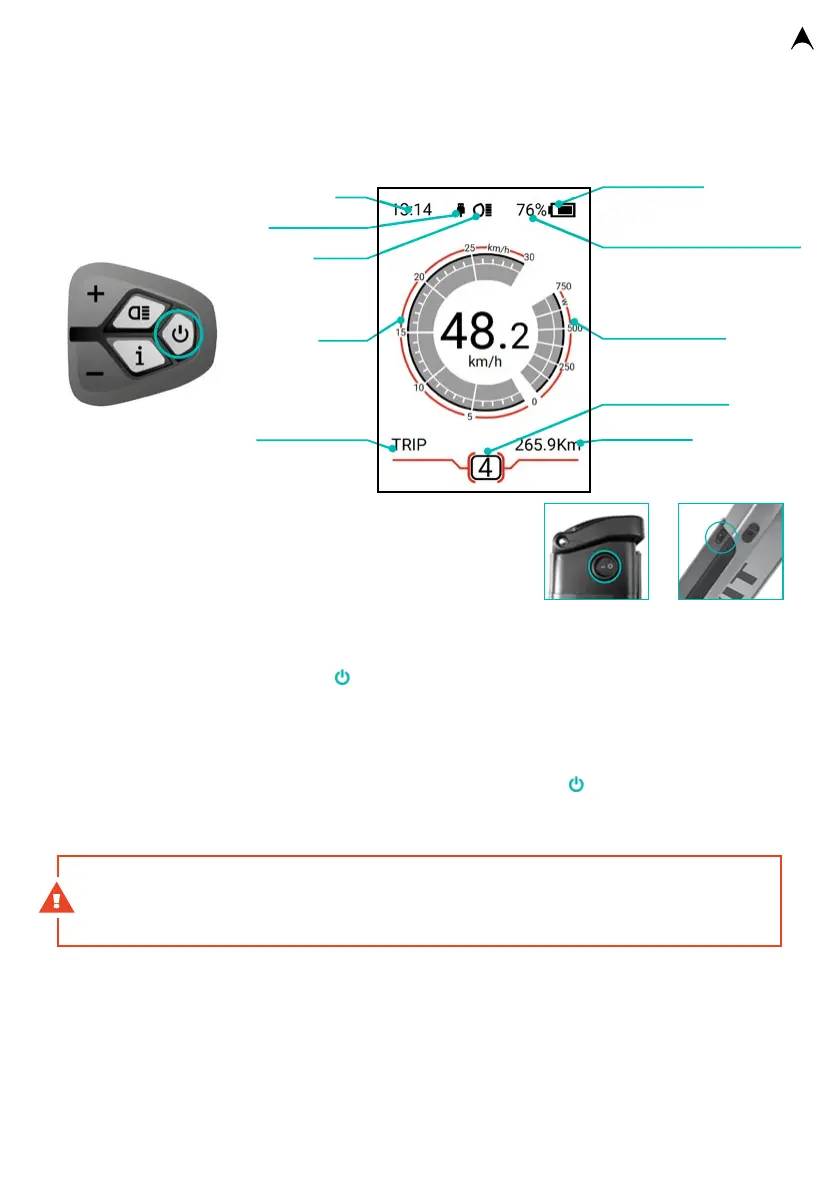
TFT COLOUR – e-bike control
Muan MX, Musca MX
ONOFF
baery status
time
USB charging
lighting
voltage indicator / baery
status percentage indicator
speed
scale
indicator mode
power indicator
data display
assistance mode
Switching On/Off
1. Switch on the electric system power on the battery
Activate the battery by pushing the button on its housing.
2. Switch on the TFT panel of the e-bike.
Push the X buon on the display control and hold it pushed
for 2 seconds. Switching o the system is carried out in the
same way. Hold the buon pushed for 4 seconds to switch o the frame baery. The system will
automatically be disabled aer 5 minutes of inactivity to save energy (this period can be set by
the user – see parameter seing below).
Setting of assistance mode
To change the assistance mode in the range of 0-5, briefly push the buon. The highest
level of assistance is indicated with the number 5, whilst the no assistance level is indicated
with the number 0. The assistance mode is set to 1 aer the display is switched on.
WARNING The motor may vibrate for a short period of time during a low revolution ride
with a high degree of assistance set. If this happens, we recommend that you immediately
change the assistance mode to a lesser degree.
Walk Assistance
The Walk Assistance is activated by pushing the (-) buon that sets the assistance to Walk
Assistance mode (the Walk Assistance mode symbol will be displayed). Push the (-) buon
again, and the assistance will be activated until you release the buon. The purpose of this
function is to make manipulation with the e-bike easier for its users. Typically, it is used during
walking with the e-bike. In this case, the e-bike speed will be between 4 and 6km/h. The walk
assistance is switched o immediately aer you release the buon.
Baery placed on
the rear side of
the seat tube
integrovaná
baterie



 To Next Page