10
LED – e-bike control
Chilo 3, Tumbi
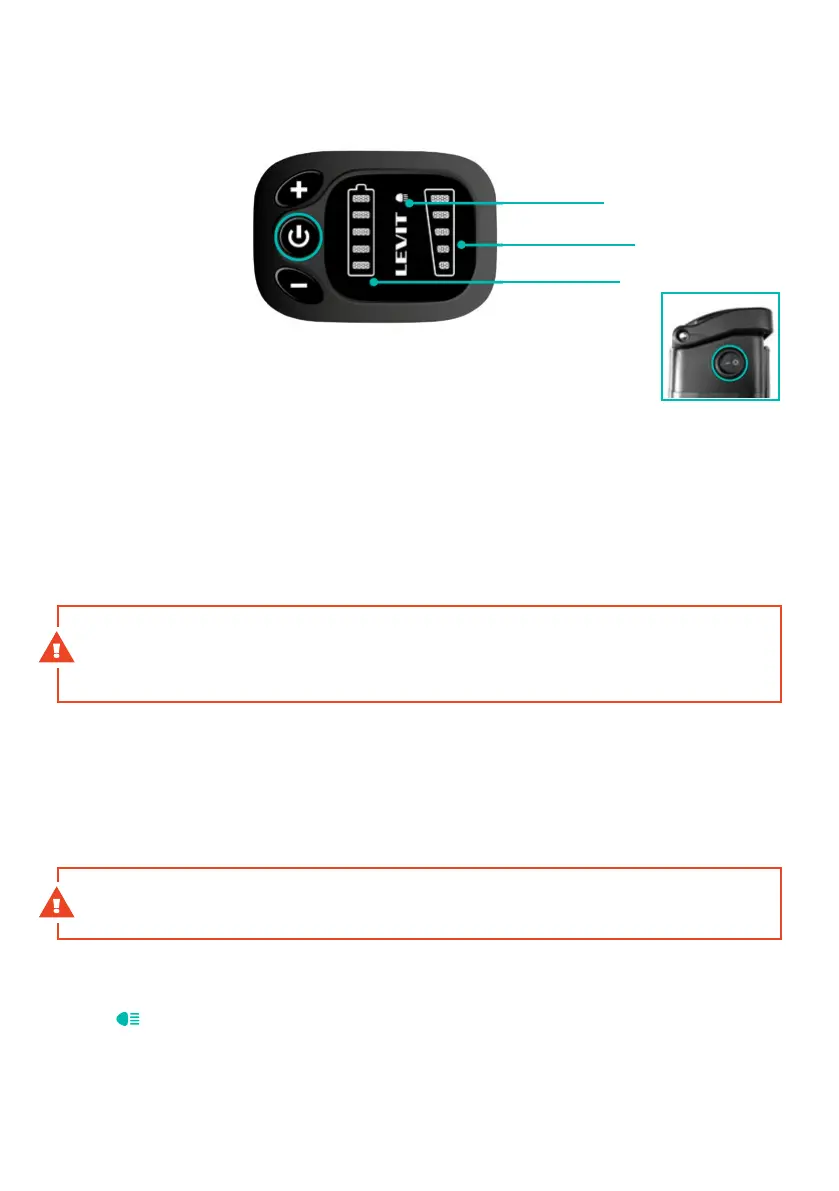
ONOFF
assistance mode
illumination
baery status
Switching On/O
1. Switch on the electric system power on the battery
Activate the battery by pushing the button on its housing.
2. Switch on the control panel of the e-bike.
Push and hold the X buon on the control pushed for 5 seconds. The system is switched o in the
same way. The system will automatically switch o aer 10 minutes of inactivity to save energy.
Seing of assistance mode
change the assistance mode in the range of 1-5, push the (+)(-) button. If you want to enjoy an
unassisted ride, switch off the electric system by pushing the X button.
WARNING The motor may vibrate for a short period of time during a low revolution ride
with a high degree of assistance set. If this happens, we recommend that you immediately
change the assistance mode to a lesser degree.
Walk assistance
Walk Assistance is activated by pushing and holding the (-) button. The assistance mode
ranging from 1 to 5 must be selected to activate the Walk Assistance mode. The purpose of
this function is to make manipulation with the e-bike easier for its users. Typically, it is used
during walking with the e-bike. In this case, the e-bike speed will be between 4 and 6km/h.
The walk assistance is switched off immediately after you release the button.
WARNING Do not try to hinder the bicycle motion. In such case, the motor may suer
damage
SWITCHING LIGHTS ON OFF
Push and hold the (+) button for 1 second to switch the lights on / off. X will light up on the
display
.
BATTERY STATUS INDICATOR
Shows the remaining battery capacity. If all LED diodes are lit, the battery is fully charged. In
the battery has lower voltage (lower current capacity) and higher current load (e.g. during an
ascent), the display of capacity may fluctuate in the control panel. A more precise reading is
provided by the indicator located directly on the battery.
Baery placed on
the rear side of
the seat tube



 To Next Page