EasyManua.ls Logo

Leviton EV Series - User Manual

Leviton EV Series
16 pages
Print Icon
To Next Page IconTo Next Page
Loading...
PK-A3503-10-00-5A
EV Series
Plug-In Charger - 40 AMP
Cat. Nos. EV40P
Installation Manual
WEB VERSION
Question and Answer IconNeed help?

Do you have a question about the Leviton EV Series and is the answer not in the manual?

Summary

Warnings and Safety Instructions

Safety Instructions

Key safety warnings and cautions for the EV40P charger, including fire, shock, and injury prevention.

Safety and Specifications Overview

EV40 P Technical Specifications

Technical specifications for the EV40P charger, including voltage, current, temperature, and Wi-Fi.

Tools and Package Contents

Status Light Indicator Guide

Charger Status Light Indicator Guide

Explanation of the LED indicator light states (Blue, Green, Red) and their meanings for the charger.

Installation Procedures

EV40 P Wall Mounting and Installation Guide

Step-by-step guide for mounting the bracket and installing the EV40P charger on a wall.

Operating Instructions

Error and Warning Message Reference

EV40 P Error and Warning Message Reference

Table detailing error statuses (e.g., Input OVP, OTP) and their corresponding light indications and remarks.

Maintenance and Repair

Summary

Warnings and Safety Instructions

Safety Instructions

Key safety warnings and cautions for the EV40P charger, including fire, shock, and injury prevention.

Safety and Specifications Overview

EV40 P Technical Specifications

Technical specifications for the EV40P charger, including voltage, current, temperature, and Wi-Fi.

Tools and Package Contents

Status Light Indicator Guide

Charger Status Light Indicator Guide

Explanation of the LED indicator light states (Blue, Green, Red) and their meanings for the charger.

Installation Procedures

EV40 P Wall Mounting and Installation Guide

Step-by-step guide for mounting the bracket and installing the EV40P charger on a wall.

Operating Instructions

Error and Warning Message Reference

EV40 P Error and Warning Message Reference

Table detailing error statuses (e.g., Input OVP, OTP) and their corresponding light indications and remarks.

Maintenance and Repair

Overview

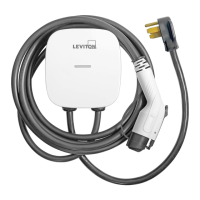
The Leviton EV Series Plug-In Charger (Cat. Nos. EV40P) is an Electric Vehicle Supply Equipment (EVSE) designed for Level 2 AC charging, compatible with vehicles adhering to the SAE J1772 charging standard. This device serves as a home charging solution, providing a convenient and efficient way to charge electric vehicles.

Function Description:

The primary function of the EV40P charger is to deliver alternating current (AC) power to an electric vehicle's battery, facilitating its recharge. It operates as a plug-in unit, meaning it connects to a standard NEMA 14-50 receptacle, making installation relatively straightforward for users with an existing compatible outlet. The charger is equipped with an attached input power cable and an output charging cable, which terminates in an SAE J1772 AC Charging Connector for connection to the vehicle's charging inlet.

A key feature of this charger is its integrated RFID card reader, which allows for user authorization and access control. By default, RFID access control is disabled, enabling "open charging" where anyone can use the unit. However, for users who wish to restrict access, the RFID system can be activated. This involves using an administrative (admin) RFID card to enable the feature, after which standard RFID cards can be used by authorized users to initiate charging sessions. This security measure is particularly useful in shared or public charging environments where controlled access is desired.

The charger provides visual feedback through an LED light indication system. This light communicates the device's operational status, including standby, waiting for charge, active charging, and fault conditions. Different colors and flashing patterns correspond to specific states, allowing users to quickly understand the charger's current activity or identify any issues. For instance, a blue light indicates standby, a steady green light signifies it's waiting for charge after connection, a flashing green light means charging is in progress, and a red light indicates a fault. In specific models (EV32W, EV48W, EV80W, and EV40P), a flashing blue light indicates MyLeviton Setup Mode, suggesting potential smart features or connectivity options, though the manual primarily focuses on the physical operation.

The device incorporates multiple safety features to protect both the user and the vehicle. These include input and output protection mechanisms such as Under Voltage Protection (UVP), Over Voltage Protection (OVP), Residual Current Device (RCD), Surge Protection Device (SPD), and Ground Fault Protection. Additionally, it offers Over Current Protection (OCP), Over Temperature Protection (OTP), and Control Pilot Fault Protection. These safeguards are crucial for preventing electrical hazards, equipment damage, and ensuring a safe charging environment.

Usage Features:

Using the EV40P charger involves a few simple steps, especially when RFID access control is disabled.

  1. Connection: The charger is designed to be plugged into a NEMA 14-50 receptacle. Once plugged in, the charger enters standby mode, indicated by a steady blue light.
  2. Vehicle Connection: To begin charging, the user presses and holds the black button on the top of the charge plug and inserts the SAE J1772 connector into the vehicle's charging inlet.
  3. Charging Initiation: If RFID access control is disabled, charging typically starts automatically once the vehicle is connected. The LED light will turn steady green, indicating it's waiting for charge, and then flash green when charging is active.
  4. Stopping and Restarting: To stop charging, the user presses the black button on the charge plug and removes it from the vehicle inlet. To restart, the user reinserts the plug after pressing the button.
  5. RFID Enabled Operation: If RFID access control is enabled, an additional step is required before connecting to the vehicle. The user must "tap" a standard RFID card to the RFID sensor image on the front of the charger. A beep confirms authorization, and the power light turns solid green, indicating the unit is ready to charge. After authorization, the vehicle connection and charging initiation steps are the same as above. To restart charging with RFID enabled, the user must re-tap their RFID card before reinserting the plug.

The charger's design emphasizes user convenience, with clear visual indicators for operational status. The cable length is generous (25 ft.), allowing flexibility in parking the vehicle relative to the charging station. After charging, it is recommended to loop the charging cable over the station to prevent tripping hazards and maintain a tidy environment.

Maintenance Features:

The EV40P charger is designed for minimal daily maintenance, primarily focusing on safe handling and environmental protection.

  1. Moisture Avoidance: A critical warning emphasizes avoiding moisture or water in the charger. In the event of water or moisture exposure, the device must be immediately powered off to prevent danger, and professional personnel should be notified for maintenance before subsequent use. This highlights the importance of keeping the unit dry and potentially installing it in a sheltered location if outdoors.
  2. Physical Protection: Users are cautioned to handle the charger properly, avoiding hitting or pressing hard on the enclosure. If the case becomes damaged, it is advised to contact a professional technician for repair, as physical damage could compromise the device's safety and functionality.
  3. Environmental Considerations: The manual recommends keeping the charger in a clean area with low humidity. It explicitly advises against installation in coastal environments with high humidity or high dust, as these conditions can negatively impact the device's longevity and performance. Furthermore, the charger should not be placed near hot objects or in high-temperature locations, nor should it be exposed to dangerous substances like flammable gases and corrosive materials.
  4. Weight Restrictions: Users are warned not to put heavy objects on the charger to avoid damage or danger. This ensures the structural integrity of the unit and prevents potential internal component damage.
  5. Professional Installation and Repair: The manual stresses that the AC charger should be installed by a qualified technician according to the user manual and local safety regulations. Similarly, any repairs or significant maintenance should be handled by professional personnel, especially if the enclosure is damaged or if there are internal issues. Incorrect installation or testing could damage the vehicle's battery or the charger itself, and such damage is excluded from the warranty.

Overall, the Leviton EV40P charger is a robust and user-friendly Level 2 EVSE, designed with safety and convenience in mind, offering both open access and restricted RFID-enabled charging options for electric vehicle owners.

Leviton EV Series Specifications

General IconGeneral
Operating Temperature-22°F to 122°F (-30°C to 50°C)
Charging LevelLevel 2
Input Voltage120-240V
Output Current40A
Cable Length18 ft, 25 ft
Product TypeElectric Vehicle Charger
Enclosure RatingNEMA 3R
Network ConnectivityWi-Fi
Smart FeaturesScheduling, Remote Monitoring, Energy Tracking
Output Power9.6 kW
Warranty3 years

Related product manuals