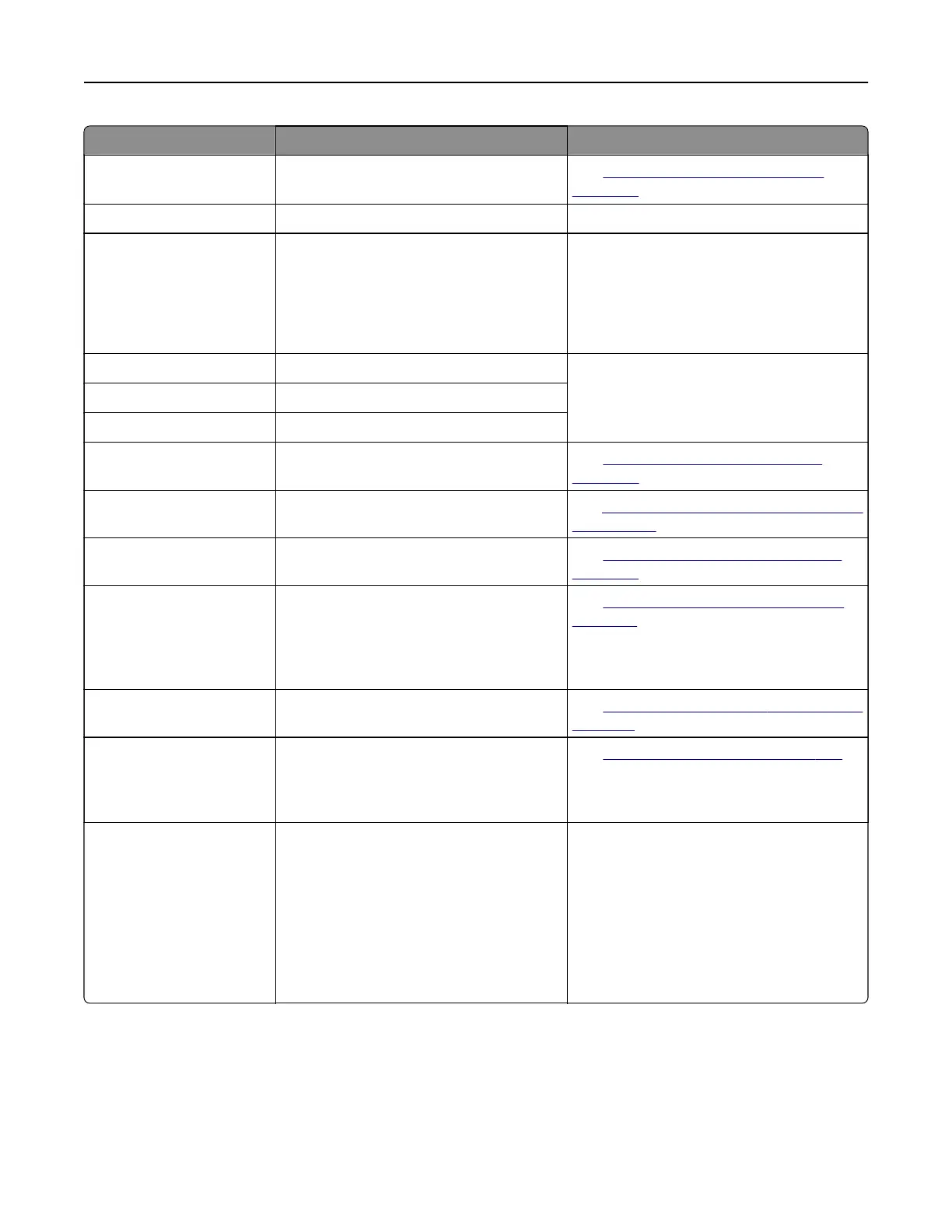
Error codes Error message Solution
86.33 Replace ADF kit, recommended
life exceeded.
See
“Replacing the ADF roller kit” on
page 304.
87.20 Hole punch box nearly full. Touc h Continue to clear the message.
87.30 Empty the hole punch box.
1 Open the paper transport cover F.
2 Remove the hole punch box, and then
empty it.
3 Insert the hole punch box.
4 Close the cover.
88.00[x] [Color] cartridge nearly low. Touc h Continue to clear the message.
88.10[x] [Color] cartridge low.
88.20[x] [Color] cartridge very low.
88.30[x], 88.40[x] Replace [color] cartridge. See
“Replacing a toner cartridge” on
page 265.
200.03, 240.06 Paper jam [jam header]. See
“Paper jam in the multipurpose feeder”
on page 391.
200.16[x], 241.16a Paper jam [jam header]. See
“Paper jam in the standard tray” on
page 386.
200.26[x], 200.36[x],
200.46[x], 200.56a,
202.95[x], 242.26, 242.33,
242.43, 243.33, 243.36,
243,43, 244,43, 244,46
Paper jam [jam header]. See
“Paper jam in the optional trays” on
page 387.
200.56a, 245.53[x],
245,56
Paper jam [jam header]. See
“Paper jam in the 2000‑sheet tray” on
page 391.
200.95, 201.96, 202.93,
202.94, 221.93, 221.95,
232.93, 240.25, 240.35,
240.55
Paper jam [jam header]. See
“Paper jam in door A” on page 392.
280.06 Please reload originals in ADF
and restart job.
Try one or more of the following:
• Remove, and then load the document
back into the ADF.
• Scan the document from the scanner
glass.
• Finish the job without scanning the
remaining the pages.
• Cancel the job.
Troubleshoot a problem 354



 To Next Page