209
4-5. Using the driving support systems
4
Driving
driver position.) If the vehicle is driven to a region where the overtaking lane is on a differ-
ent side from where the vehicle is normally driven, the vehicle may accelerate when the
turn signal lever is operated in the opposite direction to the overtaking lane (e.g., if the
driver normally operates the vehicle in a region where the overtaking lane is to the right but
then drives to a region where the overtaking lane is to the left, the vehicle may accelerate
when the right turn signal is activated).
Example of acceleration
When there are no longer any preceding vehicles driving slower than the set
speed
The system accelerates until the set speed is reached. The system then returns to constant
speed cruising.
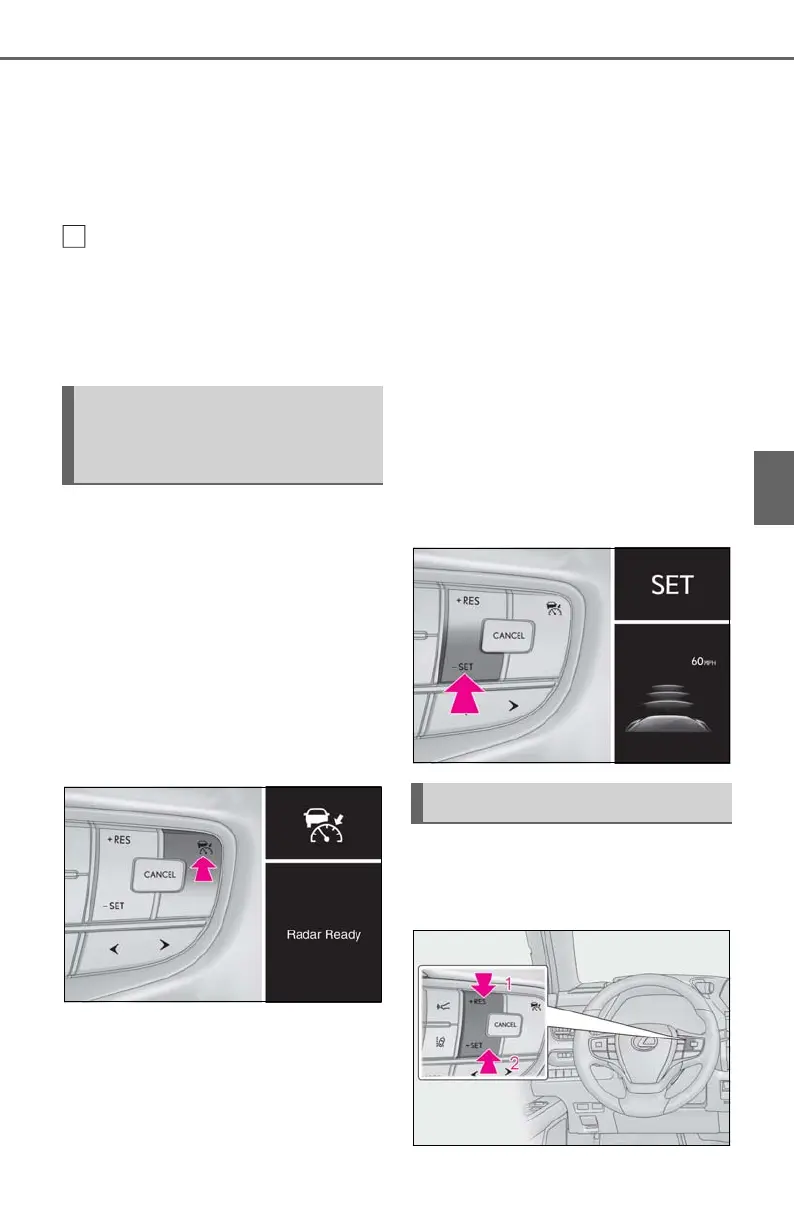
1 Press the cruise control main
switch to activate the cruise con-
trol.
Dynamic radar cruise control indicator will
come on and a message will be displayed
on the multi-information display. Press the
switch again to deactivate the cruise con-
trol.
If the cruise control main switch is pressed
and held for 1.5 seconds or more, the sys-
tem turns on in constant speed control
mode. (P.212)
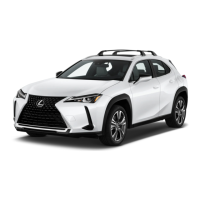
2 Accelerate or decelerate, with
accelerator pedal operation, to the
desired vehicle speed (at or above
approximately 20 mph [30 km/h])
and press the “-SET” switch to set
the speed.
Cruise control “SET” indicator will come
on.
The vehicle speed at the moment the
switch is released becomes the set speed.
To change the set speed, press the
“+RES” or “-SET” switch until the
desired set speed is displayed.
Setting the vehicle speed (vehi-
cle-to-vehicle distance control
mode)
Adjusting the set speed



 To Next Page