222
4-5. Using the driving support systems
Multi-information display and head-
up display
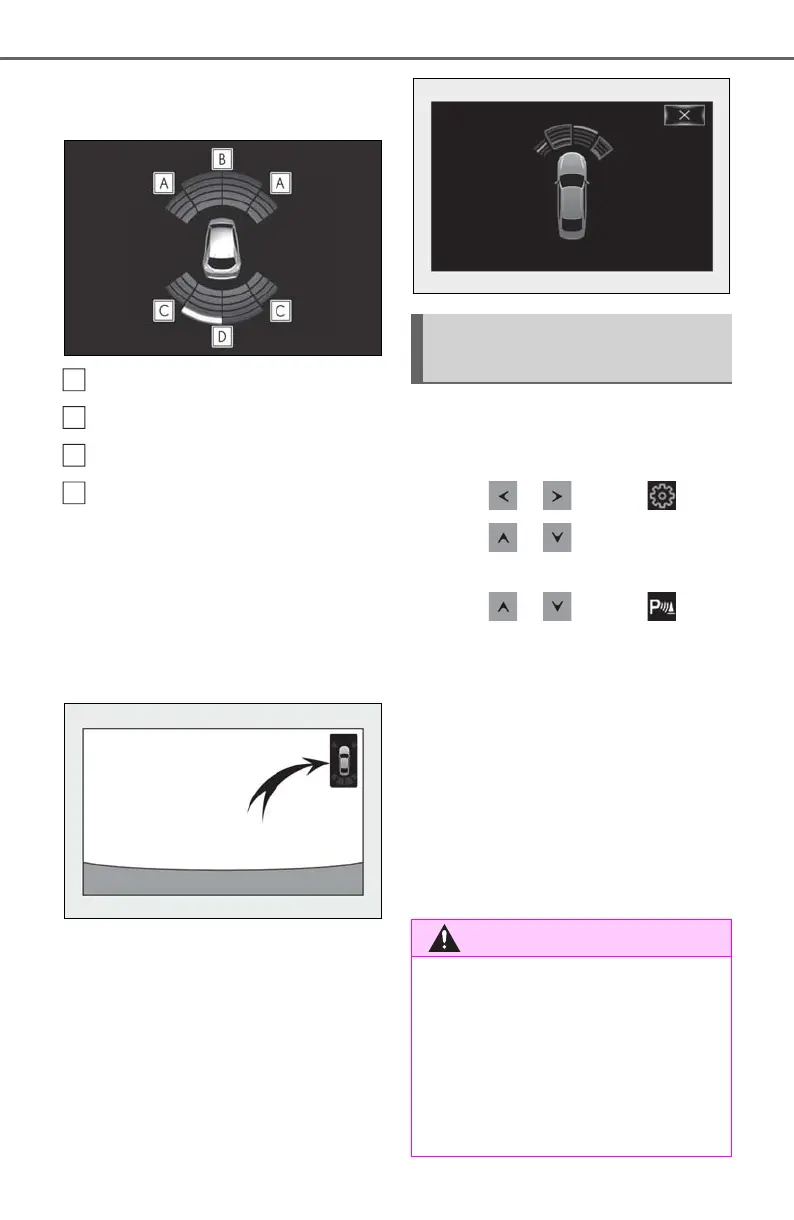
Front corner sensor detection
Front center sensor detection
Rear corner sensor detection
Rear center sensor detection
Center Display
A graphic is shown when the Lexus park-
ing assist monitor is displayed.
A simplified image is displayed on the
Center Display when an object is detected.
• When the shift lever is in R
• When the shift lever is in N, M or D
Use the meter control switches to
enable/disable the intuitive parking
assist. (P.81)
1 Press or to select .
2 Press or to select “PKSA”
and then press “OK”.
3 Press or to select and
then press “OK”.
When the intuitive parking assist func-
tion is disabled, the intuitive parking
assist OFF indicator (P.70) illumi-
nates on the multi-information display.
When the intuitive parking assist func-
tion is turned on or off, operation of the
intuitive parking assist function contin-
ues in the same condition the next time
the engine is started.
Turning intuitive parking assist
on/off
■ When using the intuitive parking
assist
Observe the following precautions.
Failing to do so may result in the vehicle
being unable to be driven safely and pos-
sibly cause an accident.
● Do not use the sensor at speeds in
excess of 6 mph (10 km/h).



 To Next Page