83
2-1. Instrument cluster
2
Vehicle status information and indicators
will turn off.
Zone of Eco driving
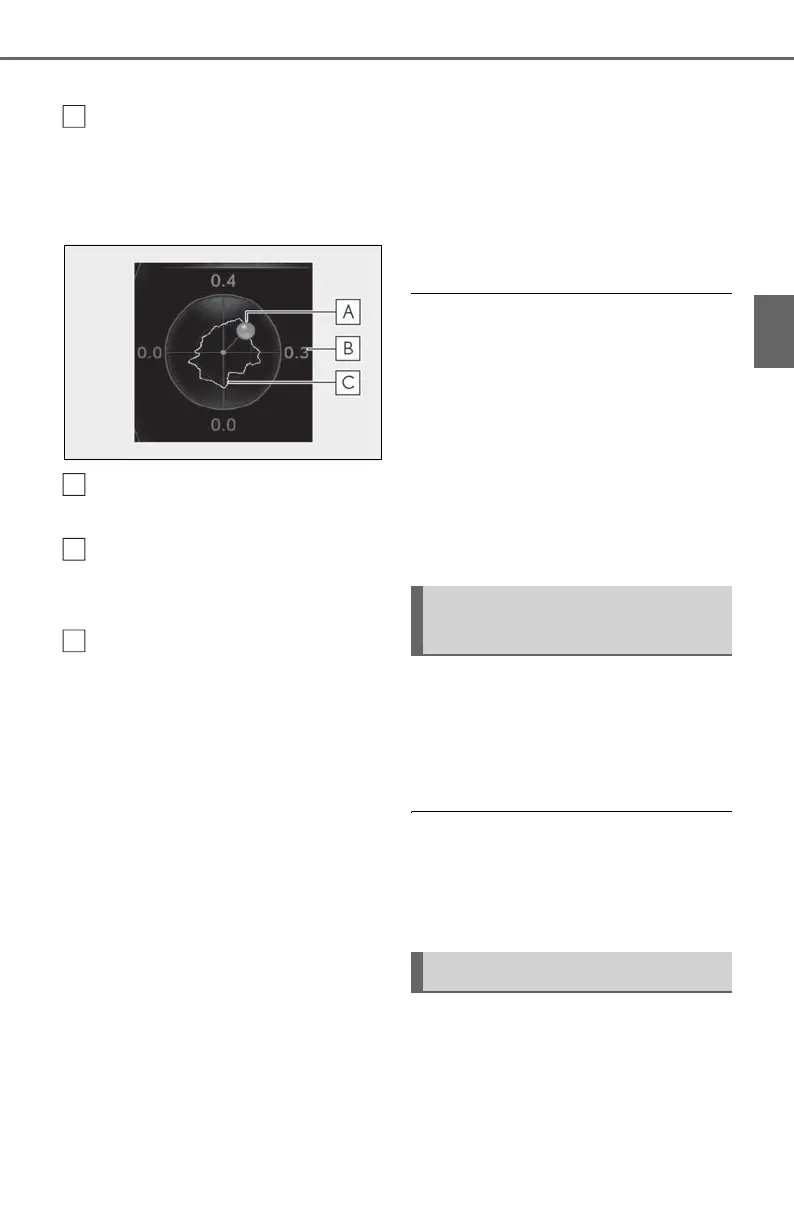
■ G-force (F SPORT models)
Displays lateral G-forces on the vehi-
cle.
Acceleration G-force on the vehi-
cle
Current G-force value (analyzed
value of front/rear and left/right G-
forces)
Record of the maximum G-forces
This display is intended for use as a guide-
line. Depending on factors such as the
road surface condition, temperature and
vehicle speed, the display may not show
the actual condition of the vehicle.
Resetting the record of maximum
G-forces
Press and hold “OK” of the meter control
switches to reset the record.
Peak hold function
If lateral G-forces of 0.5 G or greater are
generated, the G-force value display will
turn amber and be held for 2 seconds.
■ Tire pressure
P.332
■ Units (F SPORT models)
The units of measure used can be
changed while driving.
Unlike the units setting performed on the
settings display, the units setting per-
formed on the drive information display
can be changed while driving.
■ Display OFF
Displays a blank screen.
■ Eco Driving Indicator
Eco Driving Indicator will not operate
under the following conditions:
● The shift lever is in any position other than
D.
● A paddle shift switch (if equipped) is
operated.
● The driving mode is set to other than nor-
mal and Eco drive mode.
● The vehicle speed is approximately 80
mph (130 km/h) or higher.
Select to display the following naviga-
tion system-linked information.
Route guidance to destination
Compass display
■ Route guidance to destination display
When the route guidance to destination
display is enabled on the head-up display, it
will not be displayed on the multi-informa-
tion display. (P.86)
Select to enable selection of an audio
source or track on the meter using the
meter control switches.
Navigation system-linked dis-
play (if equipped)
Audio system-linked display



 To Next Page