9
ENG
ENGLISH
USING THE MONITOR SET
USINGTHEMONITORSET
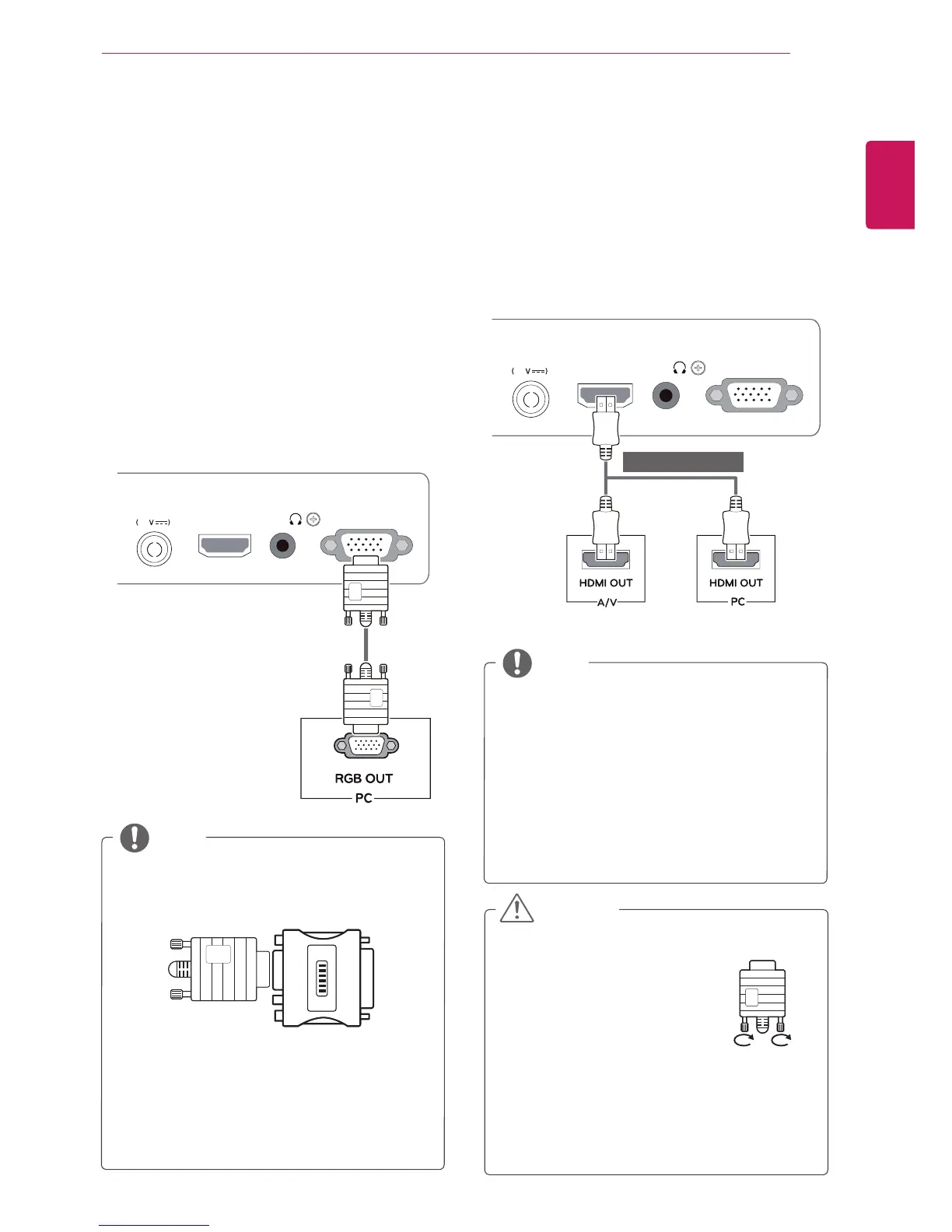
ConnectingtoaPC
YourMonitorsetsupportsPlug&Play*.
*Plug&Play:APCrecognizesaconnected
devicethatusersconnecttoaPCandturn
on,withoutdeviceconfigurationoruser
intervention.
D-SUBconnection
TransmitsanalogvideofromyourPCtothe
Monitorset.ConnectthePCandtheMonitorset
withthesuppliedD-sub15pinsignalcableas
showninthefollowingillustrations.
Macadapter
ForAppleMacintoshuse,aseparateplug
adapterisneededtochangethe15pin
highdensity(3row)D-SUBVGAconnector
onthesuppliedcabletoa15pin2row
connector.
WhenusingaD-Subsignalinputcable
connectorforMacintosh
IfyouuseHDMIPC,itcancausecompatibility
problem.
WhenyouwanttousetwoPCinourMonitor,
pleaseconnectthesignalcable(D-SUB/
HDMI)respectivelyinMonitorset.
IfyouturntheMonitorsetonwhileitiscold,
thescreenmayflicker.Thisisnormal.
Somered,green,orbluespotsmayappear
onthescreen.Thisisnormal.
NOTE
NOTE
⭫Ⓠ䗉ޛ
DC-IN
HDMI IN D-SUB IN
H / P
19
⭫Ⓠ䗉ޛ
DC-IN
HDMI IN D-SUB IN
H / P
19
HDMIconnection
Transmitsthedigitalvideoandaudiosignalsfrom
yourPCorA/VtotheMonitorset.ConnectthePC
orA/VandtheMonitorsetwiththeHDMIcableas
showninthefollowingillustrations.
Connectthesignalinputcable
andtightenitbyturningthe
screwsclockwise.
Donotpressthescreenwith
yourfingerforalongtimeas
thismayresultintemporarydistortionon
thescreen.
Avoiddisplayingafixedimageonthe
screenforalongperiodoftimetoprevent
imageburn.Useascreensaverifpossible.
CAUTION
(soldseparately)


 To Next Page
 Loading...