17
ENG
ENGLISH
USING THE MONITOR
USING THE MONITOR
Connecting to a PC
Thismonitorsupportsthe*PlugandPlay
feature.
*PlugandPlay:Afeaturethatallowsyouto
addadevicetoyourcomputerwithouthaving
toreconfigureanythingorinstallanymanual
drivers.
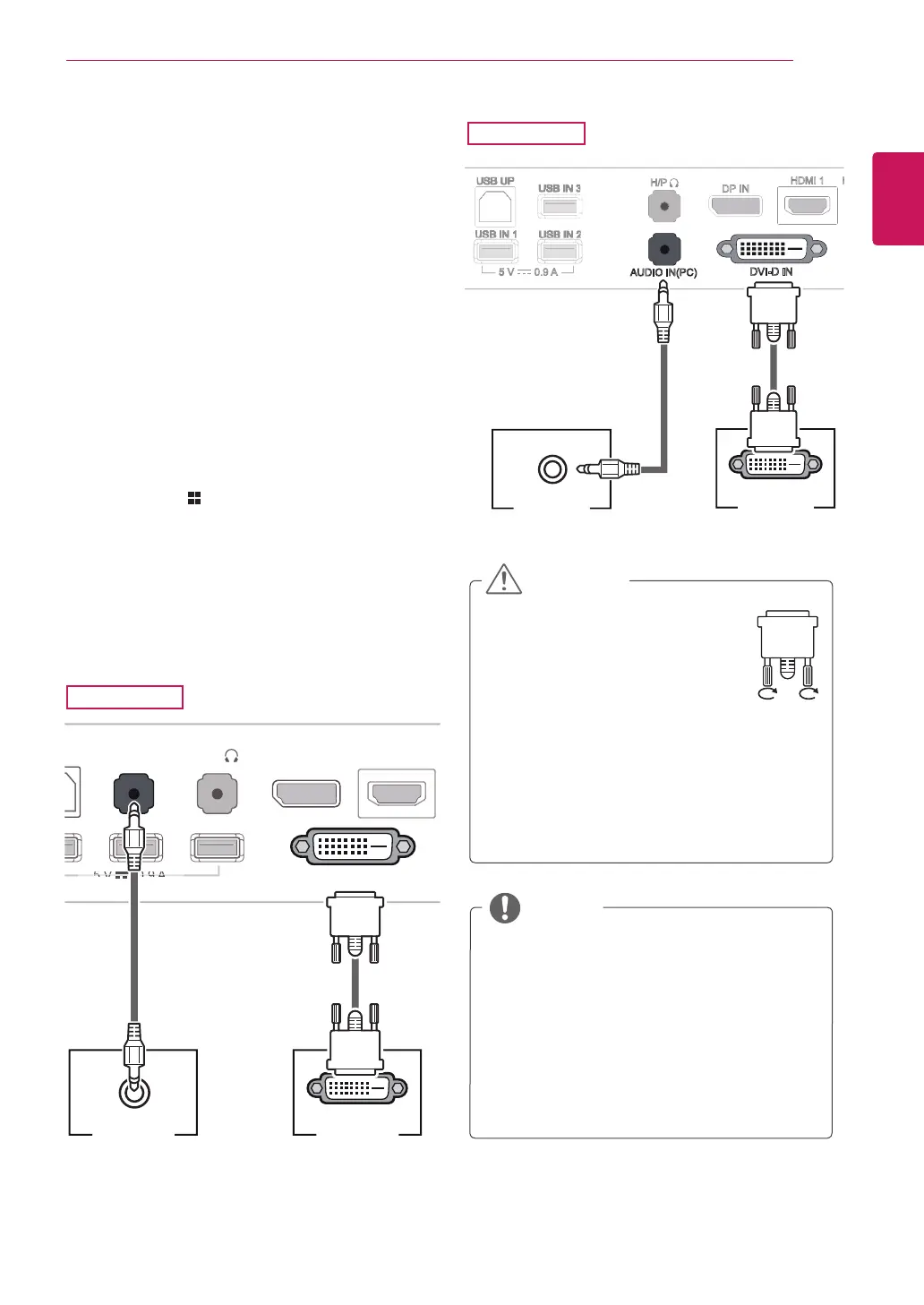
DVI connection
Transmitsdigitalvideosignalstothemonitor.Con-
nectthemonitorusingtheDVIcableasillustrated
below.
Pressthemenu( )buttonandthenselectthe
inputoptionfromtheinputmenu.
TohearthesoundinDVIinputmode,connectthe
PC'sAUDIOOUTporttothemonitor'sAUDIOIN
(PC)portusingtheaudiocablethatcamewiththe
product.
Connecttheinputsignalcableand
turninthedirectionofthearrow.
Topreventdisconnectionsecure
thecabletightly.
Donotpressonthescreenfora
prolongedperiodoftime.Thismaycause
imagedistortion.
Donotdisplayastillimageonthescreen
foraprolongedperiodoftime.Thismay
causeimageretention.Ifpossible,usethe
screensaver.
CAUTION
Whenconnectingthepowercordtotheout-
let,useagrounded(3-hole)multi-socketora
groundedpoweroutlet.
Themonitormayflickerwhenturnedoninan
areaoflowtemperature.Thisisnormal.
Sometimesred,green,orbluespotsmayap-
pearonthescreen.Thisisnormal.
UsingaDVItoHDMIcablemaycausecom-
patibilityissues.
NOTE
DVI-I(D) OUT
AUDIO OUT
PC
PC
DVI-D IN
B IN
B IN
AUDIO IN(PC)
MHL
USB IN 1 USB IN 2 USB IN 3
HDMI 1
HDMI 2 / MHL
5 V 0.9 A
PC
DVI-D IN
AUDIO IN(PC)
DVI-I(D) OUT
AUDIO OUT
PC
29EA93
29EB93



 To Next Page