22
ENG
ENGLISH
USING THE MONITOR
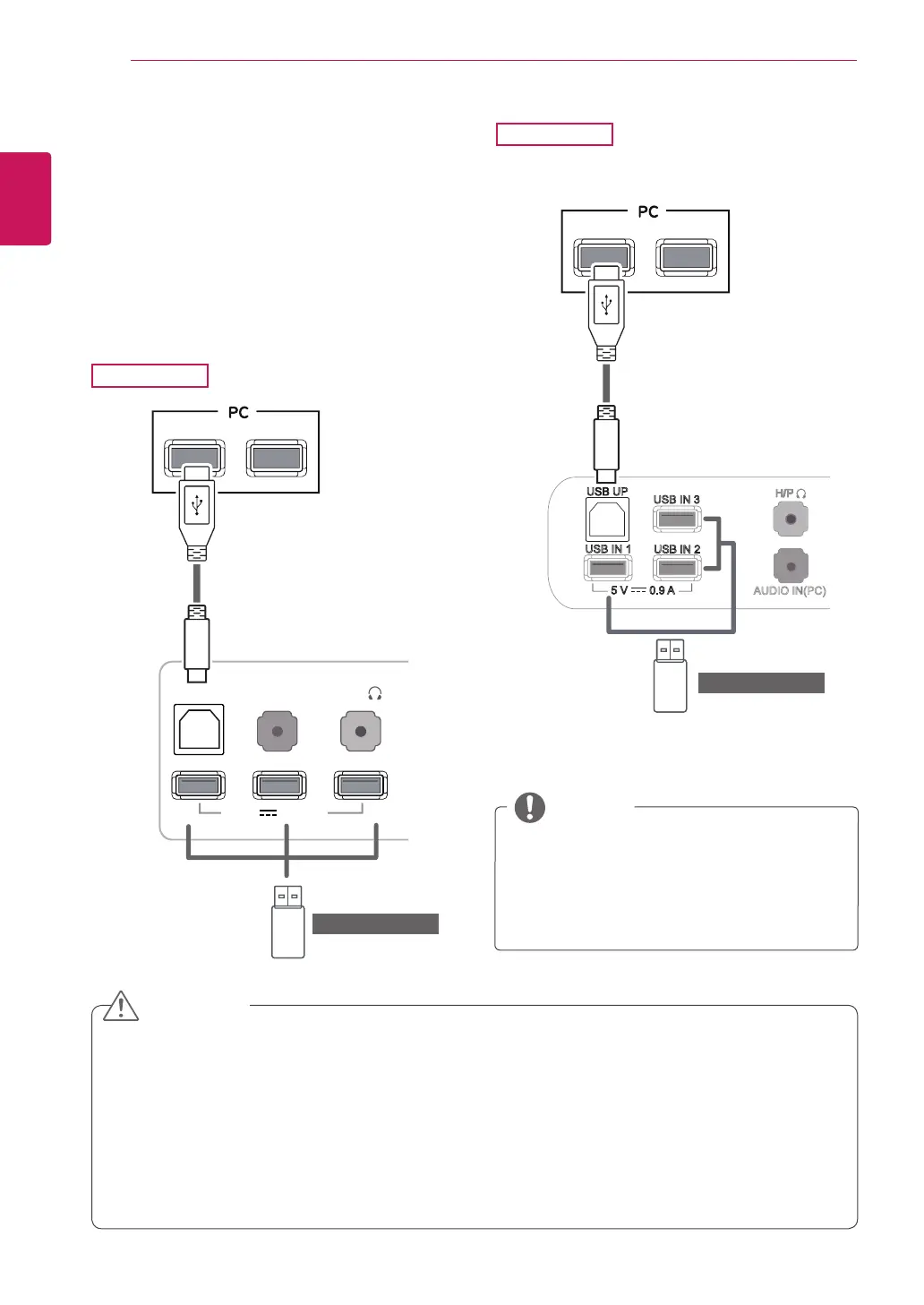
USB cable-PC connection
TheUSB3.0functionactsasaUSBhubonthe
product.
TouseUSB3.0,connecttheA-BtypeUSB3.0
cableincludedwiththeproducttothePC.
PeripheraldevicesconnectedtotheUSBINport
canbecontrolledfromthePC.
PleaseinstallthelatestWindowsservice
packbeforeuse.
Peripheraldevicesaresoldseparately.
TheUSBportscanbeusedtoconnectthe
keyboard,mouse,andotherUSBdevices.
NOTE
DVI-I(D) OUT
AUDIO OUT
PC
PC
USB IN 1 USB IN 2 USB IN 3
P
UDIO IN
PC
USB UP
5 V 0.9 A
USB IN 1
USB UP
5 V 0.9 A
USB IN 2
USB IN 3
HDMI 1
HDMI 2 / MHL
5 V 0.9 A
PC
DP OUT
DVI-D IN
AUDIO IN(PC)
<CautionsWhenUsingaUSBDevice>
AUSBstoragedevicewithanautomaticrecognitionprograminstalledorusingitsowndrivermaynotbe
recognized.
SomeUSBdevicesmaynotbesupportedormaynotworkproperly.
ItisrecommendedtouseanexternalUSBharddiskwithratedvoltageof5Vorlessandratedcurrentof
900mAorless.
ItisrecommendedtouseaUSBhuborharddiskdrivewithpowersupplied.(Ifthepowersupplyisnot
enough,theUSBstoragedevicemaynotberecognizedproperly.)
CAUTION
29EA93
29EB93
(soldseparately)
(soldseparately)



 To Next Page