ENGLISH
25
MAKING CONNECTIONS
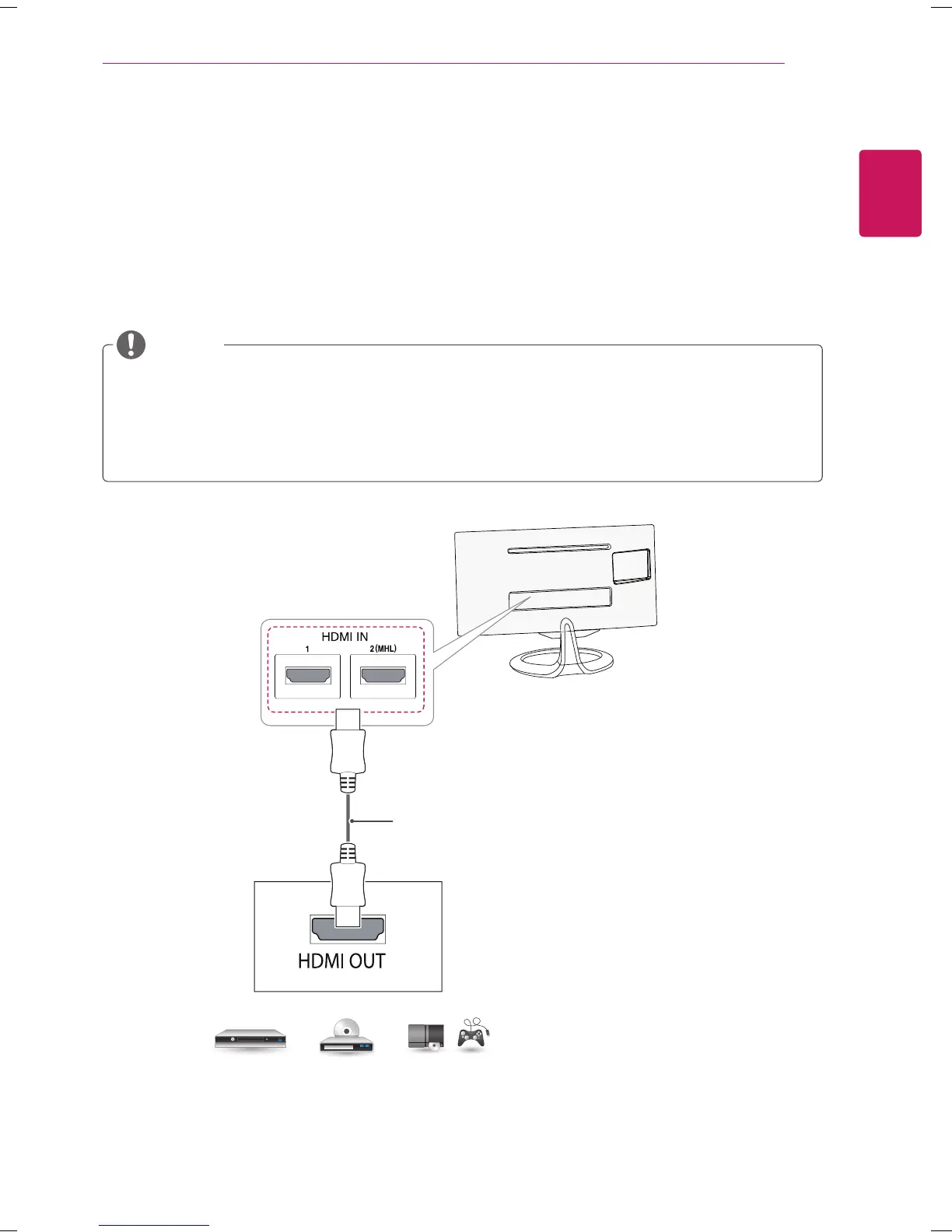
Connecting to a HD receiver, DVD Player, VCR or Gaming device
Connect a HD receiver, DVD Player, VCRor Gaming device to the TV and select an appropriate input mode.
HDMI connection
HDMI is the best way to connect a device.
Transmits the digital video and audio signals from an external device to the TV. Connect the external device
and the TV with the HDMI cable as shown on the following illustration.
NOTE
DVD / Blu-Ray / HD Cable Box /
HD STB / Gaming device
(Not Provided)
Choose any HDMI input port to connect.
It does not matter which port you use.
HDMI cable to the HDMI input and a digital broadcast receiver, connect the HDMI output. Video, with
sound output.
Press the INPUT button on the remote control to select either HDMI1 or HDMI2/MHL.
Dolby Digital and DTS are not supported. If no sound is coming out, set the audio output of the
connected device to PCM.



 To Next Page