ENGLISH
47
CUSTOMIZING SETTINGS
Each option is described below.
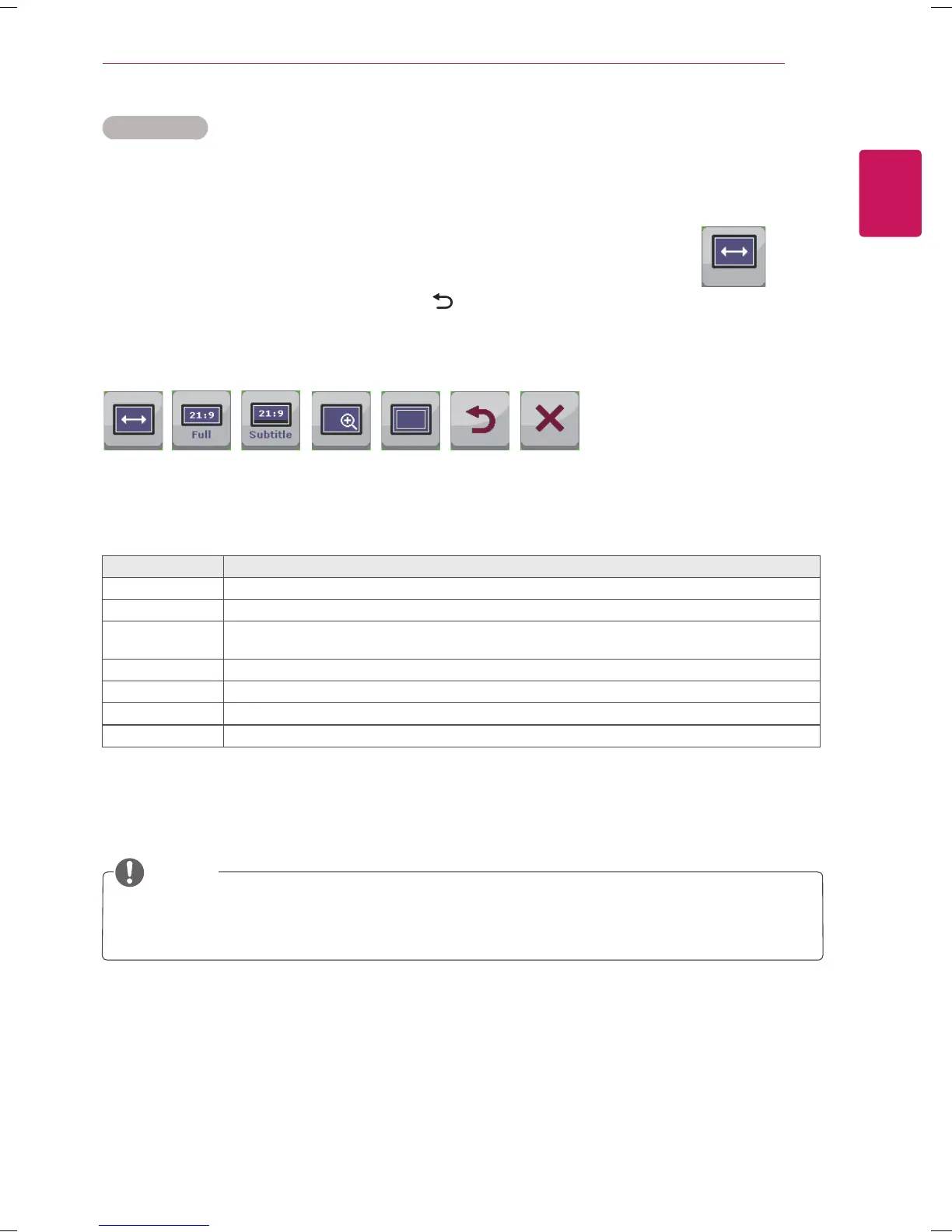
Menu > Ratio Description
Wide Displays the video in wide-screen, regardless of the video signal input.
Cinema1 Enlarges the screen with an aspect ratio of 21:9. (at 1080p)
Cinema2 Enlarges the screen with an aspect ratio of 21:9 including the black box area at the bottom for
subtitles. (at 1080p)
Original Displays a video according to the input video signal aspect ratio.
1:1
The aspect ratio is not adjusted from the original.
Back
Moves to the previous OSD screen.
Exit
Exits the OSD menu.
Ratio Settings
1
Press SETTINGS to access the main menus.
2
Press the Navigation buttons to scroll to one of the following menus and press OK.
3
Press the Navigation buttons to scroll to the setting or option you want and press
OK.
4
When you are finished, press EXIT.
When you return to the previous menu, press BACK.
Sub Menu
Wide Original 1:1Cinema1 Cinema2 Back Exit
Ratio
NOTE
The display may look the same for Wide, Original and 1:1 options at the recommended resolution
(2560 x 1080).
The ratio is disabled in the interlaced signal.



 To Next Page