EasyManua.ls Logo

LG 32LT75 - Page 114

LG 32LT75
120 pages
Print Icon
To Next Page IconTo Next Page
To Previous Page IconTo Previous Page
Loading...
112
APPENDIX
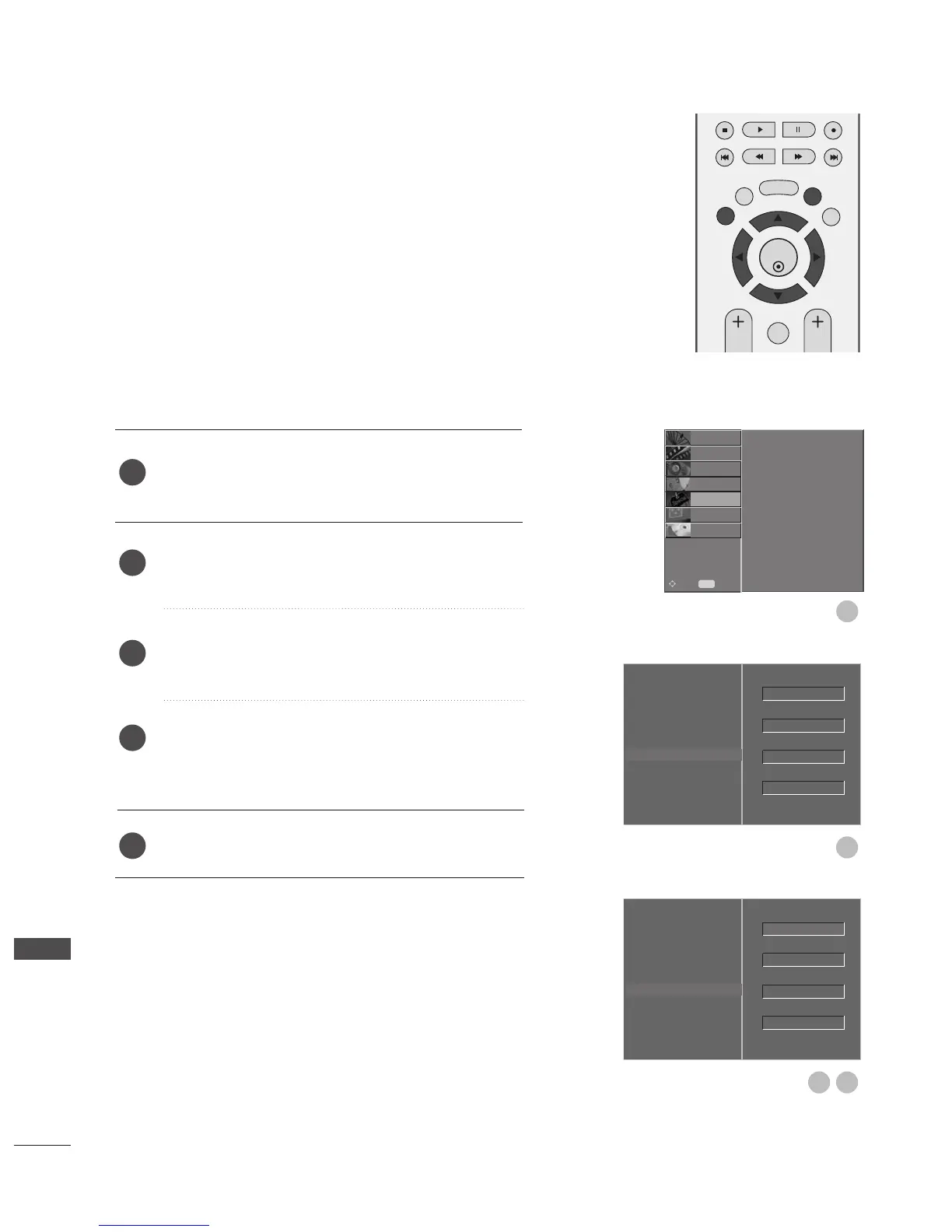
Press the
MMEENNUU
button and then use
D
or
E
button
to select the
OOPPTTIIOONN
menu.
Press the
G
button and then use
D
or
E
button to
select
FFaaccttoorryy MMooddee
.
Press the
G
button and then use
D
or
E
button to
select
SSeett IIDD
.
Press the
G
button and then use
F
or
G
button to
adjust
SSeett IIDD
to choose the desired TV ID number.
The adjustment range of SET ID is 1~99.
Press
EEXXIITT
button to return to normal TV viewing.
Use this function to specify a set ID number.
Refer to ‘Real Data Mapping’.
G
pp..111166
Set ID
2
3
4
5
1
OK
EXIT
TIME
SHIFT
TIME
SHIFT
VOL PR
GUIDE
BACK MENU
DVR
MARK
FAV
Language
Country
Lock System
Parental Control
Input Label
SIMPLINK
Factory Mode
G
Set ID
Factory Reset
ISM Method
Low Power
1
2
Language
Country
Lock System
Parental Control
Input Label
SIMPLINK
Factory Mode
Set ID
Factory Reset
ISM Method
Low Power
1
GF
3 4
OK
Normal
Off
1
OK
Normal
Off
Language
Country
Lock System
Parental Control
Input Label
SIMPLINK
Factory Mode
SETUP
O
PICTURE
O
SCREEN
O
D V R
O
Prev.
MENU
Move
AUDIO
O
TIME
O
OPTION
G
APPENDIX

Table of Contents