24
EXTERNAL EQUIPMENT SETUP
EXTERNAL EQUIPMENT SETUP
PC SETUP
This TV provides Plug and Play capability, meaning that the PC adjusts automatically to the TV's settings.
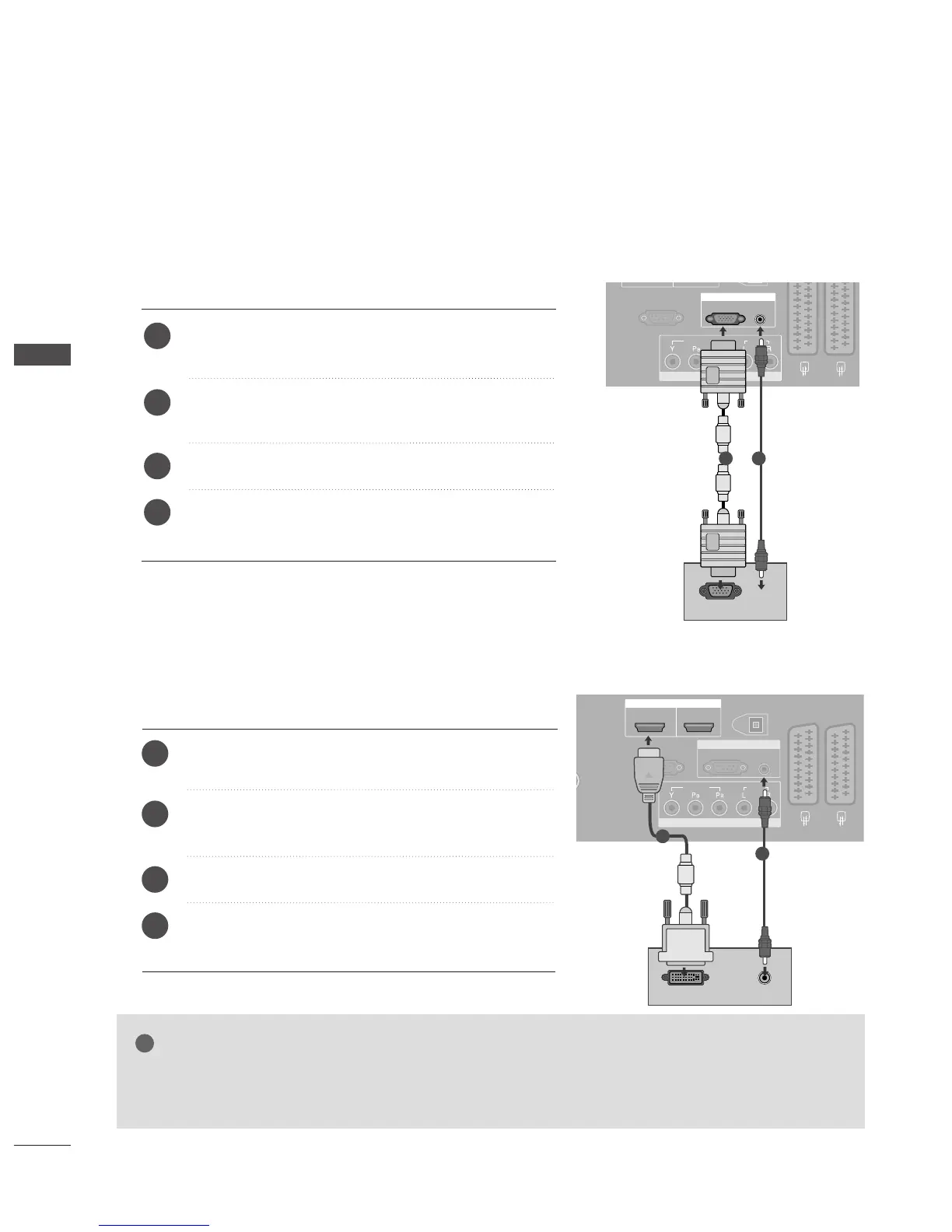
Connecting with a D-sub 15 pin cable
Connect the RGB output of the PC to the
RRGGBB
((
PP CC
))
jack on the TV.
Connect the PC audio output to the
AAUUDDIIOO IINN
((RRGGBB//DDVVII))
jack on the TV.
Turn on the PC and the TV.
Select
RGB input source using the
IINNPPUUTT
button on
the remote control.
2
3
4
1
1 2
Connecting with a HDMI to DVI cable
GG
If the PC has a DVI output and no HDMI output, a separated audio connection is necessary.
GG
If the PC does not support Auto DVI, you need to set the output resolution appropriately.
NOTE
1
2
Connect the DVI output of the PC to the
HHDDMMII//DDVVII
IINN
jack on the TV.
Connect the PC audio output to the
AAUUDDIIOO IINN
((RRGGBB//DDVVII))
jack on the TV.
Turn on the PC and the TV.
Select
HDMI1 input source using the
IINNPPUUTT
button
on the remote control.
2
3
4
1



 To Next Page