Location and function of controls
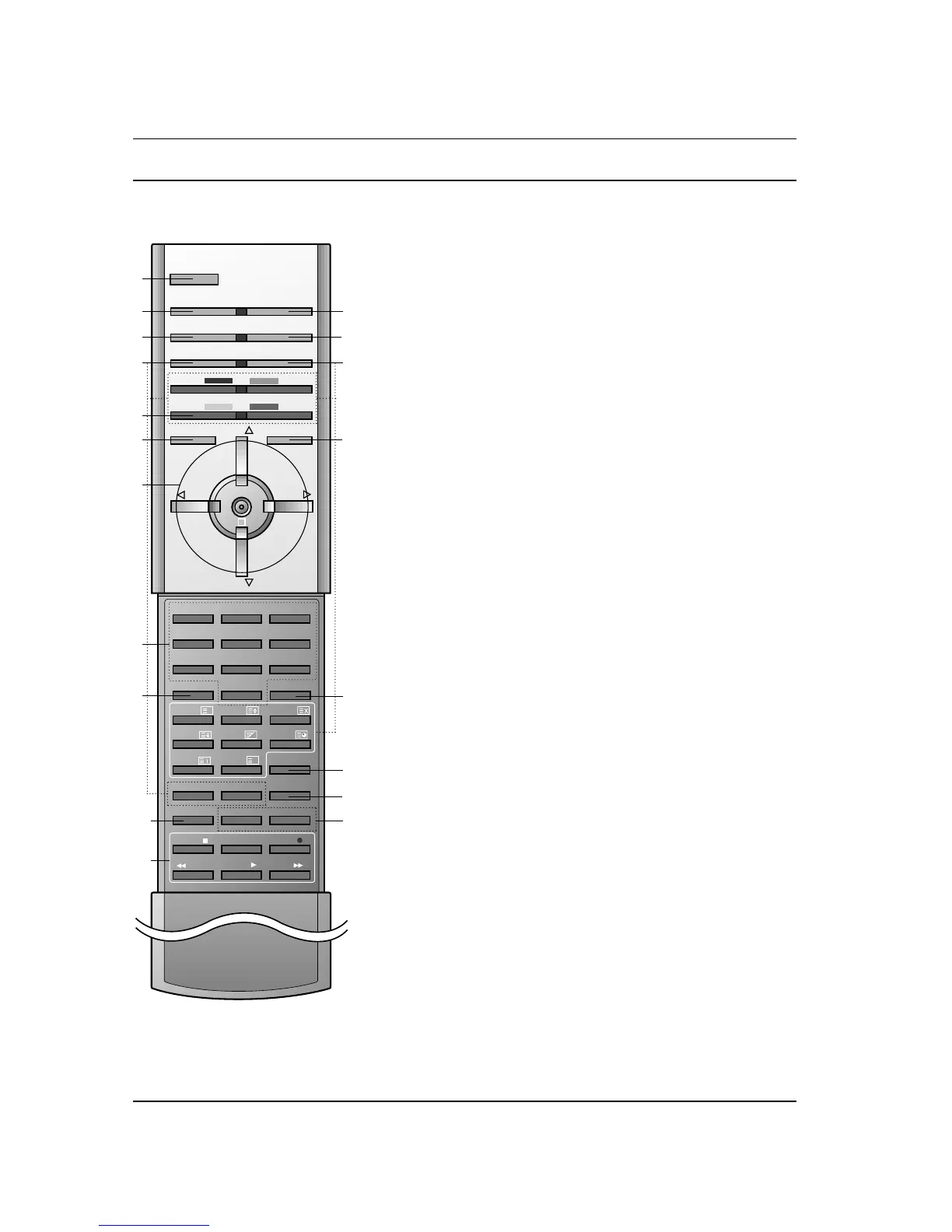
All the functions can be controlled with the remote control handset.
Some functions can also be adjusted with the buttons on the front
panel of the set.
Remote control handset
Before you use the remote control handset, please install the bat-
teries. See the next page.
1. POWER
switches the set on from standby or off to standby.
2. MULTIMEDIA
selects RGB or DVI modes.
3. ARC (Aspect Ratio Control)
changes the picture format.
4. PIP BUTTONS
PIP/DW
switches the sub picture on or off.
PR +/-
selects a programme for the sub picture.
SWAP
alternates between main and sub picture.
PIP INPUT
selects the input mode for the sub picture.
WIN.SIZE
adjusts the sub picture size.
WIN POSITION
moves the sub picture to
D
/
E
or F / G direction.
5. SWAP
returns to the previously viewed programme.
6. MENU
selects a menu.
7.
D
/
E
(Programme Up/Down)
selects a programme or a menu item.
switches the set on from standby.
F / G (Volume Up/Down)
adjusts the volume.
adjusts menu settings.
OK
accepts your selection or displays the current mode.
8. NUMBER BUTTONS
switches the set on from standby or directly select a number.
9. PSM (Picture Status Memory)
recalls your preferred picture setting.
10. SPLIT ZOOM
Enlarge the screen with regular ration.
11. VCR BUTTONS
control a LG video cassette recorder.
4



 To Next Page