Owner's Instruction
16 Deluxe wired remote controller
AUTO INDOOR REMO
ZONE 1 ZONE 2 ZONE 3 ZONE 4
ZONE 1 ZONE 2 ZONE 3 ZONE 4
2TH
REMO
AUTO
1
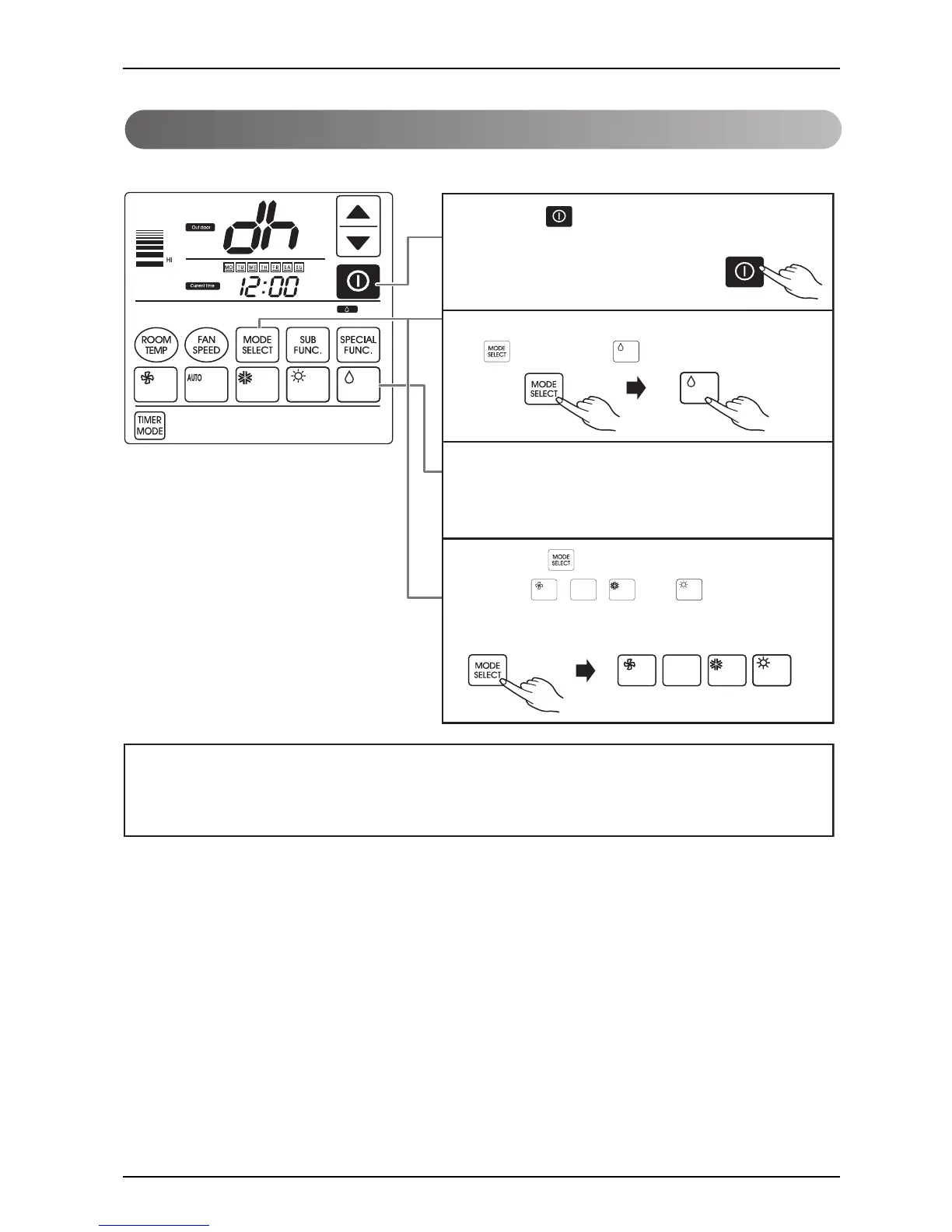
Press the button on the remote controller.
2
Select the dehumidification function by pressing the
button and the button.
3
When the dehumidification is being done, ”dh” will be
shown on the display panel
4
Press the button and choose one of the functions
among , , ,
and if you want
another operation mode during the operation.
Dehumidification operation: Dehumidification by lowering temperature slightly
If used during the rainy season or high humidity, you can have both of effective dehumidifying
and air conditioning effect.
❈ Temperature control is not available in the dehumidification operation.
Dehumidification Mode



 To Next Page