49
MYMEDIA
ViewingthePhotos
You can view photos stored on a connected device.
SupportedPhotoFiles
PHOTO (*.JPEG)
Baseline: 64-pixel (width) x 64-pixel (height) - 15360-pixel (width) x
8640-pixel (height)
Progressive: 64-pixel (width) x 64-pixel (height) - 1920-pixel (width) x
1440-pixel (height)
• Only JPEG files are supported.
• Non-supported files are displayed in the form of an icon.
• An error message is displayed for corrupted files or file formats that
cannot be played.
• Corrupted files may not be displayed properly.
• It may take some time to view high-resolution images in full screen.
BrowsingPhotoList
1 Connect a USB device.
2 Press the SETTINGS button.
3 Move to MYMEDIA.
4 Use the , or buttons to select PhotoList and press the OK
button.
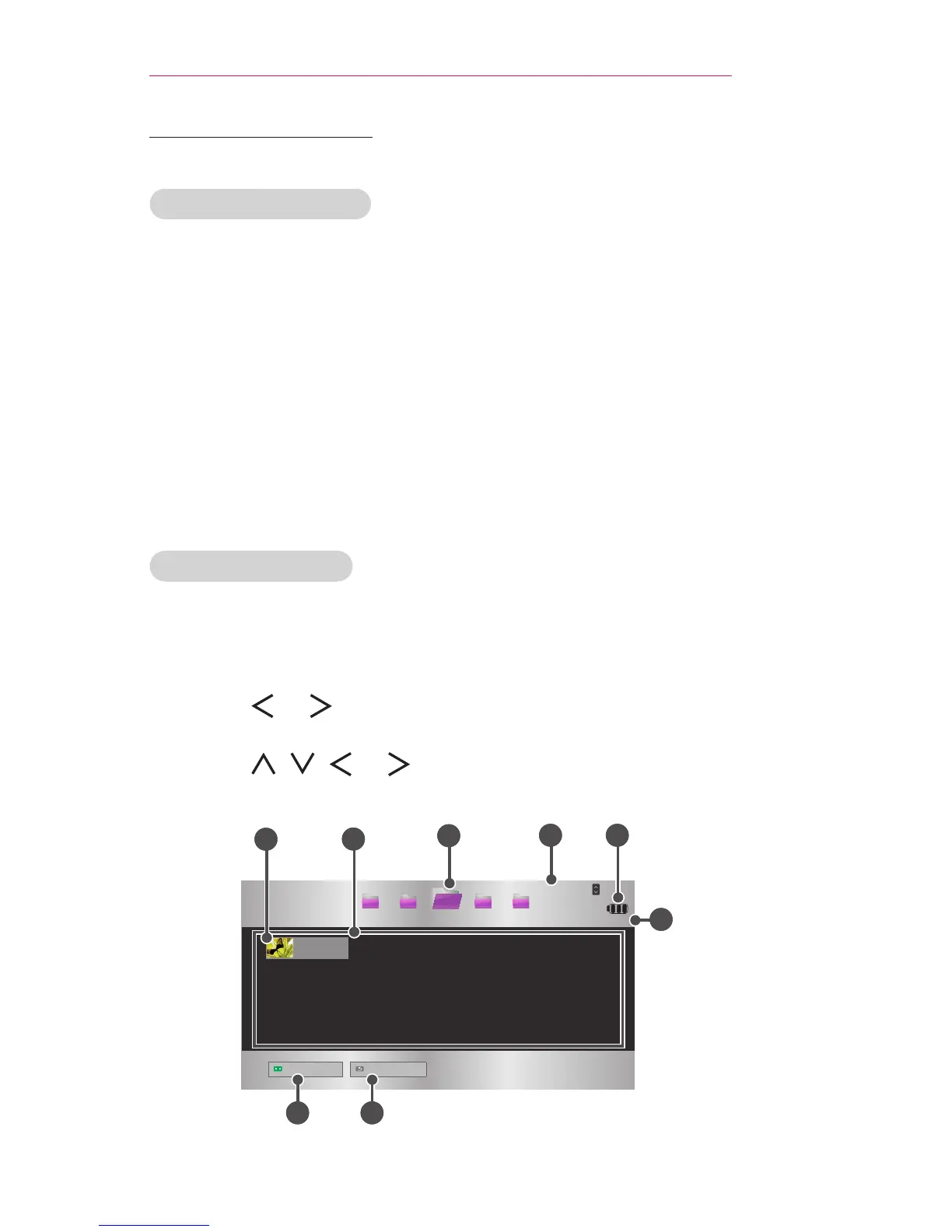
5 Use the , , , or button to select the le you want and press
the OK button.
USB STORAGE DEVICE
Page 1/1
Page 1/1
Drive1 Drive5Drive3 Drive4
Drive2
CH
Page Change
Photo List
Butterfly_...
06/09/2014
Go to root folder
Go to upper folder
1
2
4
7 8
3
6
5



 To Next Page