Connecting10
Connecting
2
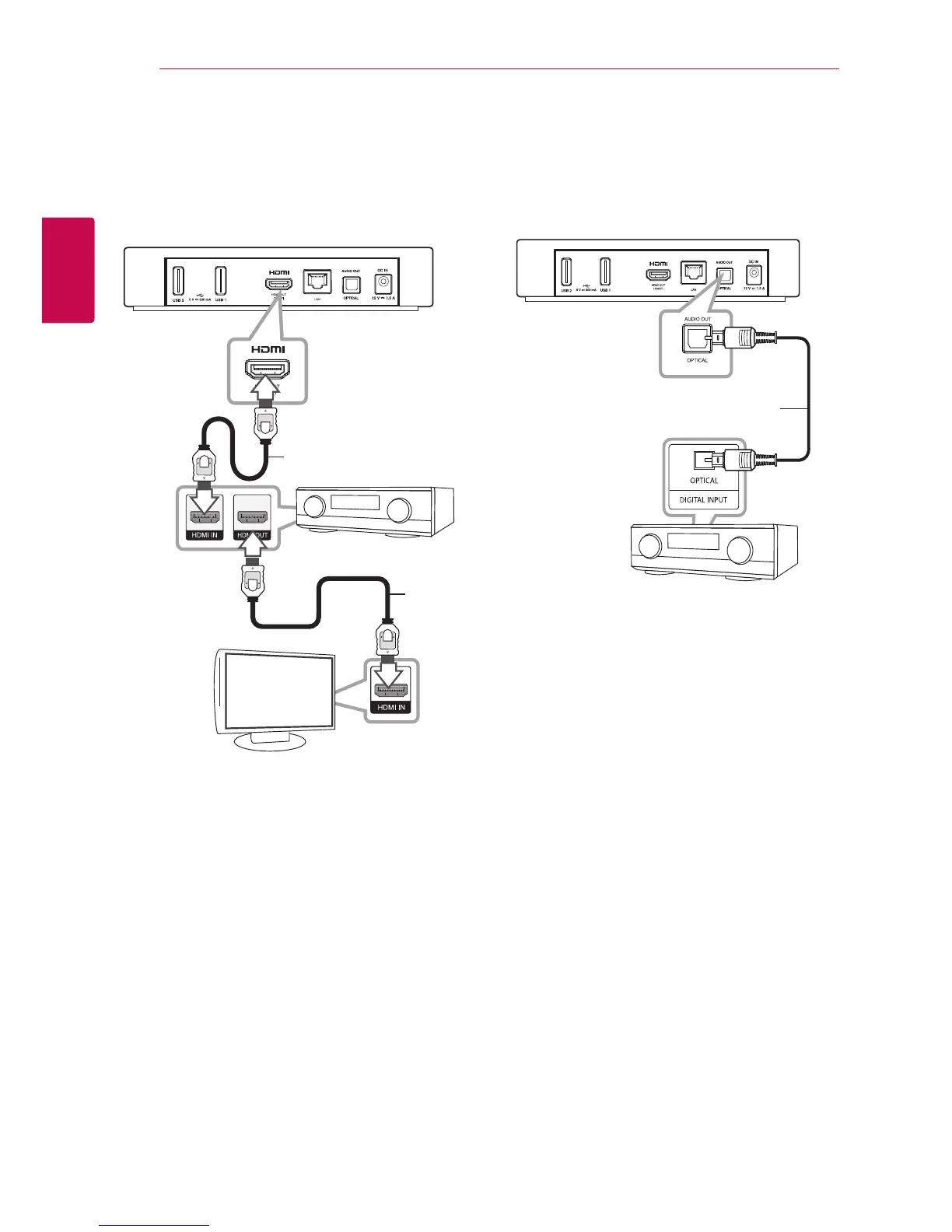
Connecting to an Amplifier via
HDMI Output
Connect the unit’s HDMI OUT jack to the
corresponding in jack on your amplier using a
HDMI cable.
HDMI cable
HDMI
cable
TV
Receiver/Amplier
Rear of the unit
Connect the amplier’s HDMI output jack to HDMI
input jack on your TV using a HDMI cable if your
amplier has HDMI output jack.
You will need to activate the unit’s digital output.
(See “[SOUND] Menu” on page 32)
Connecting to an Amplifier via
Digital Audio Output
Connect the unit’s OPTICAL AUDIO OUT jack to the
corresponding in jack (OPTICAL) on your amplier
using an optional digital audio cable.
Optical cable
Receiver/Amplier
Rear of the unit
You will need to activate the unit’s digital output.
(See “[SOUND] Menu” on page 32)


 To Next Page