Operating 17
Operating
4
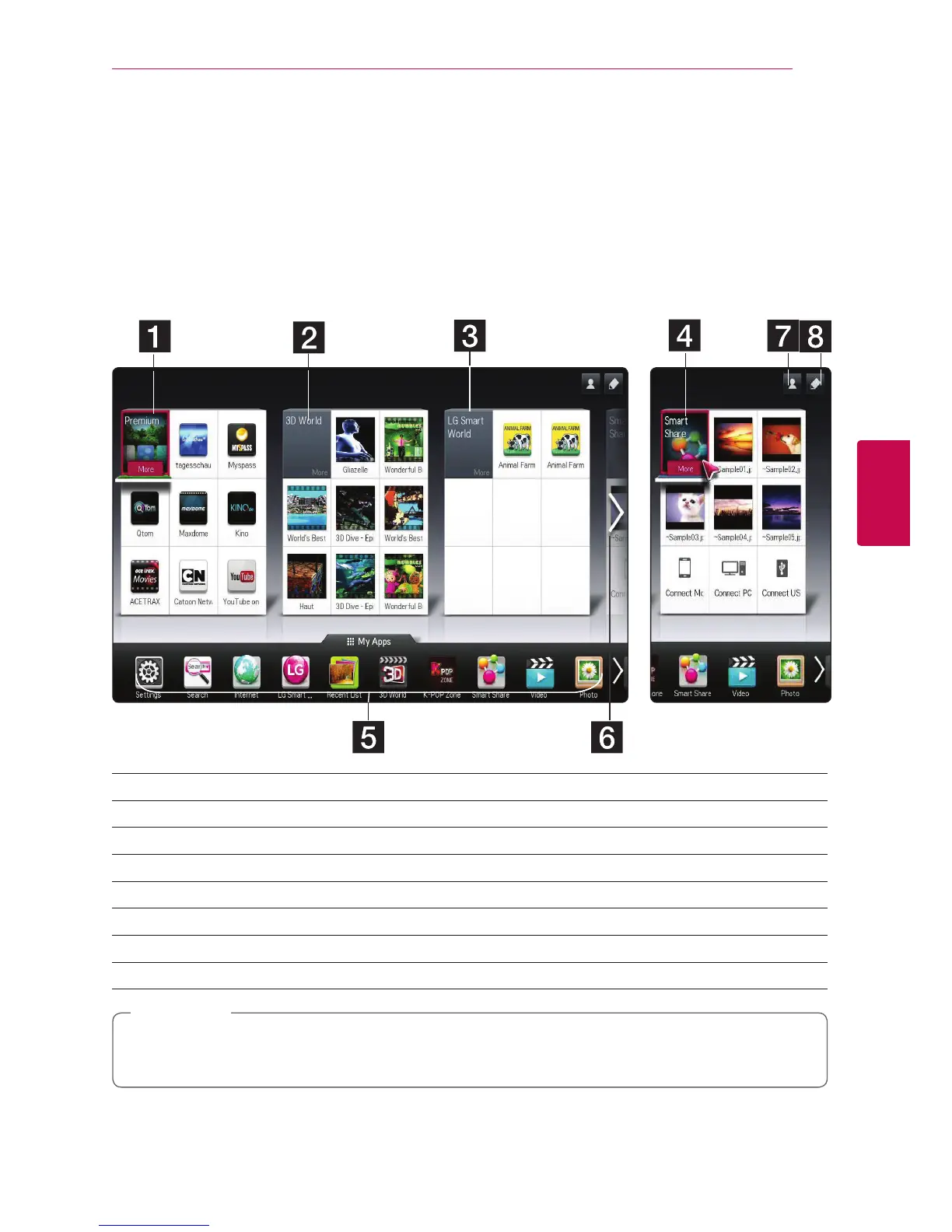
Smart function on the HOME menu
Using [HOME] menu
The home menu appears when you press HOME (
n
). For all functions in one screen, users have convenient
access to a wealth of content and applications via the easy- to-use menu arranged by themes. (Card, My
Apps)
a [Premium] - Displays various content services via internet with the premium feature.
b [3D World] - Displays the 3D image titles and content by various genre.
c [LG Smart World] - Displays LG Apps titles provided to the unit.
d [Smart Share] - Plays [Photo], [Music], and [ Video] les on all devices connected to the unit.
e [My Apps] - Shows all installed Apps. A short cut for user’s favorite Apps.
f Searching My Card - Select desired card using remote control.
g Sign In - Moves to login menu screen for the [Premium], [LG Smart world], and other features.
h Edit - Displays My cards to use and edit.
[Premium], [3D world], [LG smart world] cards and some content in the [My Apps] may not be
supported or dier depending on the country-specic services.
,
Note



 To Next Page