Connecting8
Connecting
2
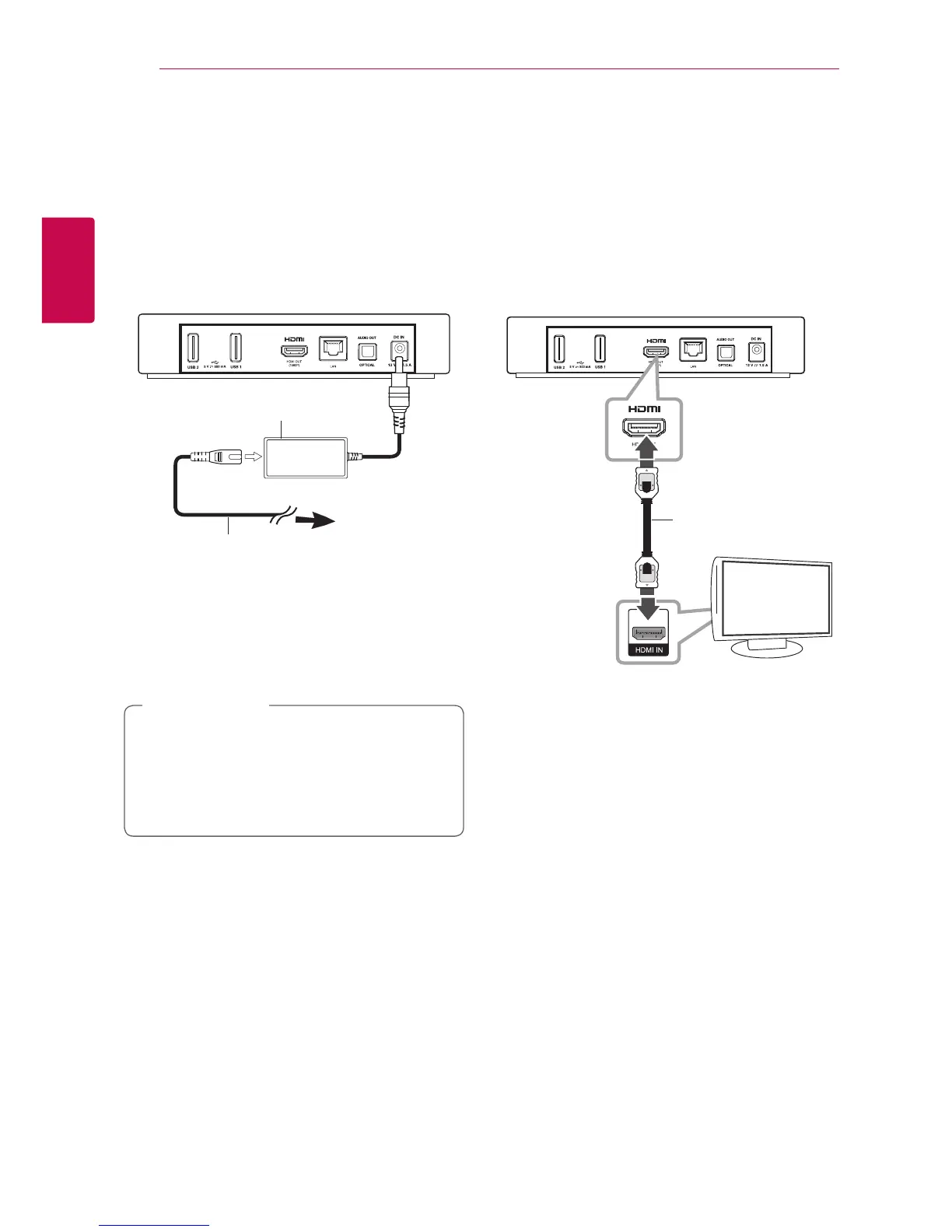
Connecting the AC
Adapter
Connect the unit to the power supply with the
supplied AC adapter.
Connect the power cord to the adapter, and then
plug the other end into an AC outlet.
Rear of the unit
Plug into a
power source
AC power cord
AC adapter
�
Contact an electrical parts distributor for
assistance in selecting a suitable AC plug adapter
or AC power cord set.
�
This AC adapter is manufactured by Asian Power
Devices Inc.
Only use the AC adapter supplied with this
device. Do not use a power supply from
another device or manufacturer. Using any
other power cable or power supply may cause
damage to the device and void your warranty.
>
Caution
HDMI Connecting to
Your TV
If you have a HDMI TV or monitor, you can connect
it to this unit using a HDMI cable (Type A, High
Speed HDMI™ Cable). Connect the HDMI jack on
the unit to the HDMI jack on a HDMI compatible TV
or monitor.
Rear of the unit
TV
HDMI cable
(not supplied)
Set the TV’s source to HDMI (refer to TV’s Owner’s
manual).



 To Next Page