EasyManua.ls Logo

LG TV - Page 12

LG TV
242 pages
Print Icon
To Next Page IconTo Next Page
To Previous Page IconTo Previous Page
Loading...
A-8
PREPARATION
PREPARATION
■ Image shown may differ from your TV.
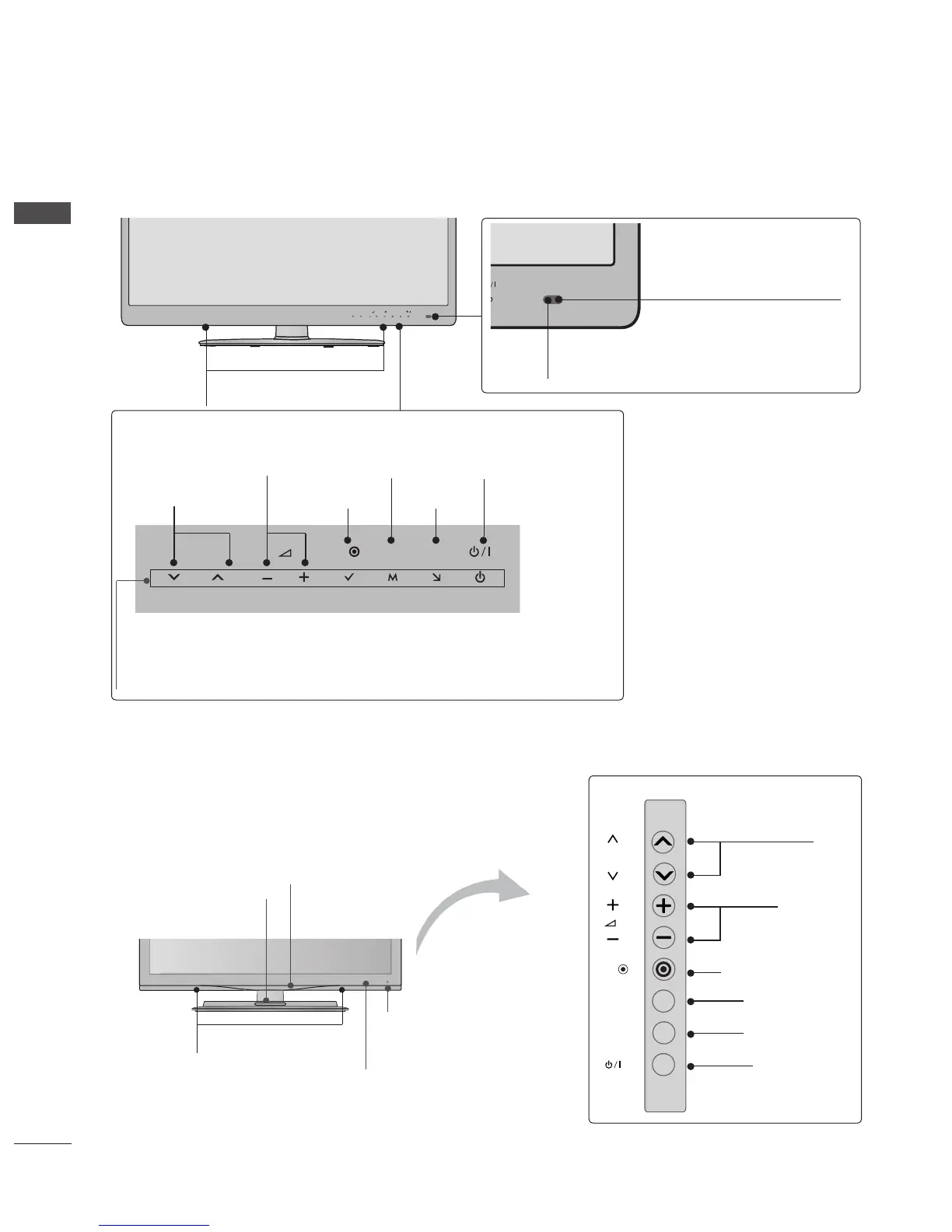
Only 42/47/55LE8***
INPUT
MENU
P
OK
SPEAKER
Remote Control Sensor
INPUT
MENU
P
OK
INPUT
MENU
P
OK
INPUT
OK
MENU
POWER
Touch Sensor
• You can use the desired button function by touching.
Power/Standby Indicator
(Can be adjusted using the Power Indicator in the OPTION
menu.)
PROGRAMME
VOLUME
Intelligent Sensor
Adjusts picture according to
the surrounding conditions.
P
OK
INPUT
MENU
Only 32/42/47/55LE4***
P
OK
INPUT
MENU
PROGRAMME
VOLUME
OK
MENU
INPUT
POWER
Remote Control Sensor
Intelligent Sensor
Adjusts picture according to
the surrounding conditions.
Woofer
(Only 32/42/47/55LE46**)
Power/Standby Indicator
(Can be adjusted using the Power
Indicator in the OPTION menu.)
SPEAKER

Table of Contents