2 Introduction
1.2 Start-Up Procedure
Before beginning start-up, make certain that unit was installed according to the instructions in the
Installation Manual. All exterior panels must be in place (closed) with the front electric panel open.
Locate the Start-Up form supplied with your unit documents. Complete the form during your start-up
and mail it to Liebert when start-up is completed. Contact your Liebert supplier if you have any ques-
tions or problems during your unit installation, start-up or operation.
1. Disconnect all power to the environmental control unit.
2. Tighten all electrical wiring connections that may have loosened during shipping (on electric
panel and at all major components, such as compressor, reheats, humidifier and motors).
3. Verify that the motor auto-transformer is tapped correctly per information provided in the
Installation Manual or unit labels.
4. Remove all line voltage fuses except the main fan fuses and the control voltage fuses in the
electric panel.
5. Turn on power and check line voltage on main unit disconnect switch. Line voltage must be
within 10% of nameplate voltage.
6. Turn ON main unit disconnect switch and check secondary voltage at transformer T1. Voltage at
T1 must be 24 VAC ±2.5 VAC (check at TB-1 and TB-8). T1 voltage must not exceed 28 VAC.
Change primary tap if necessary.
7. Push ON button. Blowers will start. Check for proper fan rotation.
8. If you do not want your unit to operate at factory default settings, set temperature and humidity
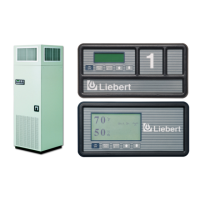
setpoints and sensitivity, alarms and other control functions. Refer to 2.0 - Operation with
Advanced Microprocessor Controls or 3.0 - Operation with Advanced Microprocessor
with Graphics Control.
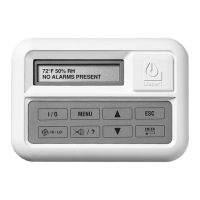
9. Stop unit by depressing On/Off button on the front display. Turn OFF main unit disconnect and
main breaker.
10. Replace all fuses, which you removed in Step 4.
11. Restore power to unit; turn ON the main unit disconnect switch.
12. Push ON button—putting the unit into operation.
13. Check the current draw on all line voltage components and match with serial tag.
14. Verify that the scroll compressor is rotating in the proper direction.
15. Check for unusual noises and vibration.
16. Check all refrigerant and fluid lines for leaks.
17. Test all functions of your unit for proper operation.
18. Close high voltage dead front cover and latch.
19. Close front accent panel and latch.
Return completed Start-Up form to:
Liebert Corporation
Warranty Registration
1050 Dearborn Drive
P.O. Box 29186
Columbus, OH 43229
!
WARNING
Potentially lethal voltages exist within this equipment during operation. Observe all cautions
and warnings on unit and in this manual. Failure to do so could result in serious injury or
death. Only qualified service and maintenance personnel should work with this equipment.
!
CAUTION
The scroll compressor must rotate in the proper direction. Rotation in the wrong direction will
result in poor performance and compressor damage.




 To Next Page