EasyManua.ls Logo

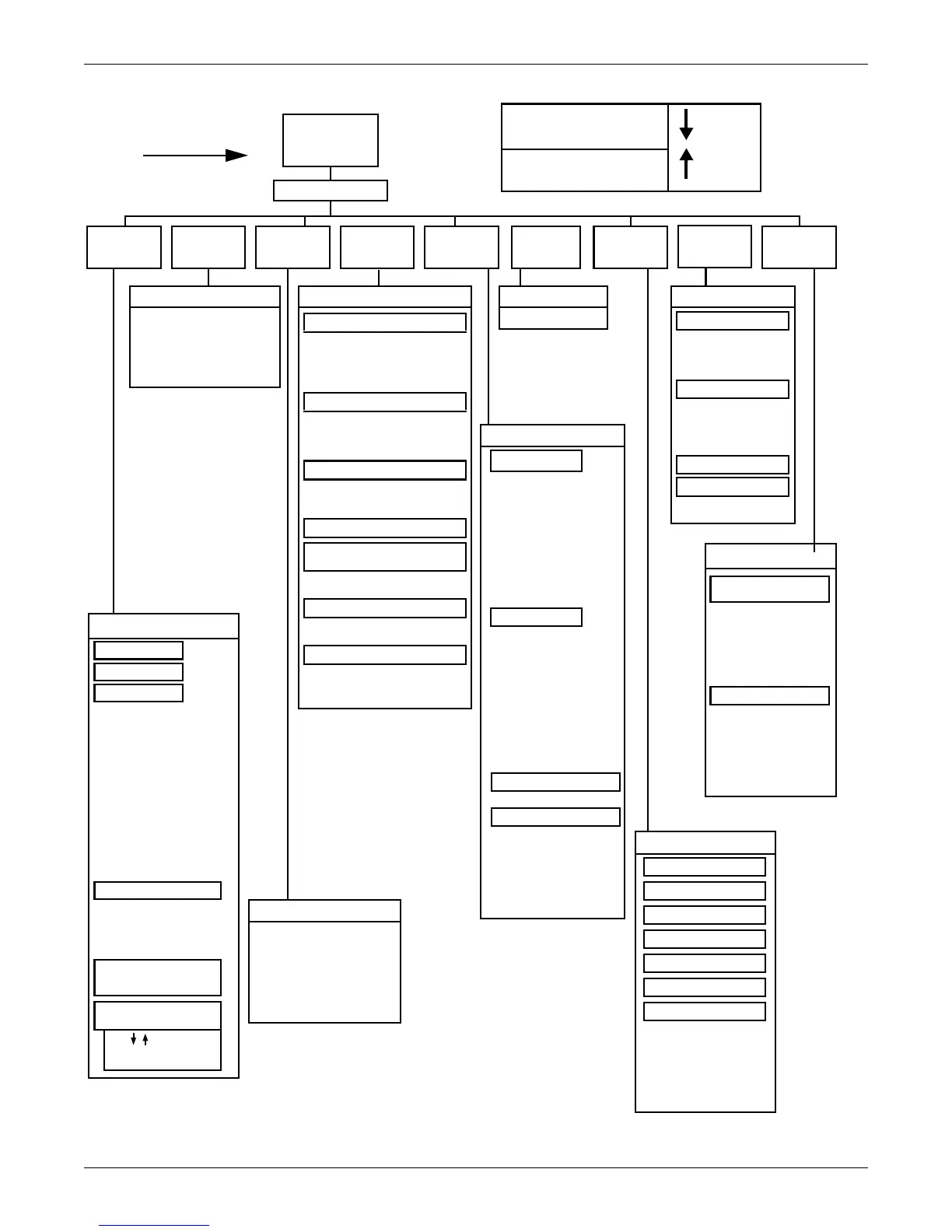
Liebert himod - Figure 4 Advanced Microprocessor with Graphics (G) Control Menu

Liebert himod
72 pages
Print Icon
To Next Page IconTo Next Page
To Previous Page IconTo Previous Page
Loading...
16 Operation with Advanced Microprocessor with Graphics Control
Figure 4 Advanced microprocessor with graphics (G) control menu
Setup System
Setup Operation
Cold Start Delay
Auto Restart Delay
CW/HW Coil Flush**
Display in Degrees (F/C)
Min Chilled Water Temp**
Select Options
Reheat
Humidify
Dehumidify
Stages of Reheat
Calibrate Sensors
Temperature Sensor
Humidity Sensor
Calibrated Reading
Calibrate Valve Actuator
Select Humidity
Sensing Mode
Relative
Absolute
Set Status Display
Sensor Reading
Setpoints
Change Passwords
Setpoint Password
Setup Password
Change Passwords
Analog Input 1
Analog Input 2
Analog Input 3
Analog Input 4
Analog Input 1 (2,3,4)
Slope
Units
Text
Intercept
(How-to Text)
Normal Display
72°F Unit On
50%RH
Dehumidifying
Cooling
***Main Menu***
View/Set
Alarms
Operating
Status
View/Set
Control
Setpoints
Setup
System
Analog/
Digital Inputs
Date and
Time
Plot GraphsRun
Diagnostics
View Run
Hours Log
Compressor Cooling %
Heating %
GLYCOOL %
Chilled Water Valve %
Dehumidification %
Humidification %
Air Sail Switch
Custom Alarm 1
Custom Alarm 2
Custom Alarm 3
Custom Alarm 4
Humidifier Problem
Filter Clog Switch
Main Fan Overload
Shutdown Device
Low Pressure Switch
Compressor Overload
High Head Pressure
Main Fan
Compressor
Liquid Line SV
HGBP/CUV
CW/CGV
Dehumidification***
R5 Relay
Reheat 1
Reheat 2
RH3 Dehum Damper
Humidifier
HMV
Common Alarm
Microcontroller
Dipswitch 1
Dipswitch 2
Dipswitch 3
Dipswitch 4
Dipswitch 5
Dipswitch 6
Dipswitch 7
High Temperature
Low Temperature
High Humidity
Low Suction Pressure
Short Cycle
Compressor Overload
Main Fan Overload
Loss of Power
Humidifier Problem
High Head Pressure
Change Filters
Loss of Air Flow
Custom Alarm 1
Custom Alarm 2
Custom Alarm 3
Custom Alarm 4
Setup Custom Alarm Text
Change Custom Text 1
Change Custom Text 2
Change Custom Text 3
Change Custom Text 4
Use UP/DOWN to move
the cursor. Hit ENTER
to select the menu item.
Date and Time
Set Clock
Operating Status
Run Diagnostics
View/Set Alarms
Set Analog Inputs
Temperature Setpoint
Sensitivity Setpoint
Humidity Setpoint
Sensitivity
High Temperature Alarm
Low Temperature Alarm
High Humidity Alarm
Low Humidity Alarm
View/Set Setpoints
Analog/ Digital Inputs
Show Inputs
Test Control Board
** Optional
*** Himod units only
Any key
except
ON/OFF
ESC key
ESC key moves backward
through menus toward the
Main Menu
Active Alarms
Alarm History
Setup Alarms
Setup Custom Alarms
View Water
Detect Floor Plan
Setup Water
Detect Floor Plan
Use / to locate file
Use ENTER to
define file
Read Analog Inputs
Test Outputs
Read Digital Inputs
Setup Digital Inputs
Modify Temp Scales
Modify Humidity Scales
Modify Analog Sensor
# 1 Scale
# 2 Scale
# 3 Scale
# 4 Scale
Plot Graphs
Analog Sensor #2 Plot
Temperature Plot
Humidity Plot
Analog Sensor #1 Plot
Analog Sensor #3 Plot
Analog Sensor #4 Plot
Modify Plot Scales
Chilled Water**
GLYCOOL**
Compressor
Condenser
Reheat 1,2
Humidifier
Main Fan
Compressor
GLYCOOL**
Chilled Water Valve**
Main Fan
Humidifier
Reheat 1,2
Heat Rejection
View Total Run Hours
View Run Hours Log
View 24 Hour Run
Time History
Show DIP Switches

Table of Contents

Other manuals for Liebert himod

Related product manuals