Operation with Advanced Microprocessor Controls 9
Setup Alarms
Selecting SETUP ALARMS will step to the following menu:
•SET TIME DELAYS
• ENABLE ALARMS
• ENABLE COMMON ALARM
• SET CUSTOM ALARMS
Each individual alarm can be programmed with a time delay from 0 to 255 seconds. Each individual
alarm can be ENABLED or DISABLED and each individual alarm can be programmed to energize or
not to energize the Common Alarm Relay.
Set Time Delays. By programming a time delay for an alarm, the system will delay the specified
amount of time before recognizing the alarm. The alarm condition must be present for the amount of
time programmed for that alarm before it will be annunciated. If the alarm condition goes away
before the time delay has timed out, the alarm will not be recognized and the time delay timer will be
reset. For software alarms such as Loss of Power, Short Cycle, and Low Suction Pressure, a time
delay will only delay the annunciation of that alarm. The condition of the alarm is not applicable
because the condition has already occurred. For these alarms the time delay should be left at the fac-
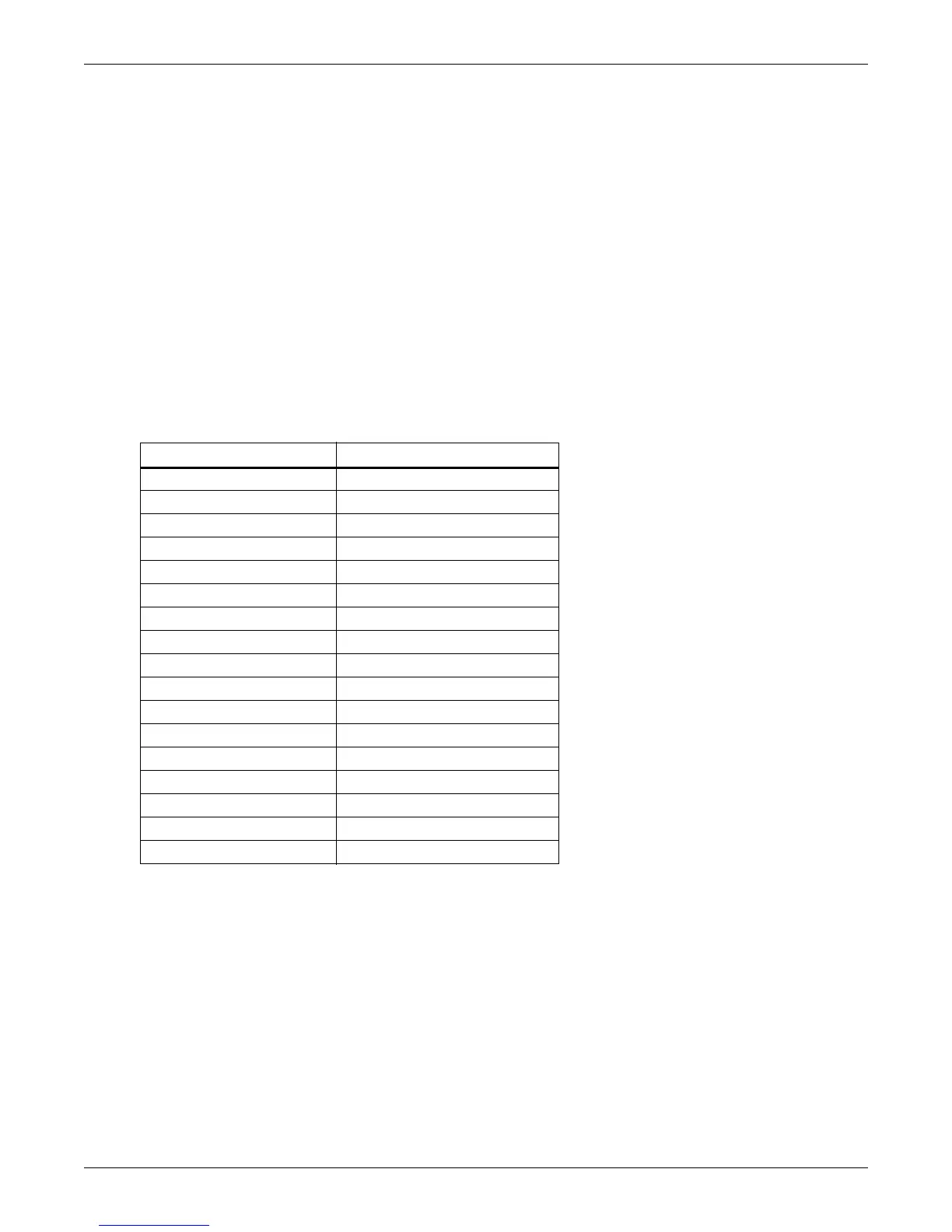
tory default of 0. Table 5 below shows the default time delays for each alarm.
Enable Alarms. Each individual alarm can be selected to be ENABLED (annunciated audibly, visu-
ally, and communicated to a Site Products System) or DISABLED (ignored).
Enable Common Alarm. Each individual alarm can be selected to energize or to not energize the com-
mon alarm relay. If the energize common alarm function is set to YES, the relay is energized immedi-
ately as the alarm is annunciated and de-energized when the alarm condition goes away (only after
the alarm has been recognized). If the function is set to NO, the alarm has no effect on the common
alarm relay regardless of whether the alarm is ENABLED or DISABLED.
Table 5 Alarm default time delays
Alarm Default Time Delay (seconds)
Humidifier Problem 2
High Head Pressure 0
Change Filter 2
Loss of Air flow 3
Custom Alarm #1 0
Custom Alarm #2 0
Custom Alarm #3 0
Custom Alarm #4 6
High Temperature 30
Low Temperature 30
High Humidity 30
Low Humidity 30
Low Suction Pressure 0
Short Cycle 0
Compressor Overload 2
Main Fan Overload 5
Loss of Power 0




 To Next Page