19
Battery Replacement Procedure
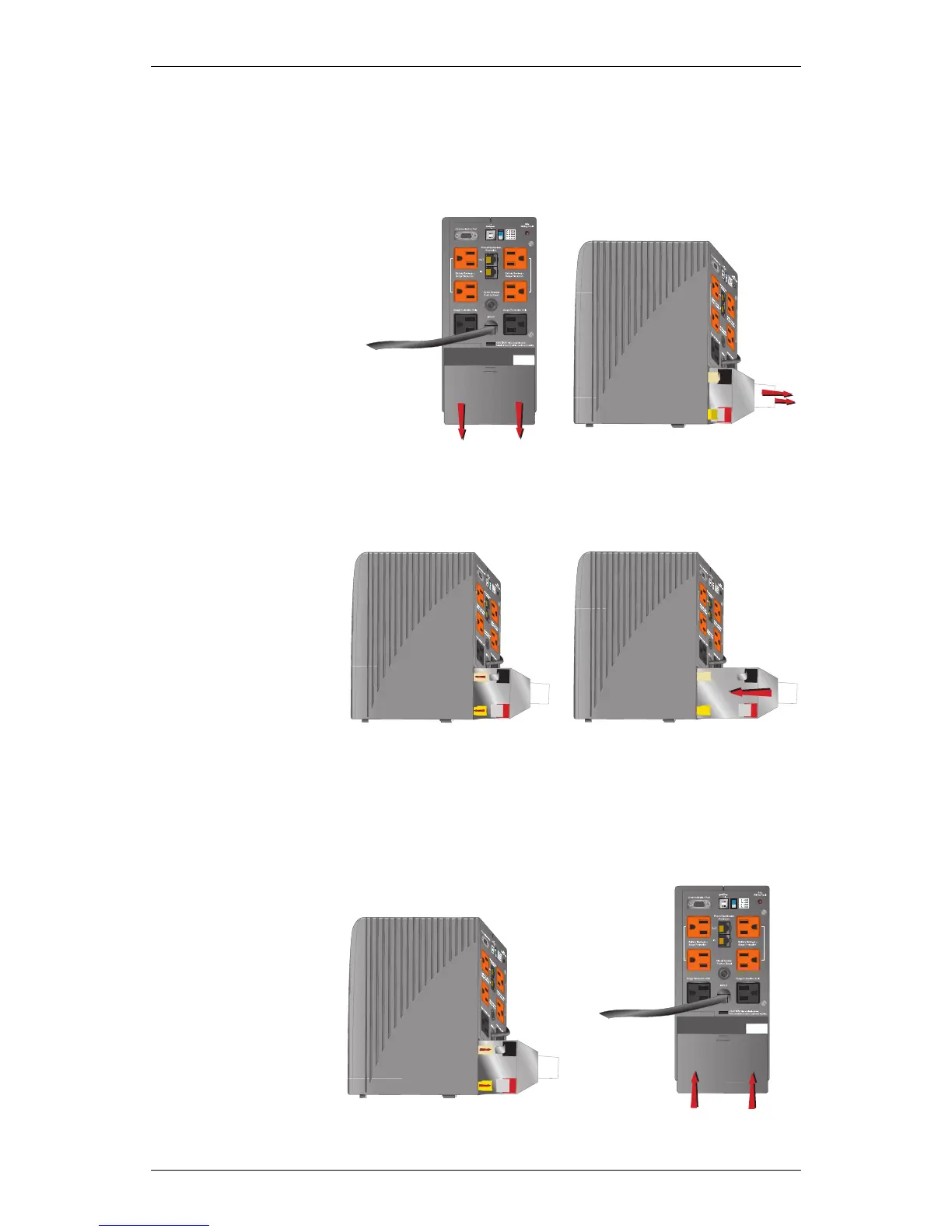
Replacement requires removing the battery cover plate on the back or
bottom of the UPS. No tools are needed.
To replace the batteries:
1. Remove the bat-
tery cover plate
on the back/bot-
tom of the UPS
(Figure 1).
2. Pull the white
tabs towards you
to remove the
battery from the
UPS (Figure 2).
Figure 1 Figure 2
3. Disconnect the
insulated con-
nectors from the
battery termi-
nals (Figure 3).
4. Insert a new
battery pack,
and push the
connectors onto
the battery ter-
minals (black to
black & red to
red) (Figure 4).
Figure 3 Figure 4
NOTE: There may be a small spark at the battery terminals
when reconnecting the connectors. This is normal and will
not harm you or the UPS.
5. Push the battery
pack into the
UPS (Figure 5).
6. Reattach the
battery cover
plate
(Figure 6).
Figure 5 Figure 6






 To Next Page