9
INSTALLATION
This UPS is designed for data processing equipment. Maximum load
must not exceed that shown on the UPS rating label. Do not connect
equipment that could overload the UPS or draw half-wave current
from the UPS, for example: electric drills, vacuum cleaners, laser
printers or hair dryers. Your total load earth leakage current must not
exceed 3.5 mA. Most data processing equipment meets this require-
ment if you use no more than two pieces of equipment. If uncertain
about your load, consult your local dealer, Liebert representative, or
Liebert Worldwide Support Group.
1. Visually inspect the UPS for freight damage. Report damage to the
carrier and your local dealer, Liebert representative or the Liebert
Worldwide Support Group.
2. Decide where to place the PowerSure PSA. Find a location that is
near an easily accessible utility outlet. Install the UPS indoors in a
controlled environment, where it cannot be accidentally turned off.
Place it in an area of unrestricted airflow around the unit, away
from water, flammable liquids, gases, corrosives, and conductive
contaminants. Maintain a minimum clearance of 4 inches (100mm)
on each side of the UPS. Maintain an ambient temperature range of
32°F to 104°F (0°C to 40°C).
3. Plug the PowerSure PSA’s attached 6-ft. (1.8m) power cord into an
AC outlet. Check that the Site Wiring Fault Indicator on the rear is
not illuminated. If it is lit, refer to the Troubleshooting section.
NOTE
UPS operation in temperatures above 77°F (25°C) reduces
battery life.
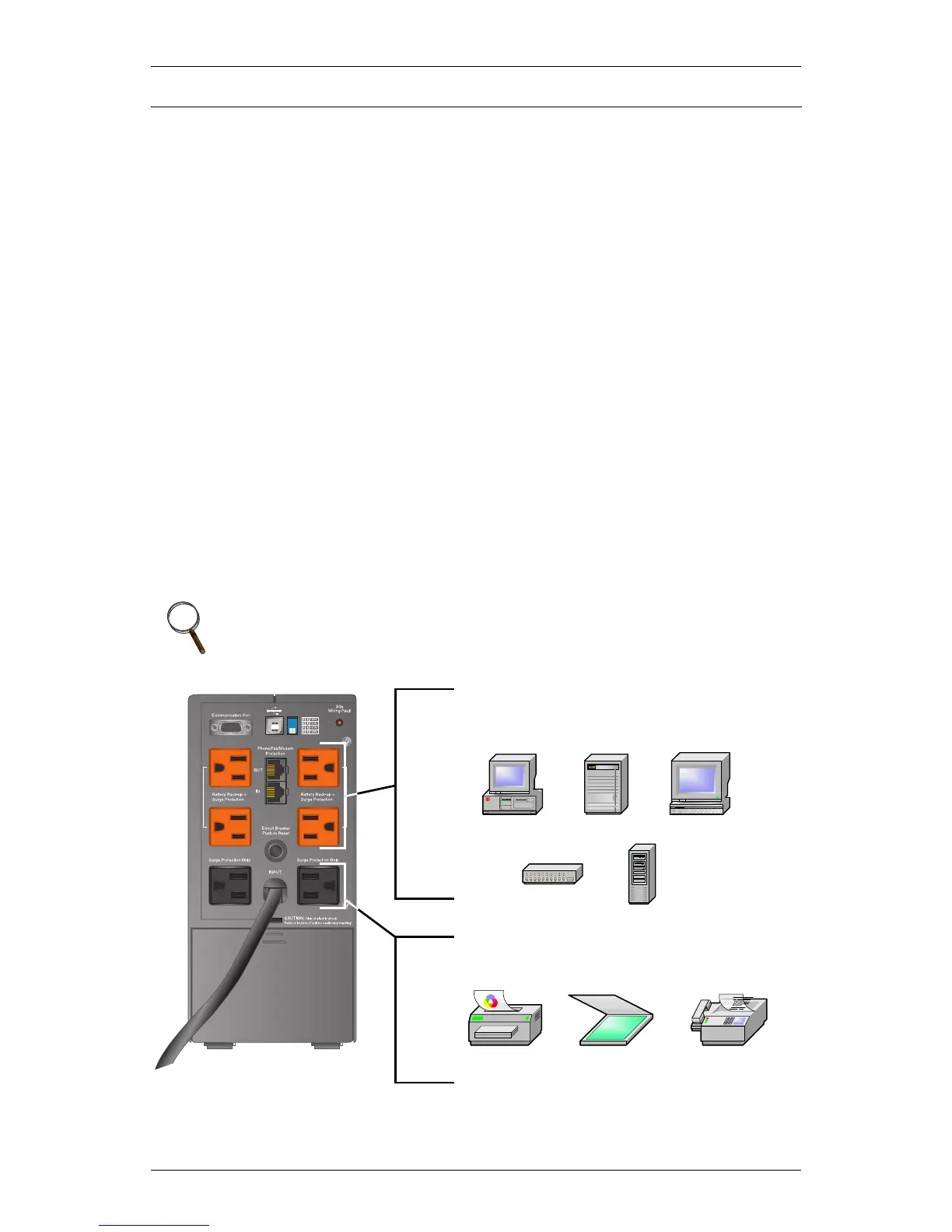
Plug this type of equipment into black
receptacles ONLY
Plug computers, monitors & network hubs
into orange receptacles
Inkjet
printer
Scanner Fax
machine






 To Next Page