20
TROUBLESHOOTING
The information below indicates various symptoms a user may
encounter in the event the PowerSure PSA experiences a problem.
Use this information to determine whether external factors caused the
problem. See Troubleshooting Chart for suggested remedy.
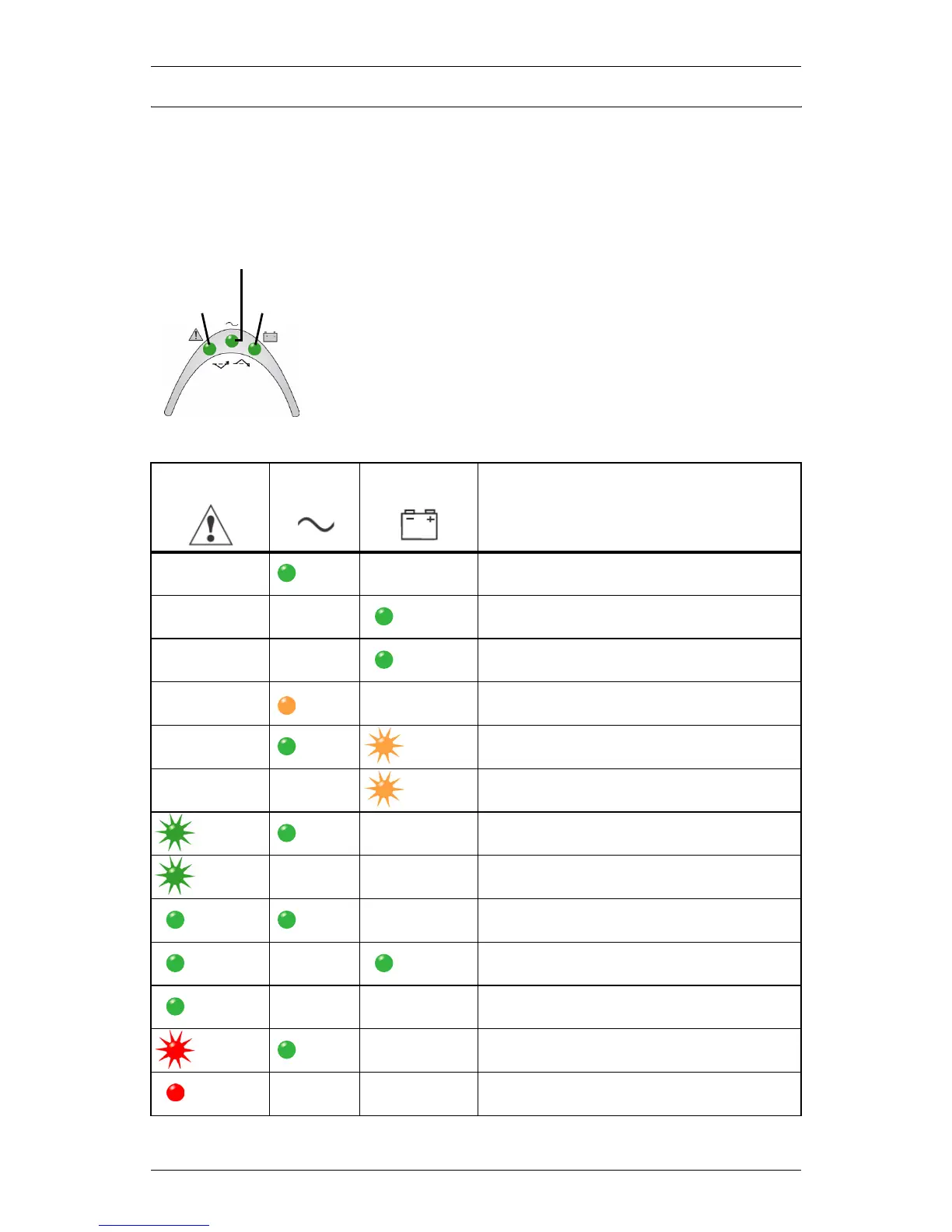
Guide to Status Indicators
1. The Fault indicator illuminates, indicating the
UPS detected a problem.
2. An alarm sounds, alerting that the UPS
requires attention. The alarm can be silenced
except for low battery, overload warning and
over-temperature warning conditions.
3. Utility and/or Battery indicators may be illumi-
nated as a diagnostic aid to the operator, as
shown below:
Fault
Indicator
Utility
Indicator
Battery
Indicator
Diagnosis/
Audible Alarm
—
Green
ON
—
Normal operation with utility power
present; no beep.
——
Green
ON
UPS is operating on battery; beep every
10 seconds.
——
Green
ON
Battery test has been initiated; no beep.
—
Amber
ON
—
UPS is operating in Buck/Boost mode;
no beep.
—
Green
ON
Amber
Flashing
Battery needs to be replaced; long beep
every minute.
——
Amber
Flashing
Low battery warning; beep every half-
second.
Green
Flashing
Green
ON
—
Overload warning, load is >100%; beep
every half-second.
Green
Flashing
——
Overload shutdown, load exceeds UPS
capacity (110%); continuous beep.
Green
ON
Green
ON
—
Over temperature (overtemp) warning;
beep every 5 seconds (Normal mode).
Green
ON
—
Green
ON
Over temperature (overtemp) warning;
beep every 5 seconds (Battery mode).
Green
ON
——
Over temperature (overtemp) shutdown;
long beep every 5 seconds.
Red
Flashing
Green
ON
—
UPS is on, fault warning; continuous
beep.
Red
ON
——
UPS has failed & shut down; continuous
beep.
Fault
Indicator
Utility
Indicator
Battery
Indicator






 To Next Page