Installation
9
3.4 Orient Display for Installation
The Liebert PSI XR features a rotating display that may be oriented for either tower or rack installa-
tions.
To set the display for your installation, pull out on the display and rotate it until it is oriented cor-
rectly, then press it into the UPS until it is seated.
Figure 8 Orienting the UPS display
3.5 Connect Input Power and Load
The 1000VA and 1500VA models do not include an input power cable; the 2200VA and 3000VA UPSs
include an input power cable.
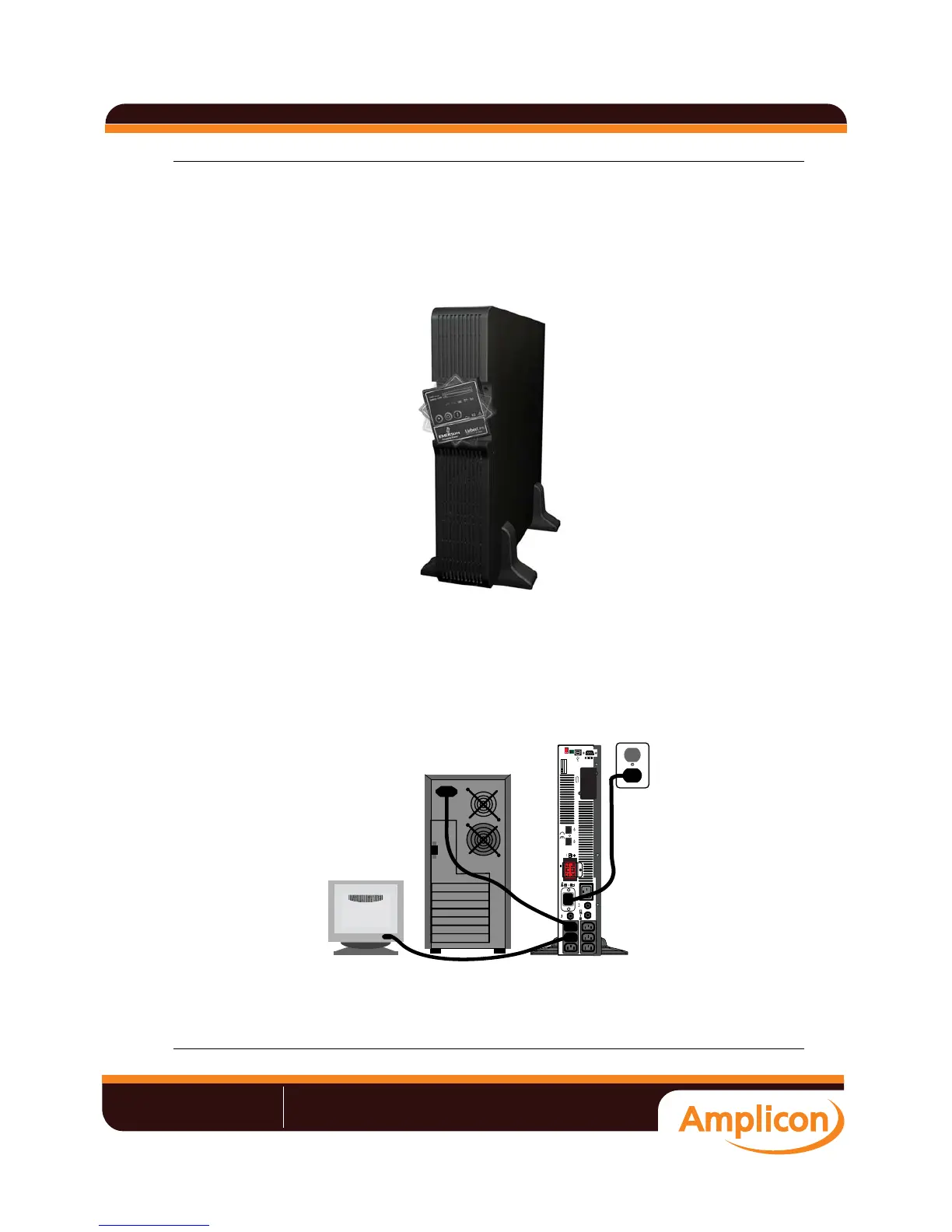
Connect input power to the UPS, then plug the equipment into the sockets on the rear of the UPS.
These UPS sockets provide battery backup and surge protection to the equipment when mains power
fails, spikes or sags (see Figure 9).
Figure 9 Connect mains power and load
DC 48V
EPO
OUTPUT
INPUT
VOLTAGE=220V
VOLTAGE=230V
VOLTAGE=240V
2 1FUNCTIO N
«V°V°ÕÊÊÊÊÊÊ/Ê>`ÊÃÌÀÕiÌ>ÌÊvÀÊ`ÕÃÌÀÞ
->iÃ\ʳ{{Êä®Ê£ÓÇÎÊxÇäÊÓÓäÊÊÊ7iLÃÌi\ÊÜÜÜ°>«V°V°ÕÊÊÊ>\ÊÃ>iÃJ>«V°V°ÕÊÊ
Liebert UPS user manual







 To Next Page