Battery Maintenance
19
7.0 BATTERY MAINTENANCE
7.1 Battery Charging, Storage
The batteries are valve-regulated, nonspillable, lead acid and must be kept charged to retain their
design life. The Liebert PSI XR continuously charges the batteries when connected to the mains sup-
ply, even while the UPS is switched Off.
If the Liebert PSI XR will be stored for an extended period, Liebert recommends connecting the UPS
to input power for at least 8 hours every four to six months to keep the batteries charged.
7.2 Internal Battery Replacement Procedure
NOTICE
This UPS is equipped with internal batteries that the user can replace without shutting down
the UPS or connected loads (hot swappable). Caution must be exercised when replacing the
batteries because the load is unprotected from power fluctuations and power failures.
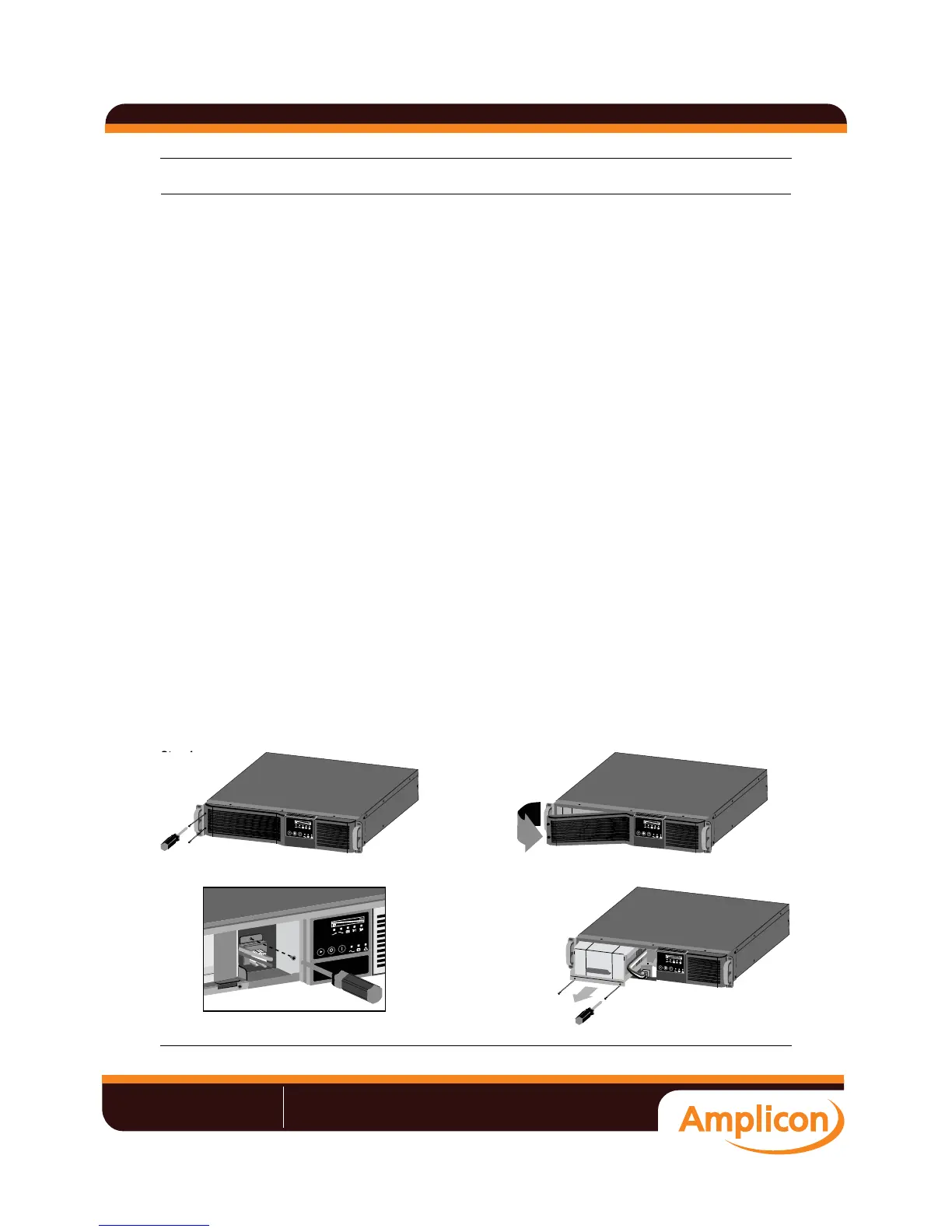
To replace the batteries:
1. Remove the two screws on the left side of the front bezel.
2. Pull the front bezel off the UPS.
3. Remove the two screws on the battery bracket.
4. Remove the screw on the battery connectors holder.
5. Disconnect the two slotted red/gray and black battery connectors.
6. Grasp the battery pack assembly by the handle and pull it out of the front of the UPS.
7. Unpack the new battery assembly, taking care not to destroy the packing.
8. Compare the new and old battery assemblies to make sure they are the same. If so, proceed with
replacement. If they are different, STOP and contact your local dealer, Emerson representative or
Liebert Applications.
9. Slide the new battery pack into the UPS.
10. Reattach the battery bracket with the two screws.
11. Reconnect the slotted red/gray and black battery connectors.
12. Reinsert the screw on the battery connectors holder.
13. Reattach the front bezel.
Figure 17 Battery replacement
L
o
a
d
L
e
v
e
l
B
a
tt
e
ry
L
e
v
e
l
L
o
a
d
L
e
v
e
l
B
a
tt
e
ry
L
e
v
e
l
Step 1 Step 2
Step 4 Step 6
L
o
a
d
L
ev
e
l
Ba
t
t
e
r
y
L
ev
e
l
L
o
a
d
L
e
v
e
l
B
a
t
t
e
r
y
L
e
v
e
l
L
o
a
d
L
e
v
e
l
B
a
tt
e
ry
L
e
v
e
l
Step 1
«V°V°ÕÊÊÊÊÊÊ/Ê>`ÊÃÌÀÕiÌ>ÌÊvÀÊ`ÕÃÌÀÞ
->iÃ\ʳ{{Êä®Ê£ÓÇÎÊxÇäÊÓÓäÊÊÊ7iLÃÌi\ÊÜÜÜ°>«V°V°ÕÊÊÊ>\ÊÃ>iÃJ>«V°V°ÕÊÊ
Liebert UPS user manual







 To Next Page