www.lifebreath.com
Page 6
TIMERS AND REPEATERS
Wireless 20/40/60 Minute Timer (99-DET02)
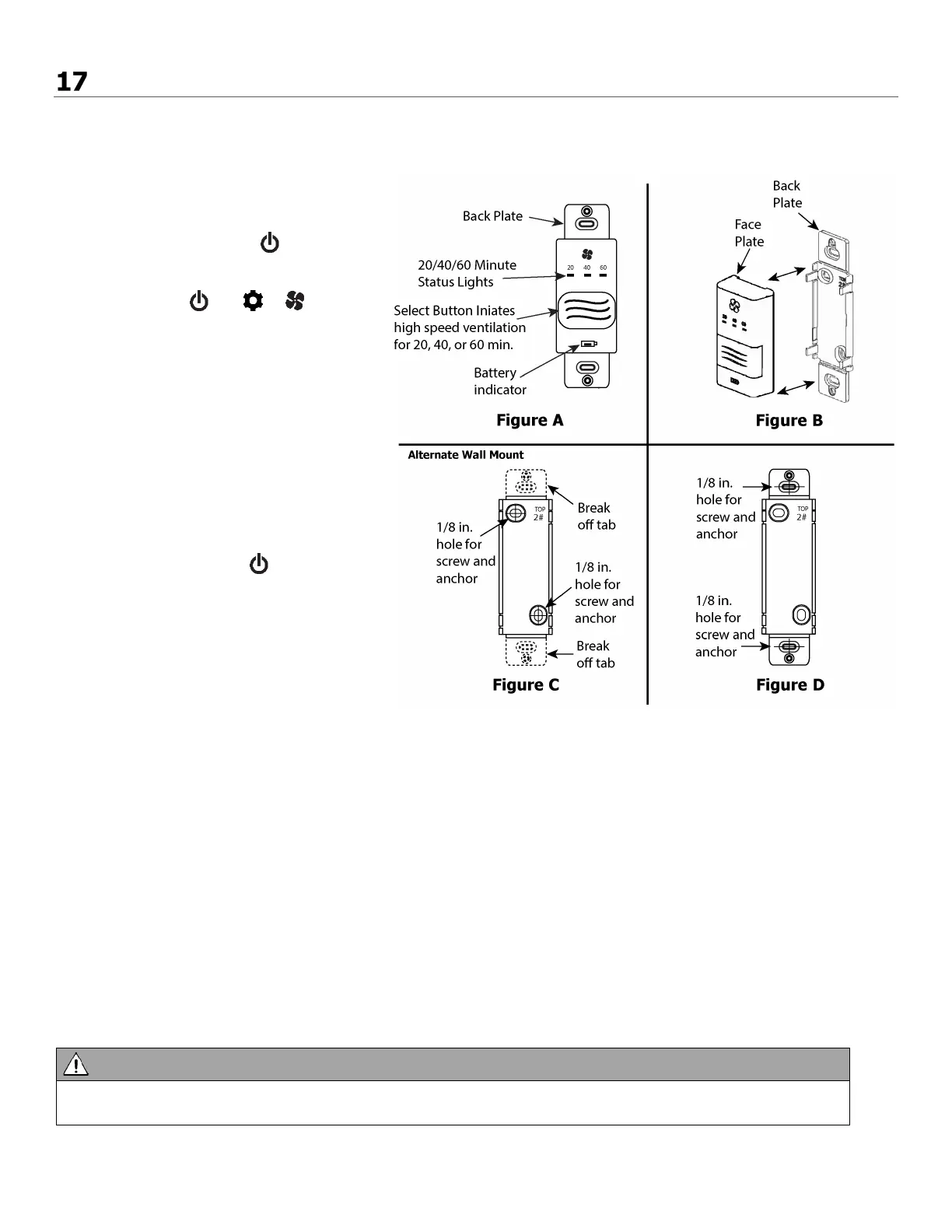
The timers may be installed onto a flush mounted electrical switch box or it may be surfaced mounted onto a wall.
Pairing
:
1. Remove the battery from the back of the
timer, if installed.
2. Press the ON/OFF Button on the main
control to turn it on.
3. BC02, BC03, or BC04: Press the left and
right buttons ( and or )
simultaneously on the main control. The
bottom row LEDs will begin flashing. This
indicates the main control is now in pairing
mode.
4. Keep the timer within 16 in. of the main
control when pairing.
5. Install the battery into the remote timer.
The four lights will immediately flash five
times. The red battery light will remain on
for 12 seconds, then the 40 minute status
light will flash. The 20, 40, and 60 minute
status lights will flash for up to 30 seconds
and then stop.
6. Press the Power Button on the main
control to exit pairing mode.
7. Press the Select Button on the timer to
test that pairing was successful (figure A).
• If the ERV initiates HIGH fan speed
ventilation, pairing was successful.
• If the ERV does not initiate HIGH fan
speed ventilation, pairing was not
successful. Un-pair the timer and return to step 1 of the pairing procedure and restart the pairing process.
8. Pair additional timers as necessary by repeating steps 1 through 8.
Un-pairing:
1. Remove the battery from the back of the timer.
2. Press and hold the Select Button on the front of the timer (figure A).
3. While holding the Select Button, reinstall the battery in the timer. Continue holding the Select Button until the 20, 40,
and 60 minute status light begins flashing (this can take up to 30 seconds). The timer will now be unpaired with the
main control (figure A).
Installation:
1. Separate the face plate from the back plate by firmly pulling apart (figure B).
2. For mounting the main control without a Decora plate, break off top and bottom tabs (figure C).
3. Place the back plate of the main control in the desired location on the wall and pencil mark the top and bottom screw
holes. Drill two 1/8" holes (figure C or D).
4. Attach the back plate to the wall using the two supplied screws and anchors.
5. Attach the face plate to the back plate (figure B).
• The wireless timers and repeaters must be paired to the main control of the HRV. This process is called
“Pairing”. Multiple timers and repeaters can be paired to the main control.



 To Next Page