www.lifebreath.com
Page 5
TIMERS AND REPEATERS
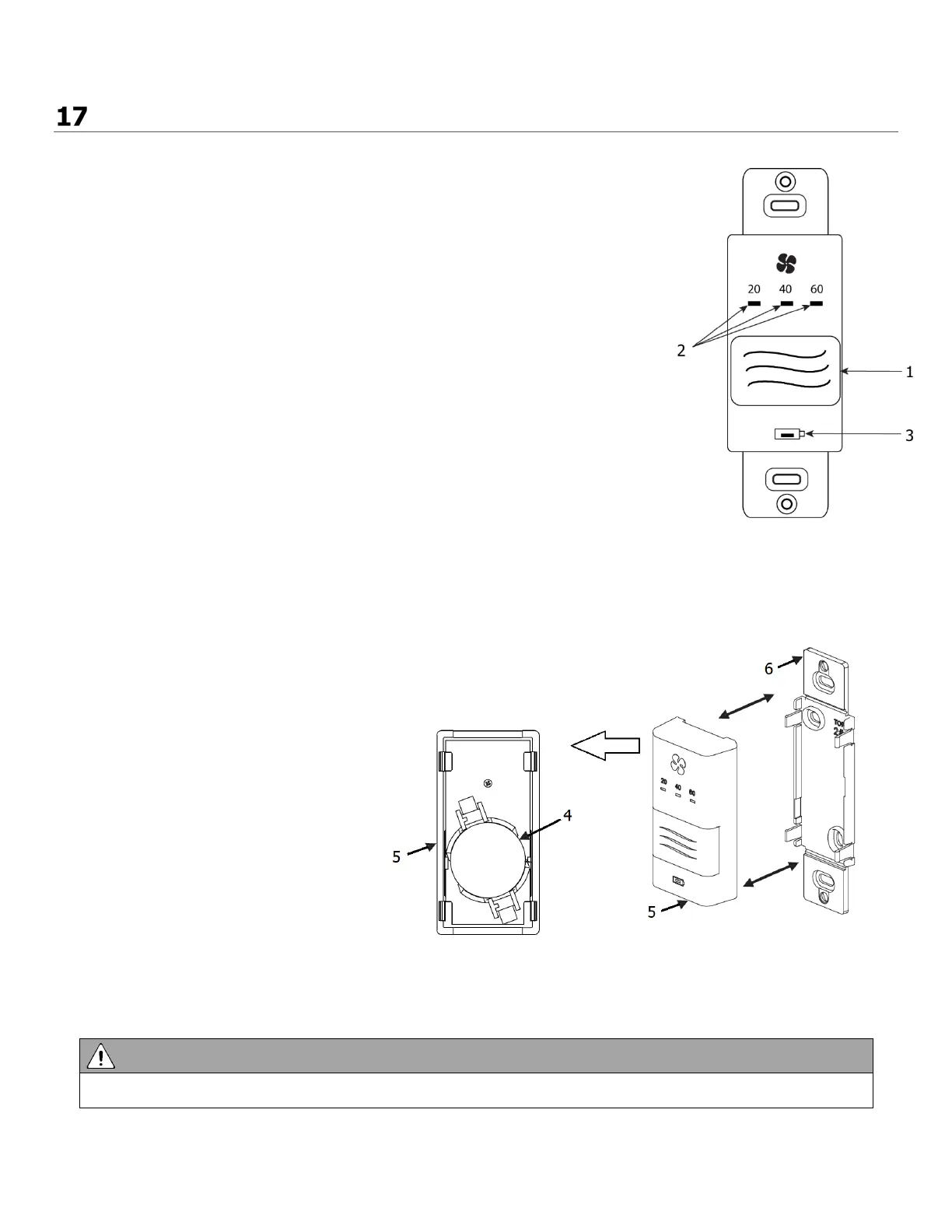
20/40/60 Minute Wireless Timer (99-DET02) Operation:
(1) Select Button
(2) 20/40/60 minute status lights
(3) Red LED battery indicator
Press the Select Button on the timer to initiate high speed ventilation for
20, 40, or 60 minutes. The 20/40/60 minute status lights indicate high
speed operation. To cancel the high speed fan operation, press the
Select Button until the 20/40/60 minute status lights are no longer
illuminated.
When the battery in the timer needs to be replaced, the red LED Battery
Indicator will illuminate.
When paired to the digital wall control, the wireless timer may be moved
to a remote location in the home such as a bathroom. Wireless timers
have an estimated range of 40 ft with no obstructions
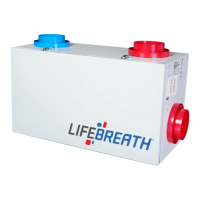
Replacing the Timer Battery (99-DET02):
(4) Battery
(5) Face plate
(6) Back plate
a) Remove the face plate by
separating it from the back plate.
On the back of the face plate the
battery will be exposed.
b) Replace the battery and re-attach
the face plate to the back plate.
•
Be careful not to damage the tabs on the back plate when re-attaching the face plate.



 To Next Page